 RANGER
 CompTIA A+ Core 2 (220-1202) · chapter 5 of 17
Week 5: Marketing's Macs and the warehouse Linux box
In this chapter Objectives 1.8, 1.9
Objective 1.8
macOS: apps, folders and accounts
Installing and removing apps
macOS apps come in three file types:
- .dmg: a disk image; double-click to mount it, then drag the app into Applications
- .pkg: an installer package that runs the Installer wizard; used when files go in several places
- .app: the application bundle itself (really a folder that looks like one file)
- App Store: Apple-reviewed apps, installed and updated automatically
Exam tip Uninstalling: drag the .app to the Trash and empty it. Apps installed from a .pkg may need the vendor's uninstaller to remove all files.
System folders
Know where things live:
/Applications  apps for all users
/Users         home folders
               (/Users/rosa)
/Library       settings, fonts, support
               files shared by all users
/System        the OS itself, protected
~/Library      one user's prefs and
               caches (hidden); same as
               /Users/rosa/Library
Exam tip Resetting one user's app settings? Look in that user's ~/Library, not the system /Library.
Apple ID and corporate restrictions
An Apple ID (Apple Account) signs in to the App Store, iCloud, iMessage and FaceTime. On company Macs, IT can use Managed Apple IDs and MDM to restrict personal iCloud, block the App Store, require FileVault, or push apps.
Exam tip A personal Apple ID on a work Mac can sync company files into a personal iCloud. That's why companies restrict it.
macOS best practices
Same habits as Windows:
- Backups: Time Machine to an external drive or network storage
- Antivirus: macOS has built-in malware protection (XProtect); companies often add endpoint protection
- Updates/patches: System Settings > General > Software Update
- Rapid Security Response (RSR): small, fast security fixes delivered between full macOS updates
Check yourself 1A designer downloads an app as a .dmg file. How is it usually installed?
- Mount it and drag the app to Applications
- Double-click it to run an Installer wizard
- Copy it into ~/Library and restart
- Open it in Terminal and run it with sudo
Show the answer
Answer: A. Mount it and drag the app to Applications
A .dmg is a disk image. Double-click to mount it, then drag the .app into Applications. A .pkg is the type that runs an Installer wizard.
Objective 1.8
macOS: settings and features
System Preferences
System Preferences (renamed System Settings in macOS 13 Ventura) holds: Displays (resolution, arrangement), Networks (Wi-Fi, Ethernet, VPN), Printers & Scanners, Privacy (Privacy & Security: app access to camera, files, screen recording), Accessibility (VoiceOver, zoom) and Time Machine (backups).
Exam tip App can't record the screen in a video call? Privacy & Security > Screen Recording: allow the app.
macOS features
Know what each one does:
- Mission Control: shows all open windows and multiple desktops (Spaces)
- Keychain: stores passwords, certificates and keys (Keychain Access app)
- Spotlight: system-wide search, Cmd+Space
- iCloud: Apple's cloud; iCloud Drive syncs files; iMessage and FaceTime for messages and calls
- Gestures: multi-finger trackpad actions
- Finder: the file manager; Dock: the app bar
- Continuity: Mac and iPhone work together (Handoff, AirDrop, Universal Clipboard, calls)
Disk Utility, FileVault, Terminal, Force Quit
The admin tools:
- Disk Utility: First Aid repairs a disk; also erase, format (APFS, exFAT) and partition
- FileVault: full-disk encryption; keep the recovery key safe
- Terminal: the command line (zsh shell)
- Force Quit: Cmd+Option+Esc closes a frozen app (like End task)
Exam tip macOS's 'Task Manager' for a frozen app is Force Quit. Activity Monitor shows CPU and memory use.
Check yourself 2A designer's Mac app is frozen and the spinning wheel won't stop. What should she do first?
- Run First Aid in Disk Utility
- Press Cmd+Option+Esc and use Force Quit
- Turn off FileVault and restart
- Delete the app's folder from /System/Library
Show the answer
Answer: B. Press Cmd+Option+Esc and use Force Quit
Force Quit (Cmd+Option+Esc) closes a hung app, like End task in Windows. Disk Utility and FileVault don't address a frozen app.
Objective 1.9
Linux: files and filesystems
File management commands
Linux is case-sensitive, and paths use forward slashes.
- ls: list files (ls -l details, ls -a hidden); pwd: print working directory
- mv: move or rename; cp: copy (cp -r for folders); rm: remove (rm -r for folders; no Recycle Bin!)
- chmod: change permissions (chmod 755 script.sh); chown: change owner (chown rosa:warehouse file)
- grep: search inside files for text (grep -i error /var/log/syslog)
- find: search for files by name, size or date (find /home -name '*.pdf')
Reading permissions
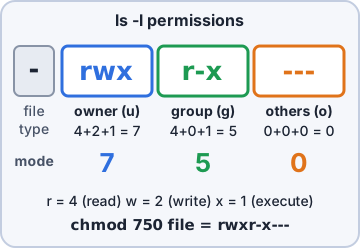
ls -l shows owner, group and permissions for owner/group/others.
$ ls -l lbl.sh
-rwxr-x--- 1 rosa warehouse 812 Oct 6 lbl.sh
  |  |  |
  |  |  +-- others: ---  no access
  |  +----- group:  r-x  read, execute
  +-------- owner:  rwx  read, write, run

r=4 w=2 x=1, so rwxr-x--- = 750
$ chmod 755 lbl.sh  (others get r-x)
Exam tip chmod changes WHAT can be done; chown changes WHO owns it.
Filesystem management
mount attaches a filesystem to a folder (mount /dev/sdb1 /mnt/usb); umount detaches it. fsck checks and repairs a Linux filesystem, like chkdsk. Run fsck on an unmounted filesystem.
Exam tip fsck on a mounted, in-use filesystem can corrupt it. Unmount first, or let it run at boot.
Objective 1.9
Linux: admin, packages, network and info
Administrative: su and sudo
The root account is the superuser (UID 0) and can do anything. su switches to another user (root by default) and needs THAT user's password. sudo runs one command as root using YOUR password, if /etc/sudoers allows it, and logs it.
Exam tip Best practice: don't sign in as root. Use sudo for single commands; it's logged and limited.
Package management
Linux installs software from repositories with a package manager:
Debian/Ubuntu:   sudo apt update
                 sudo apt install cups
                 sudo apt upgrade
Fedora/RHEL:     sudo dnf install cups
                 sudo dnf upgrade
Exam tip apt = Debian family. dnf = Red Hat family (replaced yum).
Check yourself 3lbl.sh shows -rwxr-x---. Warehouse temps are not the owner or in the group, and they need to read and run it. Which command fixes this?
- chown 755 lbl.sh
- chmod 755 lbl.sh
- chmod 750 lbl.sh
- sudo fsck lbl.sh
Show the answer
Answer: B. chmod 755 lbl.sh
chmod changes permissions. 755 gives the owner rwx (7) and the group and others r-x (5), so everyone can read and run the script.
Network commands
Linux versions of the Windows tools:
- ip: show/set addresses and routes (ip addr, ip route); replaces ifconfig
- ping: test reachability (runs until Ctrl+C on Linux)
- curl: transfer data to or from a URL; great for testing a web service
- dig: query DNS in detail (like nslookup)
- traceroute: hop-by-hop path (Windows: tracert)
Informational commands and nano
Read files and check the system:
- man: manual page for a command (man chmod)
- cat: print a file's contents
- top: live view of processes, CPU and memory (like Task Manager)
- ps: snapshot of running processes (ps aux)
- df: free space per filesystem (df -h); du: space used by folders (du -sh /var/log/*)
- nano: simple text editor; Ctrl+O saves, Ctrl+X exits
Exam tip df = Disk Free (whole filesystems). du = Disk Usage (which folders are big).
Configuration files and OS components
Key files in /etc:
- /etc/passwd: user accounts (no real passwords stored here)
- /etc/shadow: hashed passwords, readable only by root
- /etc/hosts: local name-to-IP entries, checked before DNS
- /etc/fstab: filesystems to mount at boot
- /etc/resolv.conf: DNS servers the system uses
- OS components: the bootloader (e.g. GRUB) loads the kernel (core that runs hardware and processes), then systemd (first process) starts services
Check yourself 4A Linux user can't run apt install. You want her to run admin commands with her own password, with each command logged. What should you set up?
- Share the root password for su
- Run chown root on her home folder
- Add her account to /etc/hosts
- sudo access in /etc/sudoers
Show the answer
Answer: D. sudo access in /etc/sudoers
sudo lets approved users run single commands as root with their own password, and logs each one. Sharing the root password for su has no per-user accountability.
Practice questions
Answer in your head, then open the answer. Ranger's Help Desk has 444 questions like these for A+ Core 2, with mock exams.
Question 1A Mac user downloads an app as a .dmg file and opens it. A window shows the app icon next to a shortcut to the Applications folder. What should the user do next?
- Copy the .dmg file into the /System folder
- Run the .pkg file found in /Library
- Drag the app icon to the Applications folder
- Open the .dmg file again to start an installer
Show the answer
Answer: C. Drag the app icon to the Applications folder
A .dmg is a mountable disk image; many apps are installed by dragging the .app bundle into /Applications, then ejecting the image. A .pkg would instead run an installer.
Question 2A Mac user wants to remove an app that was installed by dragging it into the Applications folder. What is the standard way to uninstall it?
- Force Quit the app
- Remove the app's icon from the Dock
- Erase the startup volume in Disk Utility, then reinstall
- Drag the app from Applications to the Trash
Show the answer
Answer: D. Drag the app from Applications to the Trash
Most Mac apps are self-contained .app bundles, so dragging them to the Trash removes them. Apps with their own uninstaller should use that instead.
Question 3A Mac app keeps crashing even after reinstalling it, and the technician suspects a corrupted preference file for that user only. Which location holds that user's app preferences?
- /Users/<username>/Library
- /Applications
- /System
- /Library
Show the answer
Answer: A. /Users/<username>/Library
Each user's Library folder (~/Library) stores preferences, caches and app support data. /Library is for settings that apply to every user.
Question 4A Mac user wants automatic hourly backups to an external drive, with the ability to restore earlier versions of files. Which macOS feature should be used?
- FileVault
- Time Machine
- Disk Utility
- iCloud Drive
Show the answer
Answer: B. Time Machine
Time Machine makes hourly, daily and weekly backups to an external or network drive and lets users restore earlier versions.
Question 5A Mac installs a small security update labeled like 'macOS 13.3.1 (a)' between regular software updates, and it applies quickly. What is this?
- A Rapid Security Response
- A Time Machine snapshot
- A FileVault recovery key update
- A beta software update
Show the answer
Answer: A. A Rapid Security Response
Rapid Security Responses deliver important security fixes between regular updates and are marked with a letter suffix. They are one of macOS's update best practices.
CompTIA, A+, Network+, Security+ and Linux+ are trademarks of CompTIA, Inc. Ranger Gamez is not affiliated with or endorsed by CompTIA. The practice questions are written to the published exam objectives; they are not real exam questions.