 RANGER
 CompTIA A+ Core 2 (220-1202) · chapter 7 of 17
Security Week, Monday: Locks, badges and logins
In this chapter Objectives 2.1, 2.3
Objective 2.1
Physical security
Keeping people and vehicles out
Physical security protects buildings and equipment.
- Bollards: short posts that stop vehicles from ramming doors or storefronts
- Fences: mark and protect the perimeter
- Access control vestibule: two doors, only one opens at a time; stops tailgating (formerly called a mantrap)
- Badge reader: opens a door for a valid badge and logs who entered
- Security guards: people who verify IDs, check visitors and respond
- Door locks for rooms and equipment locks (cable locks) for laptops and gear
Detecting and recording
Some controls don't stop anyone but detect or deter them:
- Video surveillance: cameras that deter and record (CCTV)
- Alarm systems: sound or alert when a door or window is forced
- Motion sensors: detect movement in an empty room and trigger alarms or lights
Exam tip Need to stop one badge letting two people in? Access control vestibule. Need proof of who entered? Badge reader logs or video.
Objective 2.1
Physical access security
Things you carry
Ways to prove you may enter:
- Keys: cheap and simple, but easy to copy and can't be turned off
- Key fobs: proximity (RFID) tokens you tap on a reader
- Smart cards: badges with a chip holding a certificate; also used for logging in to PCs
- Mobile digital key: a phone or watch acts as the badge (NFC or Bluetooth)
Biometrics and the environment
Biometrics use something you are: retina scanner, fingerprint scanner, palm print scanner, facial recognition technology (FRT) and voice recognition. Good lighting removes hiding places and helps cameras. Magnetometers (metal detectors) screen people for weapons or hidden devices at entrances.
Exam tip Biometrics can't be lost or shared like a badge, but they can't be changed if stolen.
Objective 2.1
Logical security
Principles
Logical security protects data and systems in software.
- Principle of least privilege: give only the rights a job needs, nothing more
- Zero Trust model: never trust by location; verify every user, device and request every time
- Access control lists (ACLs): lists of who can do what to a resource (files, firewall rules)
- Just-in-time access: admin rights granted for a short window, then removed automatically
- Privileged access management (PAM): vaults, checks out and records admin credentials
Multifactor authentication (MFA)
MFA needs two or more different factor types: something you know (password), have (phone, token) or are (fingerprint).
- Hardware token: key fob or USB/NFC security key
- Authenticator application: phone app with push or codes
- TOTP (time-based one-time password): a code that changes every 30 seconds
- OTP (one-time password/passcode): a code good for one use
- SMS, voice call or email codes: easy, but weaker (SIM swap, mailbox takeover)
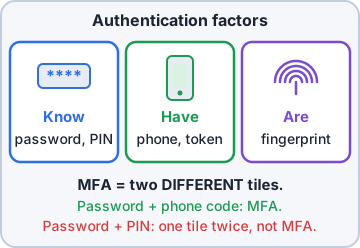
Exam tip Password + PIN is NOT MFA. Both are 'something you know'.
Check yourself 1Priya wants admin sign-ins to use true multifactor authentication. Which combination qualifies?
- A long password plus a four-digit PIN
- A fingerprint scan plus a palm scan
- A password and an authenticator code
- A PIN plus an answer to a security question
Show the answer
Answer: C. A password and an authenticator code
MFA needs two different factor types. A password is something you know; a code from an authenticator app proves something you have (the phone).
Identity and data tools
The systems behind logins:
- Directory services: central database of users and computers (Active Directory)
- IAM (identity and access management): creating, changing and removing identities and their rights
- SSO (single sign-on): sign in once, reach many apps
- SAML: the standard many web apps use to accept an SSO login from the identity provider
- MDM: enforce policy on phones and tablets
- DLP (data loss prevention): spots and blocks sensitive data leaving, e.g. card numbers in email
Check yourself 2Priya wants a single badge swipe to admit only one person into the server room hallway. Which control does this?
- Bollards at the entrance
- Access control vestibule
- Motion sensors in the hallway
- Video surveillance
Show the answer
Answer: B. Access control vestibule
An access control vestibule has two doors that can't open at the same time, so only one person passes per authorization. Cameras record tailgating but don't stop it.
Objective 2.3
Wireless security and authentication
Protocols and encryption
Wi-Fi security has improved with each generation:
- TKIP: old stopgap encryption from the original WPA; weak
- AES: strong standard cipher used by WPA2 and WPA3
- WPA2: AES encryption; Personal mode is open to offline password guessing
- WPA3: SAE replaces the PSK handshake and resists offline guessing; Enterprise adds a 192-bit mode
Proto  Encryption        Status
WPA    TKIP              legacy, avoid
WPA2   AES (CCMP)        still common
WPA3   AES (GCMP/CCMP)   current best
       + SAE handshake
Personal = one shared passphrase
           (PSK / SAE)
Enterprise = each user signs in
             via 802.1X / RADIUS
Exam tip If you see TKIP in a question, it's the wrong (weak) answer. Pick WPA3, or WPA2 with AES.
Authentication servers
Enterprise Wi-Fi and network gear check users against a central server.
- RADIUS: the standard for Wi-Fi (802.1X), VPN and network logins; UDP; encrypts only the password
- TACACS+: Cisco-designed, TCP 49; encrypts the whole session and separates authentication, authorization and accounting; ideal for admin logins to switches and routers
- Kerberos: ticket-based sign-in for Windows domains; needs clocks in sync (about 5 minutes)
- Multifactor: add a second factor (token, app, biometric) to any of these
Exam tip Wi-Fi with each user's domain login = WPA2/WPA3-Enterprise + RADIUS. Per-command control on routers = TACACS+.
Check yourself 3Domain users at Kibble & Co. sign in to Windows and reach file shares with tickets, without retyping passwords. Which protocol provides this?
- RADIUS
- TACACS+
- Kerberos
- TKIP
Show the answer
Answer: C. Kerberos
Active Directory uses Kerberos tickets so a domain user authenticates once and gets tickets for services like file shares.
Practice questions
Answer in your head, then open the answer. Ranger's Help Desk has 444 questions like these for A+ Core 2, with mock exams.
Question 1A company wants to stop vehicles from being driven into its glass lobby entrance while still letting people walk in freely. Which physical control should be installed?
- Fences
- Access control vestibule
- Bollards
- Motion sensors
Show the answer
Answer: C. Bollards
Bollards are short, sturdy posts that block vehicles while leaving space for foot traffic. Fences restrict everyone.
Question 2An unauthorized person followed an employee through a badge-controlled door. Which control prevents this by letting only one of two doors in a small entry space open at a time?
- Video surveillance
- Access control vestibule
- Badge reader
- Equipment locks
Show the answer
Answer: B. Access control vestibule
An access control vestibule (mantrap) has two interlocking doors, so a tailgater is trapped or stopped. Cameras only detect and record.
Question 3Laptops in an open-plan office sit on desks during the day, and one was recently carried out of the building. Which inexpensive control helps prevent this?
- Equipment locks such as cable locks
- Door locks on the main office entrance
- Magnetometers at the entrance
- Bollards outside the building
Show the answer
Answer: A. Equipment locks such as cable locks
Cable locks attach a laptop to a desk through its lock slot, deterring quick theft. Entrance controls do not stop an insider walking out.
Question 4A company wants to be alerted if anyone moves inside the server room after hours. Which control best meets this?
- Motion sensors tied to the alarm system
- Brighter lighting in the hallway
- A magnetometer at the server room door
- A security guard at reception during business hours
Show the answer
Answer: A. Motion sensors tied to the alarm system
Motion sensors detect presence and, when tied to an alarm system, raise an alert. Lighting and daytime guards do not detect after-hours movement in the room.
Question 5A facility wants to detect weapons and other metal objects that visitors carry as they enter. Which control should be used?
- Badge reader
- Retina scanner
- Bollards
- Magnetometer
Show the answer
Answer: D. Magnetometer
A magnetometer (metal detector) flags metal objects at an entrance. Badge readers and biometrics confirm identity, not belongings.
CompTIA, A+, Network+, Security+ and Linux+ are trademarks of CompTIA, Inc. Ranger Gamez is not affiliated with or endorsed by CompTIA. The practice questions are written to the published exam objectives; they are not real exam questions.