 RANGER
 CompTIA A+ Core 2 (220-1202) · chapter 8 of 17
Security Week, Tuesday: Locking down Windows
In this chapter Objectives 2.2
Objective 2.2
Defender, firewall and accounts
Microsoft Defender Antivirus
Built into Windows, managed in Windows Security > Virus & threat protection. Activate/deactivate: you can turn real-time protection off briefly for troubleshooting; Windows turns it back on automatically. Installing another registered antivirus product turns Defender off automatically (disabled mode; passive mode only on devices onboarded to Defender for Endpoint). Update definitions: 'security intelligence' updates arrive through Windows Update, or click Check for updates.
Exam tip Old definitions = new malware goes undetected. Updating definitions is also the first part of remediation (step 4) in malware removal.
Windows Defender Firewall
Two ways to open the firewall safely:
- Application security: allow a specific app through (an exception) on the Domain, Private or Public profile
- Port security: an inbound or outbound rule for a specific port and protocol, e.g. allow TCP 3389 only from 10.20.0.0/16
Exam tip Least privilege applies to the firewall too: open one app or port for one profile, never 'turn off the firewall'.
Users and groups
Local account: exists on one PC. Microsoft account: signs in with an email address and syncs settings through the cloud. Built-in account types and groups:
- Administrator: full control, can install software and change system settings
- Standard account: everyday use; can't change system-wide settings without an admin's credentials
- Guest user: very limited temporary access; disabled by default
- Power user: legacy group kept for backward compatibility; has no extra rights in modern Windows
Exam tip Daily work in a standard account; use admin only when needed. Malware runs with the user's rights.
Log-in OS options
Ways to sign in to Windows:
- Username and password: the classic
- PIN: tied to that one device and the TPM, so a stolen PIN is useless elsewhere
- Fingerprint and facial recognition: biometrics through Windows Hello
- Passwordless/Windows Hello: PIN or biometrics replace the password entirely
- SSO: one sign-in also opens company cloud apps
Objective 2.2
Permissions, UAC and encryption
NTFS vs. share permissions
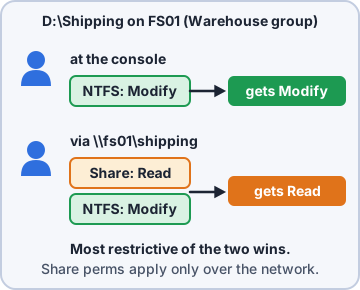
Share permissions (Read, Change, Full Control) apply ONLY when connecting over the network. NTFS permissions (Full control, Modify, Read & execute, List folder contents, Read, Write) apply both locally and over the network. Over the network, the user gets the most restrictive of the two.
D:\Shipping on FS01, user rosa
(group Warehouse)
 Share (Warehouse):  Read
 NTFS  (Warehouse):  Modify

 At the server console:  Modify
 Via \\fs01\shipping:    Read
   (most restrictive wins)
Exam tip Common practice: share = Full Control (or Change) for Authenticated Users, then control access with NTFS.
Inheritance and attributes
Inheritance: new files and subfolders take the parent folder's NTFS permissions. You can break inheritance on a folder. An explicit Deny overrides Allow. Copying a file, or moving it to a different volume, takes the destination's permissions; moving within the same volume keeps them. File and folder attributes: Read-only, Hidden, System, Archive; advanced: compress, encrypt, index.
Exam tip 'User is in a group with Allow but still denied' = look for a Deny entry on another group.
Check yourself 1Leo is in the Shipping group, which has Allow Modify on a folder. He still gets 'Access denied', even signed in at the server itself. What should you look for?
- A Deny entry on another of his groups
- A share permission set to Read for his group
- Old Microsoft Defender definitions on the server
- UAC blocking his standard account at sign-in
Show the answer
Answer: A. A Deny entry on another of his groups
An explicit Deny overrides Allow. If one of his other groups has Deny on the folder, he is blocked even though Shipping has Allow Modify.
Run as administrator and UAC
Even admins run apps with standard rights by default. Run as administrator (right-click) elevates one app. User Account Control (UAC) prompts before changes that need admin rights: admins click Yes (consent); standard users must type admin credentials. The dimmed secure desktop blocks other apps from clicking for you.
Exam tip Never turn UAC off to 'stop the popups'. It's a key barrier against malware that tries to elevate.
BitLocker, BitLocker To Go and EFS
Three ways to encrypt data at rest:
- BitLocker: full-volume encryption of internal drives; uses the TPM; Pro and up. A big hardware or firmware change triggers a request for the 48-digit recovery key
- BitLocker To Go: encrypts removable USB drives with a password or smart card
- EFS (Encrypting File System): encrypts individual files and folders per user on NTFS; tied to that user's certificate
Exam tip Keep BitLocker recovery keys in AD or the cloud account, never only on the encrypted PC. Lose the EFS certificate = lose the files.
Objective 2.2
Active Directory
Domain tasks a tech performs
Active Directory (AD) holds users, computers and groups for the domain. Typical help desk jobs:
- Joining a domain: System > About > Domain or workgroup; needs Pro or higher and domain credentials
- Assigning a log-in script: a script that runs at sign-in (map drives, printers); set in the user's Profile tab or by GPO
- Moving objects within organizational units (OUs): OUs organize accounts; moving a user changes which policies apply
- Assigning home folders: a personal network folder for each user, set in the Profile tab
Policy, groups and redirection
More AD tasks:
- Applying Group Policy: GPOs linked to sites, domains or OUs push settings (passwords, drives, software)
- Selecting security groups: grant access to groups, not individuals; add the user to the group
- Configuring folder redirection: Documents or Desktop are stored on a server share, so data is backed up and follows the user
Exam tip New hire needs the same access as a coworker? Add them to the same security groups and the right OU.
Check yourself 2A standard user tries to install a printer driver and sees a prompt asking for an administrator name and password. What is causing this?
- BitLocker
- Windows Defender Firewall
- Encrypting File System
- User Account Control
Show the answer
Answer: D. User Account Control
UAC asks standard users for admin credentials before changes that need elevation, like installing drivers.
Practice questions
Answer in your head, then open the answer. Ranger's Help Desk has 444 questions like these for A+ Core 2, with mock exams.
Question 1Windows Security reports that Microsoft Defender Antivirus security intelligence is out of date. What should the technician do first?
- Reinstall the Windows Security app
- Update the Defender definitions now
- Run a full scan with the current definitions
- Turn off real-time protection temporarily
Show the answer
Answer: B. Update the Defender definitions now
Defender updates its definitions (security intelligence) through Windows Update or the 'Check for updates' button. Update first, then scan.
Question 2After a third-party antivirus product is installed on a Windows 11 PC, Windows Security shows Microsoft Defender Antivirus is no longer providing real-time protection. Why?
- The third-party product corrupted Defender's program files
- The firewall disabled Defender to avoid conflicts
- Defender's definitions expired during the install
- Defender steps aside when another AV is registered
Show the answer
Answer: D. Defender steps aside when another AV is registered
Defender steps aside when another registered antivirus is active, so two real-time engines do not conflict, and turns itself back on if that product is removed.
Question 3A developer runs a web service on TCP port 8080 that coworkers on the office (Private) network must reach. Windows Defender Firewall blocks it. What is the best fix?
- Allow TCP 8080 inbound on the Private profile
- Add an outbound rule allowing TCP 8080
- Turn off the firewall for the Private profile
- Allow TCP 8080 inbound on Public and Private profiles
Show the answer
Answer: A. Allow TCP 8080 inbound on the Private profile
A port-based inbound rule scoped to the needed profile opens exactly what is required. Disabling the firewall removes all protection.
Question 4A user wants settings, OneDrive files and Store app purchases to follow them to a new Windows PC when they sign in. Which account type should the user sign in with?
- Power user account
- Local account
- Microsoft account
- Guest account
Show the answer
Answer: C. Microsoft account
A Microsoft account is a cloud identity that syncs settings, OneDrive and Store purchases across devices. A local account stays on one PC.
Question 5Employees keep installing unapproved software on their PCs. Following least privilege, which account type should they use for daily work?
- Standard user
- Power user
- Guest
- Administrator
Show the answer
Answer: A. Standard user
Standard accounts cannot make system-wide changes or install most software without admin credentials. Admin rights should be reserved for IT.
CompTIA, A+, Network+, Security+ and Linux+ are trademarks of CompTIA, Inc. Ranger Gamez is not affiliated with or endorsed by CompTIA. The practice questions are written to the published exam objectives; they are not real exam questions.