 RANGER
 CompTIA Linux+ (XK0-006) · chapter 1 of 14
Week 1: From power button to prompt
In this chapter Objectives 1.1, 1.2, 5.2
- From power button to login
- The map, the CPUs and the families
- Kernel modules and device tools
- When it won't boot
- Boot configuration files
- CPU architectures Linux runs on
- RPM-based vs dpkg-based distributions
- The initramfs: dracut and mkinitrd
- Data corruption
- Kernel problems
- Package dependency problems
- Filesystem won't mount
- Out of inodes
- GRUB problems
- PATH problems
- A systemd service fails to start
- Missing or disabled drivers
- Disk quota problems
- Practice questions
- Chapter recap
Objective 1.1
From power button to login
The boot chain, link by link
Every Linux box boots the same way. Firmware (BIOS or UEFI) tests the hardware and finds a bootloader. The bootloader (usually GRUB 2) loads the kernel and the initial RAM disk. The kernel starts the first process, systemd (PID 1), which brings up services until it reaches a target such as multi-user. A break in any link stops everything after it, so you troubleshoot boot problems link by link.
firmware (BIOS/UEFI)
  -> bootloader (GRUB 2)
    -> kernel + initramfs
      -> systemd (PID 1)
        -> target (multi-user)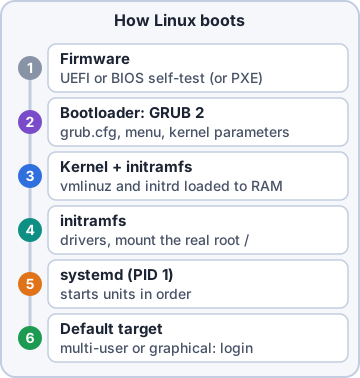
Sam: Every boot problem is just asking: which link broke?
Exam tip Know the order. A question that says the GRUB menu appears but the kernel panics points past the bootloader.
Bootloader configuration files
You don't edit GRUB's generated file by hand. You change /etc/default/grub (and scripts in /etc/grub.d), then regenerate. Debian/Ubuntu: update-grub. RHEL family: grub2-mkconfig -o /boot/grub2/grub.cfg. Hand edits to grub.cfg are overwritten at the next kernel update, which is why the regenerate step exists.
# /etc/default/grub
GRUB_TIMEOUT=5
GRUB_CMDLINE_LINUX="quiet"

# Ubuntu:   sudo update-grub
# RHEL:     sudo grub2-mkconfig \
#   -o /boot/grub2/grub.cfg
Exam tip RHEL also ships grubby: grubby --update-kernel=ALL --args="..." changes kernel parameters without touching the file.
Kernel parameters
Kernel parameters are words on the kernel command line that change how it boots: root= (where the real root filesystem is), quiet, nomodeset, or a target such as systemd.unit=rescue.target. See the running set in /proc/cmdline. For a one-time change, press e at the GRUB menu, edit the linux line, and boot with Ctrl+X. For a permanent one, add it to GRUB_CMDLINE_LINUX and regenerate.
Exam tip One-time fixes go in the GRUB menu (e). Permanent ones go in /etc/default/grub plus a regenerate.
initrd, and booting over the network
The initial RAM disk (initrd; today an initramfs) is a small temporary root filesystem loaded with the kernel. It holds the drivers and tools needed to reach the real root: storage controller modules, LVM, RAID, LUKS unlock. No matching initramfs, no root filesystem. PXE (Preboot Execution Environment) boots with no disk at all: the network card gets an address from DHCP, learns a boot server, and downloads the bootloader over TFTP. That's how you install fifty servers at once.
Exam tip PXE = DHCP to find the boot server + TFTP to fetch the files.
Check yourself 1Sam needs one boot of db01 with the kernel parameter systemd.unit=rescue.target, and only that one boot. What's the fastest correct way?
- Press e at the GRUB menu, add it to the linux line, boot
- Add it to GRUB_CMDLINE_LINUX and run grub2-mkconfig
- Write it into /proc/cmdline and reboot
- Edit /boot/grub2/grub.cfg by hand, then reboot the server
Show the answer
Answer: A. Press e at the GRUB menu, add it to the linux line, boot
Editing the entry at the GRUB menu (e, then Ctrl+X) changes only that boot. The next boot uses the saved configuration again.
Objective 1.1
The map, the CPUs and the families
The FHS in one table
The Filesystem Hierarchy Standard (FHS) says where things go, so every distro feels familiar. Modern distros merge /bin, /sbin and /lib into /usr (they're symlinks now), but the exam still expects their classic meaning.
/      top of the tree
/bin   essential user commands
/sbin  system admin commands
/lib   libraries, /lib/modules
/boot  kernel, initramfs, GRUB
/dev   device files
/etc   configuration
/home  users' files
/proc  live kernel and process info
/tmp   temporary files
/usr   programs and their data
/var   logs, spools, caches
Exam tip /proc isn't on disk: the kernel makes it up on the fly. /var grows (logs, mail, databases); /usr mostly doesn't.
Server architectures
A distro is built separately for each CPU family. x86_64, also called AMD64, is 64-bit Intel and AMD. Plain x86 is the old 32-bit line (i386/i686). AArch64 (ARM64) is 64-bit ARM: cloud instances, Raspberry Pi, power-sipping storage boxes. RISC-V is an open, royalty-free instruction set, newer to servers. Check with uname -m or lscpu.
$ uname -m
x86_64
$ ssh nas01 uname -m
aarch64
Exam tip Same CPU, different labels: Debian packages say amd64 and arm64; RPMs say x86_64 and aarch64.
Two big families of distributions
RPM-based distros (RHEL, Fedora, Rocky Linux, AlmaLinux, openSUSE) use .rpm packages, the rpm tool and dnf (zypper on SUSE). dpkg-based distros (Debian, Ubuntu) use .deb packages, dpkg and apt. Most of Linux is identical across both; the differences show up in packages, firewalls (firewalld vs ufw), security modules (SELinux vs AppArmor) and some file paths.
Sam: web01 is dpkg-based, db01 is RPM-based. You'll learn both on real boxes.
Ranger: Woof woof! one bark per family
GUI pieces, and licenses
A desktop has layers. The display manager is the graphical login screen (GDM, SDDM, LightDM). The window manager places and decorates windows. The X Server (X11) is the classic display system: network-transparent, which is why the DISPLAY variable exists. Wayland is its modern replacement, where the compositor does the drawing itself. Licenses: open source means the code is open under an approved license; free software stresses the user's freedoms; proprietary keeps code closed; copyleft (GNU GPL) says changed versions you share must stay under the same license.
Exam tip Copyleft is the trap: permissive licenses (MIT, BSD, Apache) let you close your changes; the GPL does not.
Check yourself 2Kibble wants to ship a changed version of a GPL-licensed tool to its stores. Which statement is true?
- They may keep their changes closed
- The changed version they distribute must also be under the GPL
- GPL code can't be used by a company at all
- Only the original author may distribute copies
Show the answer
Answer: B. The changed version they distribute must also be under the GPL
The GPL is copyleft: if you distribute a modified version, you must offer its source under the GPL too. Permissive licenses (MIT, BSD) don't add that rule.
Objective 1.2
Kernel modules and device tools
Kernel modules
Drivers usually load as kernel modules (.ko files under /lib/modules/$(uname -r)) instead of being built into the kernel. lsmod lists loaded modules. modinfo shows a module's file, parameters and dependencies. modprobe loads a module plus everything it depends on; modprobe -r removes one. insmod loads a single .ko file by path, with no dependency handling, and rmmod removes one. depmod rebuilds modules.dep, the dependency map modprobe reads.
$ lsmod | grep ice
$ modinfo ice | head -3
$ sudo modprobe ice
$ lsmod | grep ice
ice   1196032  0
Exam tip Prefer modprobe over insmod: it resolves dependencies and finds the file by name.
Making module choices stick
Files in /etc/modprobe.d/ set options and block modules: a line blacklist nouveau stops automatic loading. Modules named in /etc/modules-load.d/*.conf load at every boot. If a module loads early from the initramfs, change the config and then rebuild the initramfs, or the old choice keeps coming back.
# /etc/modprobe.d/no-nouveau.conf
blacklist nouveau
# /etc/modules-load.d/bonding.conf
bonding
Asking the hardware what it is
Each tool answers a different question:
- dmesg: kernel ring buffer messages (dmesg -T for clock times; journalctl -k also works)
- lspci (-k shows the driver in use), lsusb: PCI and USB devices
- lscpu, lsmem: CPU details; memory blocks and online state
- lshw: the whole hardware tree (lshw -short)
- dmidecode: firmware tables: serial number, BIOS version, RAM slots
- ipmitool: talk to the BMC: power, sensors, event log, even when the OS is down
- lm_sensors: run sensors-detect once, then sensors for temperatures and fans
Exam tip dmidecode reads what the firmware reports (serials, slots). ipmitool talks to a separate controller (the BMC).
initrd tools and special hardware
Rebuild the initramfs after storage drivers, LVM/LUKS root or early module settings change. RHEL family: dracut -f (current kernel). mkinitrd is the older tool; on RHEL it now just calls dracut. Debian/Ubuntu use update-initramfs -u. Special hardware: embedded systems (kiosks, scanners, routers) run small Linux images on ARM boards. GPUs do AI training and inference, video transcoding and other parallel compute. nvtop is a top-style monitor for GPU load and memory.
Exam tip Changed something the kernel needs before the root filesystem mounts? Rebuild the initramfs.
Check yourself 3Dev types modprobe ice and it loads, but after a reboot the module is missing again. lsmod shows nothing. Where should a line go so it loads at every boot?
- A file in /etc/modprobe.d/ containing blacklist ice
- A line in /proc/modules
- Run depmod -a once
- A file in /etc/modules-load.d/ naming the module
Show the answer
Answer: D. A file in /etc/modules-load.d/ naming the module
systemd-modules-load reads /etc/modules-load.d/*.conf at boot and loads each listed module. /etc/modprobe.d/ is for options and blacklists.
Objective 5.2
When it won't boot
Server not turning on, or not reachable
Start at the bottom. Server not turning on: power cables, PSU lights, the breaker, then the BMC: ipmitool chassis status and the system event log (ipmitool sel list) often name a failed PSU or a fan. Server inaccessible: if it's on but you can't SSH in, use the out-of-band console (BMC, hypervisor console) to see whether it's stuck at boot or just off the network.
Exam tip Out-of-band access (BMC/IPMI, VM console) is how you reach a server that the network can't.
GRUB misconfiguration
A typo in the boot config, a deleted kernel, or a wrong disk ID leaves you at a grub> or grub rescue> prompt, or with an entry that fails. Fix it for one boot by pressing e and correcting the line, then fix it for good in /etc/default/grub and regenerate. If grub.cfg is missing, boot rescue media, chroot into the system and reinstall/regenerate GRUB.
Exam tip grub rescue> means GRUB couldn't even load its modules or config: think wrong disk, missing /boot, or a broken install.
Kernel panic and kernel corruption
A kernel panic is the kernel stopping because it can't safely continue. At boot, the classic one is "VFS: Unable to mount root fs": wrong root= parameter, or an initramfs missing the storage driver. Kernel corruption (a damaged kernel or initramfs file, a failed update) looks similar. The fast fix is the same: pick the previous kernel in the GRUB menu, then reinstall the kernel package and rebuild the initramfs.
Exam tip Keep at least one older kernel installed. It's your free rollback.
Missing or disabled drivers
A device that shows in lspci but has no "Kernel driver in use" line in lspci -k has no driver bound. Causes: the module isn't installed for this kernel (common after a kernel update with out-of-tree drivers), it's blacklisted in /etc/modprobe.d, or the firmware file it needs is missing (dmesg says so). Check dmesg, modinfo and the blacklist before blaming the card.
$ lspci -k -s 3b:00.0
3b:00.0 Ethernet controller: E810
  Kernel modules: ice
(no "Kernel driver in use" line)
Go deeper
More on the objectives in this chapter, in the same exam-ready detail.
Objective 1.1 · Basic boot process: configuration files
Boot configuration files
Where boot settings live
The bootloader and early boot read a handful of files. Edit the source file, then regenerate the real config.
- /etc/default/grub: GRUB settings (timeout, default entry, kernel command line in GRUB_CMDLINE_LINUX)
- /boot/grub2/grub.cfg (RHEL) or /boot/grub/grub.cfg (Debian/Ubuntu): generated; don't edit by hand
- /etc/grub.d/: scripts that build grub.cfg
- /etc/fstab: filesystems mounted at boot
- /etc/default/ and systemd unit files decide what starts after the kernel
Regenerating GRUB
After changing /etc/default/grub run grub2-mkconfig -o /boot/grub2/grub.cfg (RHEL family) or update-grub (Debian/Ubuntu). Use grubby on RHEL to change the default kernel or kernel arguments.
Exam tip Changed /etc/default/grub but nothing happened after reboot: you forgot to regenerate grub.cfg.
Objective 1.1 · Server architectures: AArch64, RISC-V, x86, x86_64/AMD64
CPU architectures Linux runs on
The four names
Software is built for a CPU architecture; a package for one won't run on another.
- x86: older 32-bit Intel/AMD (i386/i686)
- x86_64 / AMD64: 64-bit Intel and AMD, most servers and PCs
- AArch64 (ARM64): 64-bit ARM, such as AWS Graviton, Ampere servers, Raspberry Pi 4/5
- RISC-V: open-standard instruction set, growing in embedded and new servers
Checking it
uname -m or arch prints the architecture (x86_64, aarch64). Package names show it too: .x86_64.rpm, _arm64.deb, or noarch/all for architecture-independent packages.
Exam tip Ubuntu calls 64-bit ARM 'arm64'; the kernel and RHEL call it 'aarch64'. Same thing.
Objective 1.1 · Distributions: RPM-based, dpkg-based
RPM-based vs dpkg-based distributions
Two big families
Most distributions descend from one of two packaging families:
- RPM-based: Red Hat Enterprise Linux, Fedora, CentOS Stream, Rocky Linux, AlmaLinux, Oracle Linux, SUSE/openSUSE. Packages are .rpm; tools rpm, dnf (yum), zypper on SUSE
- dpkg-based: Debian, Ubuntu, Linux Mint, Kali. Packages are .deb; tools dpkg, apt
Why it matters
Commands, paths and defaults differ: RHEL uses SELinux and firewalld by default, Ubuntu uses AppArmor and ufw; the admin group is wheel on RHEL and sudo on Ubuntu. cat /etc/os-release tells you which distribution you're on.
Exam tip rpm and dpkg install single files and don't fetch dependencies; dnf and apt resolve dependencies from repositories.
Objective 1.2 · initrd management: dracut, mkinitrd
The initramfs: dracut and mkinitrd
What initrd/initramfs is
The initial RAM disk (initrd, now usually an initramfs) is a small filesystem the bootloader loads with the kernel. It holds the drivers and tools needed to find and mount the real root filesystem (for example RAID, LVM, encrypted or unusual storage drivers).
Rebuilding it
Rebuild the initramfs after adding storage drivers, changing LUKS or LVM setup, or when a kernel can't find root.
- dracut -f (RHEL, Fedora, SUSE): rebuild for the running kernel; dracut -f /boot/initramfs-$(uname -r).img $(uname -r)
- mkinitrd: older wrapper (and the name on some distros)
- update-initramfs -u on Debian/Ubuntu
- lsinitrd lists what's inside an image
Exam tip Kernel panic 'unable to mount root fs' after a storage change: rebuild the initramfs.
Objective 5.2 · Common issues: data corruption issues
Data corruption
Signs and fixes
Files that won't open, I/O errors in dmesg, filesystem errors, or checksums that don't match.
- Check the disk's health: smartctl -a /dev/sda (smartmontools)
- Unmount and run fsck (ext4) or xfs_repair (XFS); for the root filesystem, boot to rescue mode
- Verify files: sha256sum against known hashes; rpm -Va / debsums for package files
- Restore from backup what can't be repaired
Objective 5.2 · Common issues: kernel corruption issues
Kernel problems
When the kernel won't boot
A kernel panic, a missing or damaged kernel or initramfs, or a bad kernel module after an update.
- Pick the previous kernel in the GRUB menu (keep at least two installed)
- Rebuild the initramfs: dracut -f for that kernel version
- Reinstall the kernel package from rescue media (chroot into the system)
- Read the panic message and the previous boot's log: journalctl -k -b -1
- Set the known-good kernel as default with grubby or GRUB_DEFAULT
Objective 5.2 · Common issues: package dependency issues
Package dependency problems
Fixing broken dependencies
Each package family has its own repair commands:
- Debian/Ubuntu: apt --fix-broken install (apt -f install), then dpkg --configure -a for half-installed packages
- RHEL: dnf check, dnf distro-sync, dnf history undo N to roll back a transaction
- Conflicts often come from mixing third-party repositories; check repo priorities
- Don't force installs (rpm --nodeps, dpkg --force) except as a last resort
Objective 5.2 · Common issues: filesystem will not mount
Filesystem won't mount
Checklist
Work through these in order:
- Is the device there? lsblk, blkid
- Does /etc/fstab use the right UUID, mount point and type? Test with mount -a (a bad fstab line can drop boot into emergency mode; add nofail for optional disks)
- Read the error: dmesg | tail, journalctl -xe
- Filesystem damaged: run fsck / xfs_repair on the unmounted device
- Network mounts: network up? NFS/SMB server reachable? _netdev set?
- Missing driver or LUKS not unlocked?
Objective 5.2 · Common issues: inode exhaustion
Out of inodes
Disk 'full' with free space
Every file uses an inode. Millions of tiny files (cache, mail queue, session files) can use up all inodes while df -h still shows free space: you get 'No space left on device'. Check with df -i; find the directory with the most files: **for d in /var/*; do echo "$(find "$d" | wc -l) $d"; done | sort -n**. Delete the small files; the inode count is fixed when an ext4 filesystem is created (XFS allocates inodes dynamically).
Exam tip 'No space left' but df -h shows space: check df -i.
Objective 5.2 · Common issues: GRUB misconfiguration
GRUB problems
Fixes
Ways to recover from a broken bootloader configuration:
- At the GRUB menu press e to edit the entry for one boot (fix a bad kernel parameter), Ctrl+X to boot
- Regenerate: grub2-mkconfig -o /boot/grub2/grub.cfg (RHEL) or update-grub
- Reinstall the bootloader from rescue media: grub2-install /dev/sda (BIOS); on UEFI reinstall the grub2-efi/shim packages
- 'grub rescue>' prompt: GRUB can't find its files; set root and prefix or reinstall
Objective 5.2 · Common issues: PATH misconfiguration issues
PATH problems
command not found
If a command exists but isn't found, PATH may be wrong. echo $PATH shows the directories searched, in order; which cmd / type cmd show what runs. Fix it in ~/.bash_profile or /etc/profile.d/ (export PATH=$PATH:/opt/app/bin), not by overwriting PATH. Cron jobs have a very short PATH, so use absolute paths in scripts.
Exam tip A malicious or wrong program earlier in PATH can run instead of the real one; never put . at the start of PATH.
Objective 5.2 · Common issues: systemd unit failures
A systemd service fails to start
Steps
Work through these in order:
- systemctl status app: state, last log lines, exit code
- journalctl -u app -b: full logs for this boot
- systemctl list-units --failed
- Check the unit file and config syntax; after editing units run systemctl daemon-reload
- Dependencies: systemctl list-dependencies app
- Restart loops: check Restart= and StartLimitBurst; systemctl reset-failed app
Objective 5.2 · Common issues: missing or disabled drivers
Missing or disabled drivers
Finding the driver
Find out whether the device is seen and which driver claims it:
- lspci -k / lsusb: devices and the driver in use ('Kernel driver in use')
- lsmod: loaded modules; modinfo name: details
- modprobe name: load; check it isn't blacklisted in /etc/modprobe.d/
- dmesg for firmware errors (install the linux-firmware package)
- Third-party drivers (DKMS) must be rebuilt for new kernels; Secure Boot may block unsigned modules
Objective 5.2 · Common issues: quota issues
Disk quota problems
Quota exceeded
Users get 'Disk quota exceeded' when they hit their soft limit after the grace period, or their hard limit immediately.
- See usage: quota -u alice, repquota -a (ext4); xfs_quota -x -c 'report -h' /home (XFS)
- Change limits: edquota alice or setquota
- Quotas need the usrquota/grpquota mount options and quotas turned on (quotaon)
- Remember inodes can have quotas too
Practice questions
Answer in your head, then open the answer. Ranger's Terminal has 514 questions like these for Linux+, with mock exams.
Question 1Sam adds 'console=ttyS0' to GRUB_CMDLINE_LINUX_DEFAULT in /etc/default/grub on an Ubuntu server, then reboots. The kernel command line in /proc/cmdline is unchanged. What step was missed?
- Rebuild the initramfs with update-initramfs -u
- Run systemctl daemon-reload
- Regenerate the GRUB menu with update-grub
- Run depmod -a for the running kernel
Show the answer
Answer: C. Regenerate the GRUB menu with update-grub
GRUB reads /boot/grub/grub.cfg at boot, which is generated from /etc/default/grub; update-grub (grub-mkconfig -o /boot/grub/grub.cfg) must run after editing. Rebuilding the initramfs does not touch the kernel command line.
Question 2A new hire asks what the initial RAM disk (initrd/initramfs) is for during boot. Which answer is correct?
- It stores the GRUB menu entries and the default kernel parameters
- It gives the kernel early drivers to find and mount the real root
- It runs the firmware power-on self-test before the bootloader starts
- It holds the systemd unit files that start services after login
Show the answer
Answer: B. It gives the kernel early drivers to find and mount the real root
The bootloader loads the kernel and the initramfs; the initramfs supplies early userspace and modules (storage, LVM, RAID, encryption) so the kernel can find and mount the real root filesystem, then hands over to systemd.
Question 3web01 needs to boot once into a minimal maintenance environment so Sam can fix a broken /etc/fstab. The change must not survive the next reboot. What should Sam do?
- Run systemctl set-default rescue.target, then reboot
- Add systemd.unit=rescue.target to /etc/default/grub and run update-grub
- Put rescue.target in /etc/sysctl.conf and reboot
- Press e at the GRUB menu and add systemd.unit=rescue.target
Show the answer
Answer: D. Press e at the GRUB menu and add systemd.unit=rescue.target
Editing the entry at the GRUB menu (e, then Ctrl+X or F10 to boot) changes the kernel parameters for that one boot only. set-default and /etc/default/grub both make it permanent.
Question 4Kibble & Co. will install 20 warehouse servers over the network with PXE instead of USB sticks. Which two network services must the PXE clients reach to load a bootloader? Choose two.
- LDAP
- NTP
- DHCP
- SNMP
- TFTP
Show the answer
Answers: C. DHCP, E. TFTP
The PXE firmware gets an address plus the boot server and file name from DHCP, then downloads the bootloader over TFTP. The installer can later fetch packages over HTTP or NFS, but DHCP and TFTP are what PXE itself needs.
Question 5Rosa asks where the kernel exposes live information such as /cpuinfo, /meminfo and one numbered folder per running process. Which directory is this virtual filesystem?
- /proc
- /dev
- /boot
- /var
Show the answer
Answer: A. /proc
/proc is generated by the kernel in memory: /proc/cpuinfo, /proc/meminfo and /proc/<PID>/ do not exist on disk. /dev is for device nodes.
CompTIA, A+, Network+, Security+ and Linux+ are trademarks of CompTIA, Inc. Ranger Gamez is not affiliated with or endorsed by CompTIA. The practice questions are written to the published exam objectives; they are not real exam questions.