 RANGER
 CompTIA Linux+ (XK0-006) · chapter 10 of 14
Month 5: Walls, doors and keys
In this chapter Objectives 3.2, 3.3
- Netfilter and its front ends
- firewalld and ufw
- sudo, su and the root account
- Secure remote access
- Shrinking the attack surface
- firewalld with firewall-cmd
- firewalld runtime vs permanent
- firewalld ports vs services
- ufw: Ubuntu's firewall front end
- nftables, iptables and ipset
- Netfilter: the kernel's packet filter
- NAT, PAT, SNAT and DNAT
- Stateful vs stateless firewalls
- chattr and lsattr
- Immutable and append-only files
- File permissions: chmod, chown, chgrp
- SUID, SGID and the sticky bit
- SELinux modes
- Hardening the SSH daemon
- SSH keys vs passwords
- Disabling X11 forwarding
- Replace Telnet, FTP and TFTP
- Disabling unused filesystem modules
- Practice questions
- Chapter recap
Objective 3.2
Netfilter and its front ends
One engine, many dashboards
Netfilter is the packet-filtering framework inside the kernel: hooks where packets are inspected, changed or dropped. You don't talk to it directly. iptables is the classic tool (chains INPUT, OUTPUT, FORWARD in tables like filter and nat). nftables (the nft command) is its modern replacement, with one syntax for IPv4 and IPv6 and built-in sets. ipset stores big lists of addresses that iptables rules can match in one step. firewalld and ufw are friendlier front ends that write the rules for you.
Exam tip Use ONE front end per host. Mixing hand-made iptables rules with firewalld causes surprises.
Stateful vs stateless
A stateful firewall tracks connections (conntrack). Allow the incoming SSH connection once, and its replies are let through automatically as ESTABLISHED traffic. A stateless filter judges each packet on its own, so you need rules for both directions and the return ports. firewalld, ufw and typical nftables rules are stateful.
# nftables, stateful core
ct state established,related accept
tcp dport 22 accept
drop
Address translation and forwarding
NAT rewrites addresses as packets pass. SNAT changes the source: inside hosts reach out using the gateway's address (masquerade is SNAT for a changing address). PAT (port address translation) lets many hosts share one address by tracking ports. DNAT changes the destination: port forwarding to an inside server. A Linux box only routes or NATs between interfaces if net.ipv4.ip_forward = 1 (sysctl -w now, /etc/sysctl.d/ for good).
Exam tip NAT gateway not passing traffic? Check ip_forward first. It's 0 by default.
Objective 3.2
firewalld and ufw
firewalld: zones and services
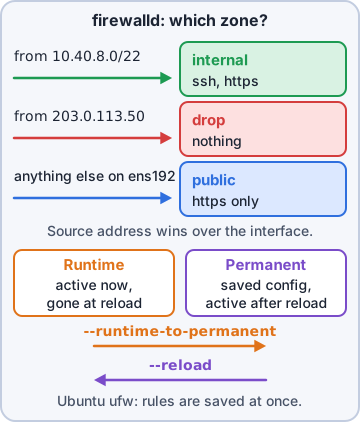
firewalld groups rules into zones (public, internal, trusted, dmz, drop, block...). Each interface or source network belongs to one zone, and the zone says what's allowed. You can allow a service (a named definition like http, which knows its ports) or a raw port (8080/tcp). Services are self-documenting; ports cover anything else.
$ firewall-cmd --get-active-zones
$ firewall-cmd --zone=public --list-all
$ firewall-cmd --permanent \
    --zone=public --add-service=https
$ firewall-cmd --permanent \
    --add-port=8080/tcp
$ firewall-cmd --reload
Runtime vs permanent
firewalld keeps two configurations. Runtime changes (no --permanent) take effect at once but vanish at the next reload or reboot. Permanent changes (--permanent) are saved but do nothing until a reload. Either add --permanent then --reload, or test in runtime and save it all with --runtime-to-permanent.
Sam: Runtime is a sticky note. Permanent is the rulebook. Reload reads the rulebook again.
Exam tip Rule works today, gone after reboot? It was runtime only.
Rich rules
For anything finer than 'open this port to everyone', use a rich rule: source addresses, ports or services, an action, plus optional logging and rate limits.
firewall-cmd --permanent --add-rich-rule=
 'rule family="ipv4"
  source address="10.10.8.0/24"
  port port="5432" protocol="tcp"
  accept'
Exam tip Rich rules = who + what + action. Zones by source address are another way to do the same.
ufw: Ubuntu's simple firewall
ufw (Uncomplicated Firewall) takes plain commands. Like firewalld, it accepts service names (from /etc/services or app profiles) or ports. Allow SSH BEFORE you enable it on a remote server.
ufw default deny incoming
ufw allow ssh            # service
ufw allow 8080/tcp       # port
ufw allow from 10.10.8.0/24 \
  to any port 5432 proto tcp
ufw enable
ufw status numbered
Exam tip ufw delete 3 removes rule number 3 from ufw status numbered.
Check yourself 1On db01, Sam ran firewall-cmd --permanent --add-service=https. Clients still can't connect, and --list-services doesn't show https. What's missing?
- firewall-cmd --runtime-to-permanent
- firewall-cmd --reload
- systemctl daemon-reload
- ufw allow https
Show the answer
Answer: B. firewall-cmd --reload
--permanent writes the saved config only. A reload loads it into the running firewall (list-services shows runtime by default).
Objective 3.3
sudo, su and the root account
sudoers, safely
sudo rules live in /etc/sudoers and drop-in files in /etc/sudoers.d/. Always edit with visudo (visudo -f /etc/sudoers.d/rosa for a drop-in): it checks the syntax before saving, because a broken sudoers file can lock everyone out of sudo. A rule reads: who, on which hosts, = (as whom), which commands.
# /etc/sudoers.d/warehouse
rosa ALL=(root) /usr/bin/systemctl \
    restart label-print
%wheel ALL=(ALL) ALL
Exam tip Give the exact command, with a full path. "rosa ALL=(ALL) ALL" is full root.
wheel, sudo, NOPASSWD and NOEXEC
Members of wheel (RHEL family) or sudo (Debian/Ubuntu) get full sudo by default; add admins with usermod -aG. NOPASSWD: skips the password: fine for one narrow automation command, risky on broad rules, because malware or anyone at an unlocked session gets root silently. NOEXEC: stops an allowed program from starting other programs, which blocks shell escapes like :!sh from vi or less.
Exam tip NOPASSWD on ALL = root for anyone who reaches that account. Keep it to specific commands.
sudo -i vs su -
sudo -i opens a root login shell using YOUR password and your sudo rights, and it's logged. su - switches to root with a full login environment, but needs ROOT's password, which then has to be shared. Plain su (no dash) keeps your environment, PATH included. Prefer sudo: per-person accountability and per-command limits.
Exam tip The dash matters: su - loads root's login environment; su alone doesn't.
Check yourself 2Rosa needs to restart only the label printer service on db01, as root. Which sudoers entry follows least privilege?
- rosa ALL=(root) /usr/bin/systemctl restart label-print
- rosa ALL=(ALL) NOPASSWD: ALL
- rosa ALL=(root) NOPASSWD: /usr/bin/systemctl restart *
- Add rosa to the wheel group
Show the answer
Answer: A. rosa ALL=(root) /usr/bin/systemctl restart label-print
Naming the exact command and arguments limits Rosa to that one action. Add it with visudo -f /etc/sudoers.d/rosa.
Objective 3.3
Secure remote access
Keys instead of passwords
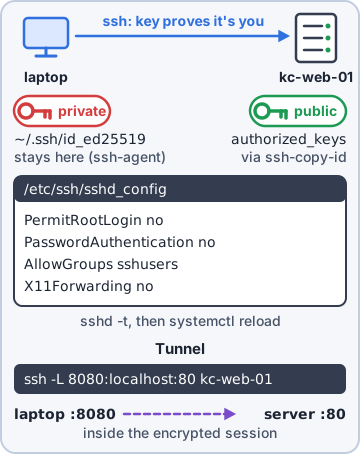
Key authentication uses a key pair: the private key stays on your machine (protected by a passphrase), and the public key goes into ~/.ssh/authorized_keys on the server. Nothing guessable crosses the network, so brute force is pointless. Once keys work, set PasswordAuthentication no. An SSH agent (ssh-agent, ssh-add) holds your unlocked key in memory so you type the passphrase once per session.
$ ssh-keygen -t ed25519
$ ssh-copy-id sam@db01
$ ssh-add          # load into the agent
Exam tip If ~/.ssh or authorized_keys is writable by group or others, sshd ignores the key. 700 and 600 are the safe modes.
sshd_config hardening
Settings in /etc/ssh/sshd_config (or sshd_config.d/*.conf):
- PermitRootLogin no: log in as yourself, then sudo
- AllowUsers / AllowGroups: only these may log in at all
- X11Forwarding no: disable X forwarding on servers that need no GUI
PermitRootLogin no
PasswordAuthentication no
AllowGroups sshusers admins
X11Forwarding no

$ sudo sshd -t       # test syntax
$ sudo systemctl reload sshd
Exam tip Keep your current session open while you test a new one. A typo can lock you out.
Tunnels, SFTP, chroot and fail2ban
SSH tunneling carries other traffic inside SSH: ssh -L 5432:localhost:5432 db01 makes the remote database reachable on your local port 5432 (-R is the reverse, -D a SOCKS proxy). SFTP moves files over SSH. A chroot jail (ChrootDirectory with ForceCommand internal-sftp) traps an SFTP-only user in one directory, which must be owned by root. fail2ban watches logs and bans IPs in the firewall after repeated failures.
Exam tip A partner who only uploads price lists gets SFTP + chroot, not a shell.
Objective 3.3
Shrinking the attack surface
Retire the cleartext protocols
Telnet (23) sends everything, passwords included, in clear text: use SSH. FTP (21) does the same: use SFTP (or FTPS). TFTP (69) has no authentication at all: keep it to isolated PXE install networks. Remove the server packages, don't just stop them.
Exam tip On the exam, Telnet, FTP and TFTP are the "replace me" answers.
Disable unused filesystems
Every filesystem driver the kernel can load is code an attacker might exploit, for example through a crafted USB stick. Hardening guides block rarely used ones (cramfs, freevxfs, hfs, udf...) with a modprobe.d file so they can't load.
# /etc/modprobe.d/cis-fs.conf
install cramfs /bin/false
blacklist cramfs
install udf /bin/false
blacklist udf
Exam tip blacklist alone only stops automatic loading. install ... /bin/false stops explicit loading too.
Secure boot
UEFI Secure Boot checks signatures from the firmware up: the firmware verifies the signed shim, the shim verifies GRUB, and GRUB verifies the kernel, which then checks modules. Bootkits and tampered kernels are refused. Check with mokutil --sb-state. A self-built or third-party kernel module must be signed with a key enrolled as a MOK (machine owner key), or it won't load.
Exam tip Vendor driver won't load only on Secure Boot machines? It's unsigned. Sign it and enroll the key.
Go deeper
More on the objectives in this chapter, in the same exam-ready detail.
Objective 3.2 · firewalld: firewall-cmd
firewalld with firewall-cmd
Zones and rules
firewalld groups rules into zones (public, internal, trusted, drop...). Each interface belongs to a zone.
- firewall-cmd --state, --get-active-zones
- firewall-cmd --list-all (default zone) or --zone=public --list-all
- firewall-cmd --add-service=https --permanent
- firewall-cmd --add-port=8443/tcp --permanent
- firewall-cmd --reload to apply permanent changes
- --add-rich-rule for source-specific rules
Objective 3.2 · firewalld: runtime vs. permanent
firewalld runtime vs permanent
Two configurations
Without --permanent, a change is runtime only: active immediately but lost on reload or reboot. With --permanent it's saved but not active until --reload.
- Test first at runtime, then make it permanent: firewall-cmd --runtime-to-permanent
- Or add both: run the command once with --permanent and once without, or --permanent then --reload
Exam tip Rule works now but disappears after reboot: you forgot --permanent. Rule saved but not working: you forgot --reload.
Objective 3.2 · firewalld: ports vs. services
firewalld ports vs services
Two ways to open traffic
--add-service=http uses a named service definition (XML files in /usr/lib/firewalld/services/) that can include several ports and helpers. --add-port=8080/tcp opens a raw port. Prefer services for standard software (clearer, maintained by the package); use ports for custom apps.
Objective 3.2 · Uncomplicated Firewall (ufw): ports vs. services
ufw: Ubuntu's firewall front end
Basics
ufw keeps firewall rules simple on Ubuntu:
- ufw enable, ufw status verbose
- ufw allow 22/tcp (port) or ufw allow OpenSSH (application profile, like a service; list with ufw app list)
- ufw allow from 10.0.0.0/24 to any port 5432
- ufw deny 23, ufw delete allow 80
- Default policy: ufw default deny incoming
Exam tip Allow SSH before you enable ufw on a remote server or you'll lock yourself out.
Objective 3.2 · nftables, iptables, ipset
nftables, iptables and ipset
The layers
iptables is the classic tool for Netfilter rules (tables like filter and nat; chains INPUT, OUTPUT, FORWARD). nftables (nft) is its modern replacement with one syntax for IPv4/IPv6 and better performance; current firewalld and ufw use it underneath. ipset stores large lists of addresses/networks that one rule can match (block thousands of IPs efficiently).
- iptables -L -n -v; iptables -A INPUT -p tcp --dport 22 -j ACCEPT
- nft list ruleset
- ipset create blocklist hash:ip; ipset add blocklist 203.0.113.9; iptables -A INPUT -m set --match-set blocklist src -j DROP
Don't mix them
Use one management tool. If firewalld is running, adding raw iptables rules by hand can be overwritten or conflict.
Objective 3.2 · Netfilter module
Netfilter: the kernel's packet filter
What it is
Netfilter is the framework inside the Linux kernel that inspects packets at hooks (prerouting, input, forward, output, postrouting). iptables, nftables, firewalld and ufw are all user-space tools that load rules into Netfilter. Connection tracking (conntrack) is part of it and enables stateful rules and NAT.
Objective 3.2 · Address translation: NAT, PAT, DNAT, SNAT
NAT, PAT, SNAT and DNAT
The terms
Address translation comes in several flavors:
- NAT: rewriting IP addresses as packets pass through a router
- SNAT (source NAT): change the source address of outgoing traffic, so private hosts reach the internet with the router's public IP. Masquerade is SNAT that uses whatever the interface's current IP is
- DNAT (destination NAT): change the destination, for port forwarding a public port to an internal server
- PAT (port address translation, NAT overload): many internal hosts share one public IP, told apart by port numbers
On Linux
Enable forwarding with sysctl net.ipv4.ip_forward=1. firewalld: --add-masquerade, --add-forward-port=port=80:proto=tcp:toaddr=10.0.0.5.
Objective 3.2 · Stateful vs. stateless
Stateful vs stateless firewalls
The difference
A stateful firewall tracks connections: once an outgoing connection is allowed, the replies are allowed automatically (rule: ESTABLISHED,RELATED accept). A stateless firewall judges each packet alone, so you must write rules for return traffic too. Netfilter with conntrack is stateful; firewalld and ufw rules are stateful.
Objective 3.3 · File attributes: chattr, lsattr
chattr and lsattr
Attributes beyond permissions
ext4 and XFS support extra attributes that even root must remove before acting. lsattr file shows them; chattr +i file sets, chattr -i file removes.
Exam tip rm says 'Operation not permitted' even as root: check lsattr for i or a.
Objective 3.3 · File attributes: immutable, append only
Immutable and append-only files
The two that matter
Two attributes are tested most often:
- i (immutable): can't be modified, deleted, renamed or linked, even by root, until chattr -i. Protects critical configs
- a (append only): data can only be added to the end, never rewritten or deleted. Good for log files attackers might try to clean
Objective 3.3 · Permissions: file permissions (chgrp, chmod (octal, symbolic), chown)
File permissions: chmod, chown, chgrp
Reading permissions
-rwxr-x--- = file type, then user, group, other. r=4, w=2, x=1. So rwx=7, r-x=5, ---=0: 750. On a directory, x means you can enter it, r list it, w create/delete files in it.
Changing them
Use chmod for permissions and chown/chgrp for ownership:
- chmod 640 file (octal) or chmod u=rw,g=r,o= file / chmod g+w file (symbolic)
- chmod -R recursive (careful)
- chown alice:web file changes owner and group; chown -R
- chgrp web file changes group only
- umask (e.g. 022) sets default permissions for new files: 666-022 = 644, directories 777-022 = 755
Objective 3.3 · Permissions: special permissions (sticky bit, setuid, setgid)
SUID, SGID and the sticky bit
Three special bits
Three extra permission bits change how files and directories behave:
- setuid (SUID, 4000): an executable runs as its owner (e.g. /usr/bin/passwd runs as root). Shown as s in the user x position: -rwsr-xr-x
- setgid (SGID, 2000): on an executable, runs as the group; on a directory, new files inherit the directory's group (shared team folders)
- sticky bit (1000) on a directory: users can delete only their own files (/tmp: drwxrwxrwt)
Setting and auditing
chmod u+s, chmod g+s dir, chmod +t dir, or octal chmod 2775 /srv/team. Find SUID files to audit: find / -perm -4000 -type f 2>/dev/null. Unneeded SUID binaries are a privilege-escalation risk.
Objective 3.3 · Access control: SELinux states: enforcing, permissive, disabled
SELinux modes
Three states
SELinux is always in one of three modes:
- Enforcing: policy is applied; violations are blocked and logged
- Permissive: nothing is blocked, but violations are logged (troubleshooting)
- Disabled: SELinux is off (needs a reboot to change, and a full relabel when turning it back on)
Commands
getenforce shows the mode; setenforce 0/1 switches between permissive and enforcing until reboot; sestatus gives details. The boot-time setting is SELINUX= in /etc/selinux/config.
Exam tip App broken and you suspect SELinux: setenforce 0 briefly. If it works, fix the label/boolean (restorecon, setsebool, semanage) and go back to enforcing. Never leave it disabled.
Objective 3.3 · Secure remote access: SSHD (the SSH daemon)
Hardening the SSH daemon
sshd_config essentials
The SSH server (sshd) is configured in /etc/ssh/sshd_config (and drop-ins in /etc/ssh/sshd_config.d/). Common hardening:
- PermitRootLogin no (or prohibit-password)
- PasswordAuthentication no once keys work
- AllowUsers alice bob / AllowGroups sshusers
- X11Forwarding no, AllowTcpForwarding no if not needed
- MaxAuthTries 3, LoginGraceTime 30
- Change the port only as noise reduction, not real security
Apply safely
Check syntax with sshd -t, then systemctl reload sshd, and keep your current session open while you test a new login. fail2ban bans IPs after repeated failures.
Objective 3.3 · Secure remote access: key vs. password authentication
SSH keys vs passwords
Why keys
Passwords can be guessed or brute-forced. Key-based authentication uses a key pair: the private key stays on your machine (protect it with a passphrase); the public key goes in the server's ~/.ssh/authorized_keys.
- ssh-keygen -t ed25519: make a key pair
- ssh-copy-id user@server: install the public key
- Permissions: ~/.ssh 700, authorized_keys 600 (sshd refuses keys with loose permissions)
- ssh-agent / ssh-add keeps the unlocked key in memory
Then turn passwords off
After confirming key login works, set PasswordAuthentication no (and KbdInteractiveAuthentication no) in sshd_config.
Exam tip Key login refused even though the key is in authorized_keys: check permissions on ~/.ssh and the home directory.
Objective 3.3 · Secure remote access: disabling X forwarding
Disabling X11 forwarding
Why turn it off
X11 forwarding lets graphical programs on the server display on your screen through SSH. It also opens a path for a compromised server to interact with your desktop session. Servers rarely need it: set X11Forwarding no in sshd_config and reload sshd.
Objective 3.3 · Avoid the use of unsecure access services: Telnet, FTP, TFTP
Replace Telnet, FTP and TFTP
Why they're unsafe
Telnet (23), FTP (21) and TFTP (69/UDP) send data, and for Telnet/FTP usernames and passwords, in clear text; anyone on the path can read them. TFTP has no authentication at all.
- Telnet → SSH
- FTP → SFTP (over SSH) or FTPS
- TFTP → only where required (PXE boot, network gear) and on isolated networks
Remove them
Uninstall the packages (telnet-server, vsftpd, tftp-server), disable their services/sockets, and close the ports. Check listening services with ss -tulpn.
Objective 3.3 · Disabling unused file systems
Disabling unused filesystem modules
Shrinking the attack surface
The kernel can load modules for rarely used filesystems (cramfs, freevxfs, hfs, hfsplus, jffs2, udf, squashfs...). Bugs in them have been exploited by mounting crafted images. CIS Benchmarks recommend blocking the ones you don't use:
- Create /etc/modprobe.d/disable-fs.conf with lines like install cramfs /bin/false and blacklist cramfs
- Unload if loaded: modprobe -r cramfs
- Check: lsmod | grep cramfs
Practice questions
Answer in your head, then open the answer. Ranger's Terminal has 514 questions like these for Linux+, with mock exams.
Question 1Dev ran firewall-cmd --permanent --add-service=https on web01, but a scan shows 443 still blocked. firewall-cmd --list-services does not show https. What should he run next?
- firewall-cmd --runtime-to-permanent
- systemctl restart nginx
- firewall-cmd --reload
- firewall-cmd --list-all --permanent
Show the answer
Answer: C. firewall-cmd --reload
--permanent writes the saved configuration only. firewall-cmd --reload loads the permanent configuration into the running firewall (or Dev could repeat the command without --permanent).
Question 2Dev tested several firewalld changes on app01 without --permanent and everything works. He wants to keep exactly the rules that are running now after the next reboot. Which command does that?
- systemctl enable --now firewalld
- firewall-cmd --runtime-to-permanent
- firewall-cmd --permanent --reload
- firewall-cmd --reload
Show the answer
Answer: B. firewall-cmd --runtime-to-permanent
--runtime-to-permanent saves the current running configuration as the permanent one. A --reload first would wipe out the tested runtime changes.
Question 3SSH on db01 must be reachable only from the admin subnet 192.0.2.0/24. Which text completes firewall-cmd --permanent --zone=public --add-rich-rule='...'?
- rule family="ipv4" destination address="192.0.2.0/24" service name="ssh" accept
- rule family="ipv4" source address="192.0.2.0/24" port port="ssh" accept
- rule source address="192.0.2.0/24" service name="ssh" drop
- rule family="ipv4" source address="192.0.2.0/24" service name="ssh" accept
Show the answer
Answer: D. rule family="ipv4" source address="192.0.2.0/24" service name="ssh" accept
A rich rule names the family, the source to match, the service (or port/protocol) and the action. For a full lockdown also remove the plain ssh service from the zone so only the rich rule allows it.
Question 4Dev needs to see which firewalld zones are in use on app02 and which interfaces or sources belong to each. Which command shows this?
- nmcli device status
- firewall-cmd --get-zones
- firewall-cmd --get-active-zones
- firewall-cmd --get-default-zone
Show the answer
Answer: C. firewall-cmd --get-active-zones
--get-active-zones lists only zones that have interfaces or sources bound, with those bindings. --get-zones lists all defined zones.
Question 5A Kibble & Co. web app listens on TCP 8443 instead of 443. Which firewalld option opens the port it really uses?
- --add-service=https
- --add-source=8443/tcp
- --add-forward-port=port=443:proto=tcp:toport=8443
- --add-port=8443/tcp
Show the answer
Answer: D. --add-port=8443/tcp
A firewalld service is a named bundle of ports (https = 443/tcp). When an app uses a nonstandard port, open the port itself with --add-port=8443/tcp (or define a custom service).
CompTIA, A+, Network+, Security+ and Linux+ are trademarks of CompTIA, Inc. Ranger Gamez is not affiliated with or endorsed by CompTIA. The practice questions are written to the published exam objectives; they are not real exam questions.