 RANGER
 CompTIA Linux+ (XK0-006) · chapter 11 of 14
Month 6: Permissions, labels and denials
In this chapter Objectives 3.3, 5.4
Objective 3.3
Permissions, all the way down
Octal and symbolic modes
Each file has read (4), write (2) and execute (1) bits for the user (owner), group and others. Add them per class: rwxr-x--- is 7, 5, 0 = 750. chmod 640 file sets them all in octal; chmod u+x,g-w,o= file changes them symbolically. chown sam:webteam file changes the owner and group; chgrp webteam file only the group. On a directory, r lists names, w creates and deletes, x lets you enter.
rwx r-x ---
421 401 000
 7   5   0   = chmod 750
Exam tip Directory with r but no x: you can see names but can't open anything inside.
setuid, setgid and sticky
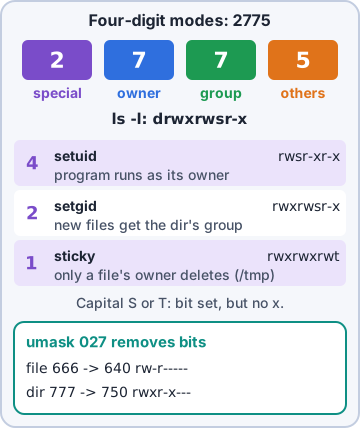
A fourth octal digit goes in front. setuid (4000, s in the user x spot) runs a program as its owner: /usr/bin/passwd runs as root to write /etc/shadow. setgid (2000) on a program runs it with the file's group; on a directory it makes new files inherit the directory's group, which is perfect for team folders. sticky (1000, t in the others x spot) on a directory means only a file's owner may delete it: /tmp is 1777.
-rwsr-xr-x root  /usr/bin/passwd   (4755)
drwxrwsr-x shop  /srv/shop        (2775)
drwxrwxrwt root  /tmp             (1777)
Exam tip A capital S or T means the special bit is set but the x underneath isn't. Usually a mistake.
umask: the default mode filter
New files start from 666 and new directories from 777. The umask removes bits from that. umask 022 gives 644 files and 755 directories; umask 027 gives 640 and 750; umask 002 gives 664 and 775, which suits shared group folders. Set it in /etc/login.defs or a profile script; check yours with umask.
$ umask 027; touch f; mkdir d
$ stat -c '%a %n' f d
640 f
750 d
Exam tip umask isn't subtraction digit by digit: it masks bits. 666 with umask 033 gives 644, not 633.
Objective 3.3
ACLs, attributes and SUID cleanup
Access control lists
Plain permissions allow one owner and one group. An ACL adds more: setfacl -m u:rosa:rw report.csv gives Rosa read-write without changing the group. A default ACL on a directory (-m d:g:webteam:rwx) is copied to new files inside it. getfacl shows them all; ls -l marks such files with a +. setfacl -x removes one entry, -b removes all.
$ getfacl /srv/shop/prices.csv
user::rw-
user:rosa:rw-
group::r--
mask::rw-
other::r--
Exam tip The mask line caps what named users and groups really get. A mask of r-- quietly removes Rosa's write.
Immutable and append-only
File attributes sit below permissions. chattr +i file makes it immutable: nobody, not even root, may change, delete or rename it until chattr -i. chattr +a makes it append-only: data can be added but never changed or removed, which suits logs. lsattr shows the flags.
$ sudo chattr +i /etc/hosts
$ lsattr /etc/hosts
----i---------e------- /etc/hosts
Exam tip root gets "Operation not permitted" deleting a file? Check lsattr for i or a.
Removing unneeded SUID bits
Every setuid-root program is a potential path to root if it has a bug. List them with find / -xdev -perm -4000 -type f, compare against what the system needs, and remove the bit from the rest with chmod u-s. Mount data and removable filesystems with nosuid so new ones can't appear there.
Exam tip Keep a baseline list of SUID files. A new one appearing is a classic sign of compromise.
Check yourself 1The webteam group shares /srv/shop. New files keep getting each uploader's personal group, so teammates can't edit them. Which change fixes that for new files?
- chmod o+t /srv/shop
- chmod u+s /srv/shop
- chmod g+s /srv/shop
- chattr +a /srv/shop
Show the answer
Answer: C. chmod g+s /srv/shop
setgid on a directory makes new files inherit the directory's group (webteam). Pair it with a umask of 002 so the group also gets write.
Objective 3.3
SELinux in practice
Labels and type enforcement
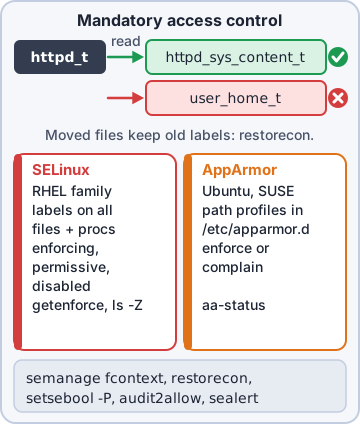
SELinux gives every process and file a context: user:role:type:level. Policy says which process types may touch which file types. The web server runs as httpd_t and may read httpd_sys_content_t, but not user_home_t, even when the Unix permissions allow it. ls -Z shows file labels and ps -Z process labels. Ubuntu's counterpart, AppArmor, confines programs with path-based profiles instead (aa-status, complain or enforce mode).
$ ls -Z /var/www/html/index.html
system_u:object_r:httpd_sys_content_t:s0
$ ps -Z -C httpd | tail -1
system_u:system_r:httpd_t:s0  httpd
Exam tip SELinux checks come AFTER normal permissions. Both must allow the access.
Modes
Enforcing: denies and logs. Permissive: allows but logs what it would deny, good for diagnosis. Disabled: off entirely. getenforce shows the mode; setenforce 0/1 switches between permissive and enforcing until reboot. The boot-time mode is SELINUX= in /etc/selinux/config. Going from disabled to enabled needs a reboot and a full relabel.
Exam tip setenforce can't disable SELinux. That takes a reboot with SELINUX=disabled, or the selinux=0 boot parameter (Red Hat's preferred way on RHEL 9 and later).
Fixing labels: chcon, semanage, restorecon
chcon -t httpd_sys_content_t file changes a label right now, but a relabel or restorecon will undo it. The lasting way: tell the policy with semanage fcontext, then apply with restorecon. Moving a file (mv) keeps its old label; copying creates a new file labeled for its new home. restorecon -Rv resets a tree to what the policy says.
semanage fcontext -a \
  -t httpd_sys_content_t \
  "/srv/shop(/.*)?"
restorecon -Rv /srv/shop
Exam tip Files mv'd from a home directory into a web root keep user_home_t. restorecon fixes them.
Booleans, ports and denials
Booleans are on/off switches built into the policy: getsebool -a | grep httpd lists them; setsebool -P httpd_can_network_connect on lets the web server make outgoing connections (-P makes it permanent). A service on a non-standard port needs semanage port -a -t http_port_t -p tcp 3131. Denials are logged as AVC lines in /var/log/audit/audit.log; sealert -a explains them in plain words. audit2allow builds a custom policy module from denials: a last resort, after labels and Booleans.
Exam tip Order of fixes: label (restorecon), Boolean (setsebool -P), port (semanage port). audit2allow last.
Check yourself 2web03's httpd must listen on port 3131, but it fails with "Permission denied" binding the port. ss shows nothing on 3131, and SELinux is enforcing. What's the right fix?
- semanage port -a -t http_port_t -p tcp 3131
- setsebool -P httpd_can_network_connect on
- restorecon -Rv /etc/httpd
- Put setenforce 0 in /etc/rc.local so it runs at boot
Show the answer
Answer: A. semanage port -a -t http_port_t -p tcp 3131
SELinux only lets httpd_t bind ports labeled http_port_t. Adding 3131 to that type makes the bind legal.
Objective 5.4
Troubleshooting security issues
SELinux, permissions and attributes
Access denied with permissions that look right? Check in layers. SELinux issues: AVC denials in the audit log (ausearch -m avc -ts recent). Is it the context (wrong label), a Boolean that's off, or policy that has no rule for this? Permission issues: the owner, group and mode, then an ACL mask, then attributes (lsattr) such as immutable.
Exam tip Quick test: setenforce 0 for one minute. Works now? It's SELinux. Then setenforce 1 and fix it properly.
Accounts and remote access
Account access: is it locked (passwd -S), expired (chage -l), set to nologin, or blocked by faillock? Remote access issues: AllowUsers/AllowGroups, PasswordAuthentication off with no key, home or ~/.ssh too open (sshd's StrictModes refuses keys if the permissions are loose), or a changed host key warning. Read the server's log: journalctl -u sshd.
Exam tip "REMOTE HOST IDENTIFICATION HAS CHANGED" after a rebuild is expected. Without a rebuild, investigate.
Exposed services and unpatched systems
Exposed or misconfigured services: ss -tulpn shows what listens where. A database on 0.0.0.0 instead of 127.0.0.1, or an admin page open to the internet, is a finding. Unpatched vulnerable systems: check pending updates (dnf check-update, apt list --upgradable) and compare installed versions against advisories. Misconfigured package repository: a GPG key error, a wrong release in the URL, or a dead mirror stops patches silently.
Exam tip An update job that fails on a repo error can leave a server unpatched for months. Watch for it.
Certificates, protocols and ciphers
Certificate issues: expired, wrong host name, or a chain the client doesn't trust. openssl s_client -connect host:443 and openssl x509 -noout -dates -subject show why. Obsolete or insecure protocols and ciphers: SSLv3, TLS 1.0/1.1, RC4, 3DES, SSH protocol 1 should be off. Cipher negotiation issues: client and server share no common TLS version or cipher, so the handshake fails. On RHEL, update-crypto-policies sets one system-wide level (DEFAULT, LEGACY, FUTURE).
Exam tip "no shared cipher" or "handshake failure" after hardening? An old client can't speak the new protocols.
Go deeper
More on the objectives in this chapter, in the same exam-ready detail.
Objective 5.4 · Common issues: file and directory permission issues (ACLs, attributes)
Permission denied: beyond chmod
Checklist
Check every layer of access control, not just the permission bits:
- Regular permissions on the file and every parent directory (x needed to pass through): namei -l /path/to/file
- Owner/group: ls -l, id user
- ACLs: a + at the end of ls -l permissions; getfacl file; fix with setfacl -m u:alice:rw file or remove with -x / -b
- Attributes: lsattr for i (immutable) or a (append-only)
- SELinux: ls -Z; denials in /var/log/audit/audit.log; restorecon -Rv /path
- Mount options like ro or noexec
Objective 5.4 · Common issues: exposed or misconfigured services
Exposed or misconfigured services
Find and fix
Find what's listening, then lock it down:
- List listening ports: ss -tulpn; is a database listening on 0.0.0.0 when it should be 127.0.0.1?
- Scan from outside: nmap host
- Disable services you don't need: systemctl disable --now name
- Bind services to the right interface; require authentication; patch them
- Close ports in the firewall; restrict by source address
Practice questions
Answer in your head, then open the answer. Ranger's Terminal has 514 questions like these for Linux+, with mock exams.
Question 1Sam tells you to never open /etc/sudoers in a plain editor. What does visudo do that a plain editor does not?
- Adds the editing user to the wheel group
- Encrypts the file so only root can read it
- Locks the file and checks syntax before saving
- Restarts the sudo service so the changes apply
Show the answer
Answer: C. Locks the file and checks syntax before saving
visudo locks sudoers against simultaneous edits and refuses to save a file with syntax errors, which could otherwise lock everyone out of sudo. visudo -c checks the files without editing.
Question 2Sam created /etc/sudoers.d/webteam.conf with a valid rule for the web team, but sudo -l for a team member shows no new rights. visudo -c reports no errors. What is the MOST likely cause?
- Rules in sudoers.d apply only after a reboot
- sudo ignores sudoers.d files with a dot in the name
- Files in sudoers.d need the .conf suffix to be read
- Group rules only work in the main /etc/sudoers file
Show the answer
Answer: B. sudo ignores sudoers.d files with a dot in the name
The @includedir (#includedir) directive reads files in /etc/sudoers.d except those whose names end in '~' or contain a '.'. Renaming the file to 'webteam' fixes it.
Question 3A deploy script runs as user deploy and needs root rights. A teammate suggests 'deploy ALL=(ALL) NOPASSWD: ALL' in sudoers. What is the main security concern?
- Anyone controlling deploy gets full root with no extra check
- Commands run with NOPASSWD are not written to the logs
- deploy will be prompted for root's password on every command
- sudo will refuse the rule because NOPASSWD needs a group
Show the answer
Answer: A. Anyone controlling deploy gets full root with no extra check
NOPASSWD: ALL turns a compromise of that account (or its SSH key) into instant root. Limit the rule to the exact commands the script needs, ideally with full paths.
Question 4Help desk staff may read logs as root with sudo less, but Priya worries they could type !sh inside less to get a root shell. Which sudoers tag blocks that?
- LOG_OUTPUT
- SETENV
- NOPASSWD
- NOEXEC
Show the answer
Answer: D. NOEXEC
NOEXEC: stops a command run through sudo from starting other programs (on most systems via an LD_PRELOAD wrapper), so a shell escape in less or vi fails. Example: '%helpdesk ALL=(root) NOEXEC: /usr/bin/less /var/log/*'.
Question 5New admin Maya needs full sudo rights on a RHEL server and on an Ubuntu server, using each distro's default sudoers rules. Which groups should she join?
- wheel on RHEL and sudo on Ubuntu
- adm on both servers
- sudo on RHEL and wheel on Ubuntu
- root on both servers
Show the answer
Answer: A. wheel on RHEL and sudo on Ubuntu
RHEL-family sudoers ships '%wheel ALL=(ALL) ALL'; Debian/Ubuntu ships '%sudo ALL=(ALL:ALL) ALL'. Add her with usermod -aG wheel maya or usermod -aG sudo maya.
CompTIA, A+, Network+, Security+ and Linux+ are trademarks of CompTIA, Inc. Ranger Gamez is not affiliated with or endorsed by CompTIA. The practice questions are written to the published exam objectives; they are not real exam questions.