 RANGER
 CompTIA Linux+ (XK0-006) · chapter 13 of 14
Month 8: Scripts, Python and Git
In this chapter Objectives 4.2, 4.3, 4.4
- Script building blocks
- Decisions, tests and loops
- Python basics for sysadmins
- Git, day to day
- Parameter expansion
- Command substitution
- IFS and OFS
- if and case
- for, while and until loops
- Numeric comparisons
- Regex matching in bash
- File and string tests
- Python indentation
- Python data types
- Python virtual environments
- Installing Python dependencies with pip
- Practice questions
- Chapter recap
Objective 4.2
Script building blocks
The first line and variables
#!/bin/bash (the interpreter directive, or shebang) tells the kernel which program runs the file; #!/usr/bin/env python3 finds python3 on PATH. Make it executable with chmod +x. Assign with no spaces: COUNT=0. Read with $COUNT or ${COUNT}. Arguments arrive as $1, $2..., $# (how many), "$@" (all, safely quoted) and $0 (the script's name). $? holds the last command's return code: 0 means success.
#!/bin/bash
host=$1
ping -c1 "$host" >/dev/null
echo "exit code: $?"
Exam tip COUNT = 0 with spaces runs a command called COUNT. No spaces around = in assignments.
Assignments and scope
export VAR passes a variable to child programs (an environmental variable). local keeps a variable inside a function. unset VAR removes it. set with no arguments lists everything; set -e stops on the first error, set -u treats unset variables as errors, set -x traces each line. alias/unalias make or remove command shortcuts; they're for interactive shells and are off in scripts by default.
Exam tip Start serious scripts with set -euo pipefail: fail fast instead of carrying on with bad data.
Expansions and subshells
Parameter expansion: ${var}, ${var:-default} (use a default if empty), ${#var} (length), ${file%.log} (strip a suffix). Command substitution puts a command's output into the line: $(date +%F), or the older backticks date +%F. A subshell (commands in parentheses) runs in a child copy of the shell, so a cd or variable inside it doesn't affect the script.
name=report.log
echo ${name%.log}        # report
echo ${COUNT:-0}         # 0 if empty
today=$(date +%F)
(cd /tmp && tar -czf x.tgz data)
pwd                      # unchanged
Exam tip $( ) nests cleanly and is easier to read than backticks. Prefer it.
Objective 4.2
Decisions, tests and loops
if, tests and comparisons
if runs a command and checks its exit code; [ ] and [[ ]] are test commands. File tests: -f (regular file exists), -d (directory). String tests: -z (empty), -n (not empty), ! negates. Numbers: -eq -ne -gt -ge -lt -le. Strings: = or ==, !=, and in [[ ]] also < and > (alphabetical order). <= and >= are number operators inside (( )).
if [ -f "$LOG" ] &&
   [ "$COUNT" -gt 100 ]; then
  echo alert
elif [[ $host != web* ]]; then
  echo skip
fi
Exam tip -gt compares numbers; > inside [ ] is a REDIRECT and creates a file. Use -gt or [[ ]].
case and regular expressions
case matches one value against patterns, cleaner than a chain of elifs. [[ $var =~ regex ]] tests a regular expression; captured groups land in BASH_REMATCH.
case "$1" in
  start) systemctl start labeld ;;
  stop)  systemctl stop labeld ;;
  *)     echo "usage: $0 start|stop"
         exit 1 ;;
esac

if [[ $ip =~ ^10\.([0-9]+)\. ]]; then
  echo "site ${BASH_REMATCH[1]}"
fi
Exam tip Don't quote the regex on the right side of =~, or bash treats it as a plain string.
Loops
for walks a list; while repeats while a command succeeds; until repeats until one succeeds.
for h in web01 web02 db01; do
  ssh "$h" uptime
done

while IFS=: read -r user _ uid _; do
  [ "$uid" -ge 1000 ] && echo "$user"
done < /etc/passwd

until ping -c1 db01 >/dev/null; do
  sleep 5
done
Functions, IFS and OFS
A function groups commands: check_disk() { local mount=$1; ...; return 0; }. Call it like a command; return sets its exit code. IFS (internal field separator) is how the shell splits words and how read splits a line: IFS=: read splits /etc/passwd fields. OFS is awk's output field separator: awk 'BEGIN{FS=":"; OFS=","} {print $1,$3}' turns passwd into CSV.
Exam tip Change IFS only for one command (IFS=: read ...), so the rest of the script isn't affected.
Check yourself 1This line fails with "unary operator expected" when grep finds no log: if [ $COUNT -gt 100 ]. Which change makes it safe?
- if [ $COUNT > 100 ]
- if [ "${COUNT:-0}" -gt 100 ]
- if [ -z $COUNT -gt 100 ]
- if [ $COUNT -gt 100 ] 2>/dev/null
Show the answer
Answer: B. if [ "${COUNT:-0}" -gt 100 ]
When COUNT is empty, [ sees just -gt 100 and complains. Quoting plus a default (${COUNT:-0}) always gives the test a number.
Objective 4.3
Python basics for sysadmins
Indentation and versions
Python marks blocks by indentation, not braces: everything indented under if belongs to it. Use 4 spaces, and never mix tabs and spaces (IndentationError or TabError). Current versions are Python 3 (a new 3.x arrives every October; distros may ship an older one); Python 2 reached end of life in 2020, so #!/usr/bin/python with no 3 is a red flag.
#!/usr/bin/env python3
for host in ["web01", "db01"]:
    if host.startswith("web"):
        print(host, "is a web server")
print("done")
Data types and structures
The built-in types the exam names:
- Boolean: True or False
- integer (42) and floating point (0.75)
- string: "db01", with methods like .split() and .strip()
- list: an ordered, changeable sequence: ["web01", "web02"]
- dictionary: key-value pairs: {"host": "db01", "cpu": 32}
disk = {"mount": "/var", "used_pct": 91.5}
if disk["used_pct"] > 90:
    alert = True
Modules: built-in and installed
Python is extensible using modules and packages. The standard library's built-in modules cover most admin work: os, sys, subprocess (run commands), pathlib and shutil (files), json, re, logging, argparse, datetime, socket. Others come from PyPI with pip, for example requests for HTTP APIs. List them in requirements.txt (pip freeze > requirements.txt) so the next person installs the same versions with pip install -r.
import subprocess, json
out = subprocess.run(["df", "-h"],
    capture_output=True, text=True)
print(out.stdout)
Virtual environments and PEP 8
Set up a virtual environment per project so its packages don't collide with the system's: python3 -m venv .venv, then source .venv/bin/activate, then pip install. Ubuntu 24.04 and other distros block system-wide pip installs for this reason. PEP 8 is Python's style guide: 4-space indents, snake_case names for functions and variables, CapWords for classes, UPPER_CASE constants, short lines, imports at the top. flake8 or black check and fix it.
$ python3 -m venv .venv
$ source .venv/bin/activate
(.venv)$ pip install -r requirements.txt
Exam tip PEP = Python Enhancement Proposal. PEP 8 is the style one.
Check yourself 2Sam's Python script works on his laptop but fails on web01 with ModuleNotFoundError: No module named 'requests'. web01 runs Ubuntu 24.04. What's the best fix?
- sudo pip install requests into the system Python
- Change the shebang to #!/usr/bin/python2
- Install it into a venv on web01
- Copy the requests folder from Sam's laptop by hand
Show the answer
Answer: C. Install it into a venv on web01
A virtual environment holds the project's own packages; requirements.txt installs the same versions everywhere. Point the shebang or the service at .venv/bin/python.
Objective 4.4
Git, day to day
Start, stage, commit
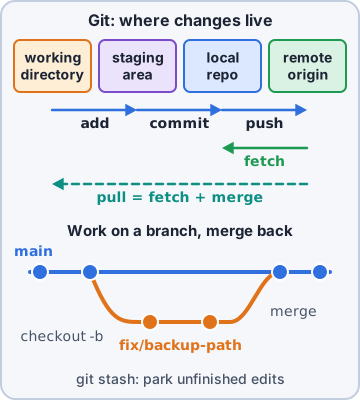
git config --global user.name / user.email labels your commits. git init makes a new repository; git clone URL copies an existing one. Changes move through three places: the working tree, the staging area (git add), then history (git commit -m). git status says where everything is; git diff shows unstaged changes (--staged for staged ones); git log --oneline lists history. .gitignore names files Git must never track: secrets, .venv/, logs.
$ git init ops-scripts && cd ops-scripts
$ printf '.venv/\n.env\n' > .gitignore
$ git add weekly-fails.sh .gitignore
$ git commit -m "Add weekly report"
Exam tip Put secrets in .gitignore BEFORE the first commit. Once committed, they stay in history.
Branches, merge and rebase
A branch is a movable pointer for separate work: git branch fix-ubuntu, then git checkout fix-ubuntu (git checkout -b does both; git switch is the newer verb). git merge fix-ubuntu, run from main, joins the work back in. git rebase main, run from a branch, replays its commits on top of main for a straight-line history. Squash combines several commits into one: git merge --squash, or squash in an interactive rebase.
Exam tip Never rebase commits others already pulled: it rewrites history under them.
Remotes: fetch, pull, push
git fetch downloads new commits from the remote without touching your files. git pull is fetch plus merge (or rebase) into your branch. git push uploads your commits. git tag -a v1.2 -m "..." marks a release; git push --tags shares tags.
Exam tip fetch = look; pull = look and combine; push = share.
Undo tools: stash and reset
git stash shelves uncommitted changes so you can switch branches; git stash pop brings them back. git reset moves the branch pointer back: --soft keeps the changes staged, the default (--mixed) keeps them unstaged, and --hard throws them away completely. For commits already pushed, git revert (a new commit that undoes one) is the safe choice.
Exam tip reset --hard is the one Git command that really deletes your work. Pause before Enter.
Check yourself 3You committed twice on main, then realized both belong on a branch. Nothing is pushed yet. You want the changes kept in your files, but the commits gone from main. Which command?
- git reset --hard HEAD~2
- git stash pop
- git revert HEAD~2
- git reset HEAD~2
Show the answer
Answer: D. git reset HEAD~2
A mixed reset moves main back two commits and leaves their changes in the working tree, unstaged. Then git checkout -b feature and commit them there.
Go deeper
More on the objectives in this chapter, in the same exam-ready detail.
Objective 4.2 · Expansion: parameter expansion ${var}
Parameter expansion
Beyond $var
${var} separates a name from text after it (${name}_backup). Bash adds useful forms:
- ${var:-default}: use default if empty/unset
- ${var:=default}: also assign it
- ${#var}: length
- ${var#prefix} / ${var%suffix}: strip from start/end (${file%.txt})
- ${var/old/new}: replace first match (// all)
- ${var:0:5}: substring
Objective 4.2 · Expansion: command substitution $(foo) and foo
Command substitution
Use a command's output
$(command) runs the command and puts its output in place: today=$(date +%F); echo "Kernel: $(uname -r)". The older backtick form command does the same but is hard to read and to nest. Related: (commands) runs them in a subshell, so changes like cd don't affect the main script.
Exam tip Quote it: "$(command)" keeps spaces and newlines intact.
Objective 4.2 · Internal field separator/output field separator (IFS/OFS)
IFS and OFS
How text gets split
IFS (internal field separator, default space/tab/newline) tells bash where to split words, for example when read splits a line into variables. To read a CSV line: IFS=',' read -r name dept id <<< "$line". Set IFS only for that command (as here) so the rest of the script isn't affected. OFS is awk's output field separator: awk -F: 'BEGIN{OFS=","} {print $1,$3}' /etc/passwd prints name,uid.
Objective 4.2 · Conditional statements: if, case
if and case
if
Run commands only when a test succeeds:
- if [[ -f /etc/app.conf ]]; then
- echo found
- elif [[ $count -gt 5 ]]; then
- echo many
- else
- echo none
- fi
case
Matches one value against patterns, cleaner than many elifs:
- case "$1" in
- start) start_app ;;
- stop|halt) stop_app ;;
- *) echo "usage: $0 start|stop"; exit 1 ;;
- esac
Exam tip if tests a command's exit status: 0 = true. [[ ]] is bash's safer test; [ ] is the POSIX test command.
Objective 4.2 · Looping statements: until, for, while
for, while and until loops
Three loops
Bash has three loop types plus ways to leave or skip:
- for over a list: for host in web1 web2 web3; do ping -c1 "$host"; done
- C-style: for ((i=1; i<=5; i++)); do ...; done
- while the condition is true; read a file line by line: while IFS= read -r line; do ...; done < file.txt
- until the condition becomes true: until ping -c1 db01 &>/dev/null; do sleep 5; done
- break leaves a loop; continue skips to the next pass
Objective 4.2 · Comparisons: numerical (-eq, -ge, -gt, -le, -lt, -ne)
Numeric comparisons
The operators
Inside [ ] or [[ ]]: -eq equal, -ne not equal, -gt greater than, -ge greater or equal, -lt less than, -le less or equal. Example: if [[ $(df --output=pcent / | tail -1 | tr -dc '0-9') -ge 90 ]]; then echo 'disk almost full'; fi. Inside (( )) you can write normal math symbols: (( count > 10 )).
Exam tip Strings use = (or ==), !=, < and >; numbers use -eq, -lt... Using > inside [ ] redirects to a file instead of comparing.
Objective 4.2 · Regular expressions: [[ $foo =~ regex ]]
Regex matching in bash
=~
Inside [[ ]], =~ tests a string against an extended regular expression: if [[ $ip =~ ^[0-9]{1,3}(\.[0-9]{1,3}){3}$ ]]; then echo looks like an IPv4 address; fi. Captured groups land in the array BASH_REMATCH (BASH_REMATCH[1] is the first group).
Exam tip Don't quote the regex on the right side of =~, or bash treats it as a plain string.
Objective 4.2 · Test: !, -d, -f, -n, -z
File and string tests
The tests
The most common tests inside [[ ]] or [ ]:
- -f file: exists and is a regular file
- -d dir: exists and is a directory
- -e path: exists (any type); -r/-w/-x readable/writable/executable; -s not empty
- -z "$var": string is empty (zero length)
- -n "$var": string is not empty
- ! negates: if [[ ! -d /backup ]]; then mkdir -p /backup; fi
Objective 4.3 · Python fundamentals: indentations
Python indentation
Indentation is syntax
Python uses indentation, not braces, to mark blocks. Everything indented under an if, for, def or class line belongs to it. Use 4 spaces per level and never mix tabs and spaces (you'll get IndentationError or TabError).
- if disk_used > 90:
- print("warning")
- send_alert()
- print("done") # back at the outer level, runs either way
Objective 4.3 · Python fundamentals: data types and structures (Boolean, dictionary, floating point, integer, list, string)
Python data types
The core types
Python's built-in types you'll use in admin scripts:
- int: 42; float: 3.14 (watch rounding: 0.1 + 0.2 isn't exactly 0.3)
- str: "web01" (immutable; f-strings: f"{host} is up")
- bool: True / False
- list: ordered, changeable: hosts = ["web1", "web2"]; hosts.append("web3"); hosts[0]
- dict: key-value pairs: ports = {"ssh": 22, "https": 443}; ports["ssh"]
- type(x) shows a value's type; int("5"), str(5) convert
Objective 4.3 · Setting up a virtual environment
Python virtual environments
Why and how
A virtual environment gives a project its own Python packages so it doesn't conflict with the system's packages or other projects (and so you never pip install into the system Python).
- python3 -m venv .venv: create
- source .venv/bin/activate: use it (prompt shows (.venv)); deactivate to leave
- Packages installed now go into .venv only
Objective 4.3 · Installing dependencies
Installing Python dependencies with pip
pip and requirements files
Inside an activated virtual environment:
- pip install requests: install a package
- pip install -r requirements.txt: install everything a project lists
- pip freeze > requirements.txt: record exact versions you have
- pip list, pip show requests, pip install --upgrade requests
Exam tip 'externally-managed-environment' error on modern distros: you're installing into system Python. Use a venv (or the distro package, e.g. python3-requests).
Practice questions
Answer in your head, then open the answer. Ranger's Terminal has 514 questions like these for Linux+, with mock exams.
Question 1A backup script contains DEST="${BACKUP_DIR:-/srv/backup}". What does DEST become?
- Always /srv/backup, even when BACKUP_DIR is set
- BACKUP_DIR is set to /srv/backup when it was empty
- BACKUP_DIR's value if set and not empty, else /srv/backup
- The script stops with an error message when BACKUP_DIR is unset
Show the answer
Answer: C. BACKUP_DIR's value if set and not empty, else /srv/backup
${VAR:-default} expands to default when VAR is unset or empty, without changing VAR. := also assigns it, and :? stops with an error.
Question 2What does the script in the exhibit print?
- log
- app.2026-10-15.log
- app
- app.2026-10-15
Show the answer
Answer: D. app.2026-10-15
${var%pattern} deletes the shortest match of pattern from the end; %% deletes the longest. # and ## do the same from the start.
Question 3A script must name its archive with today's date, for example backup-2026-10-15.tar.gz. Which line does that?
- tar -czf "backup-(date +%F).tar.gz" /etc
- tar -czf "backup-$(date +%F).tar.gz" /etc
- tar -czf 'backup-$(date +%F).tar.gz' /etc
- tar -czf "backup-${date +%F}.tar.gz" /etc
Show the answer
Answer: B. tar -czf "backup-$(date +%F).tar.gz" /etc
Command substitution $(command) (or the older command) is replaced by the command's output. It works inside double quotes but not single quotes.
Question 4A script is running in /home/sam. It then runs the line in the exhibit. What is the current directory afterwards?
- /home/sam
- /
- /var/log
- The script stops because subshells cannot use cd
Show the answer
Answer: A. /home/sam
Commands in ( ) run in a child subshell. Directory changes and variables set there disappear when it exits, which makes ( ) handy for temporary cd.
Question 5Read the function in the exhibit. What does the script print?
- 0 and then 0
- An error, because functions cannot use local
- 1 and then 1
- 1 and then 0
Show the answer
Answer: D. 1 and then 0
local makes a variable belong to the function only. The global count stays 0. A function's return N sets its exit status ($?), not its output.
CompTIA, A+, Network+, Security+ and Linux+ are trademarks of CompTIA, Inc. Ranger Gamez is not affiliated with or endorsed by CompTIA. The practice questions are written to the published exam objectives; they are not real exam questions.