 RANGER
 CompTIA Linux+ (XK0-006) · chapter 14 of 14
Month 9: Watching, tuning, and exam day
In this chapter Objectives 4.5, 5.1, 5.5
- AI as a sysadmin's assistant
- Monitoring: targets and data
- Alerting that people trust
- Reading the symptoms
- From "it's slow" to a cause
- Don't paste AI or internet code blindly
- Verify what AI tools give you
- Prompt engineering for admin tasks
- SNMP: polling, traps and MIBs
- Agent vs agentless monitoring
- Monitoring: thresholds and alerts
- High load average
- High context switching
- Many failed logins
- High disk latency
- Slow network storage (NFS, SMB, iSCSI)
- Practice questions
- Chapter recap
Objective 4.5
AI as a sysadmin's assistant
Where AI helps
Large language models (LLMs) are useful drafting tools for admins:
- Generate code and regular expressions ("match an IPv4 address at the end of a line")
- Generate infrastructure as code: a first draft of an Ansible playbook or OpenTofu resource
- Document code and create documentation: explain an old script, write a README or runbook
- Security review, code optimization, code linting and recommendations to improve compliance ("check this sshd_config against CIS")
Exam tip Think of it as a fast junior colleague: great first drafts, needs supervision.
Verify, never just paste
AI output can look perfect and still be wrong: invented command options, the wrong distro's paths, a regex that matches too much, a playbook that isn't idempotent. Avoid copy/paste without review: read it, check flags against man pages, run it in a lab or with --check, and have a human approve it like any other code (human review, quality assurance).
Sam: It once told me firewall-cmd had a --forever flag. Very confident. Doesn't exist.
Exam tip If you can't explain what the generated command does, you aren't ready to run it as root.
Data governance
What you paste goes somewhere. Security of data: never paste passwords, keys, customer data or full configs with secrets. LLM training: public services may use prompts to train future models. Private vs public: an enterprise tenant with no-training terms, or a local model running in-house, keeps data inside. Above all, adhere to corporate policy: use only the tools and data classes the company has approved.
Exam tip Redact first: hostnames, IPs, usernames and secrets become placeholders.
Prompt engineering
Better questions, better drafts. Give context ("RHEL 9, firewalld, SELinux enforcing"), the goal and constraints ("idempotent, no shell module"), the output format ("one playbook, YAML, with comments"), and an example if you have one. Ask it to explain each step or list assumptions. Then iterate: point out what's wrong and ask again.
Bad:  write a firewall script
Good: RHEL 9 with firewalld. Allow https
  from anywhere and 5432/tcp only from
  10.10.8.0/24, permanently. Use
  firewall-cmd, explain each line.
Check yourself 1Dev wants an AI chatbot to fix a failing playbook. The playbook includes the database password and real server names. Kibble's policy approves only the company's private AI tenant. What should he do?
- Paste it into a public chatbot; it's faster
- Redact it and use the approved tenant
- Paste it, then delete the chat afterwards
- Run the AI's answer straight in production
Show the answer
Answer: B. Redact it and use the approved tenant
Follow corporate policy (approved tool), protect the data (redact secrets and names), and verify the result before it runs anywhere.
Objective 5.1
Monitoring: targets and data
SLA, SLO and SLI
An SLI (service-level indicator) is a measurement: the share of checkout requests answered in under 300 ms, or uptime per month. An SLO (service-level objective) is the internal target for it: 99.9% of checkouts under 300 ms. An SLA (service-level agreement) is the promise to a customer, with consequences if missed, and is set looser than the SLO so you have a safety margin.
SLI  measured   99.94% fast checkouts
SLO  target     99.9%
SLA  contract   99.5%, or refunds
Exam tip I = what you measure. O = what you aim for. A = what you promised someone else.
SNMP, agents and agentless
SNMP lets a manager poll devices for values (UDP 161). Each value has an OID, described in MIBs (management information bases). Traps are messages the device sends unprompted when something happens (UDP 162). Use SNMPv3 for authentication and encryption. Agent-based monitoring installs a small program on each server for deep metrics; agentless polls over SSH, SNMP or APIs, with nothing to install but less detail.
Exam tip Poll = the manager asks. Trap = the device shouts first.
Webhooks, health checks, log aggregation
A webhook pushes an event as an HTTP request to a URL: an alert into the team chat, or a ticket opened automatically. A health check probes an endpoint (GET /health) or a port on a schedule; load balancers use them to stop sending traffic to a sick server. Log aggregation collects logs from every server in one searchable place (rsyslog forwarding, journald remote, a log platform), so one search covers the whole fleet.
Exam tip Health checks should test what users need (the database answers), not just that the process exists.
Objective 5.1
Alerting that people trust
Thresholds, events, alerts, notifications
A threshold is a limit on a metric: disk over 85%, p95 latency over 300 ms for 5 minutes. An event is something that happened: a service restarted, a backup finished. An alert fires when a threshold is crossed or an important event occurs. A notification delivers it to the right people (chat, email, pager), with severity and escalation. Logging records what happened for later analysis, at a level that's useful without flooding the disk.
Sam: Warning goes to chat. Critical wakes someone up. Nothing else wakes anyone up.
Ranger: only barks for critical things, mostly
Exam tip Every alert should need a human action. Alerts nobody acts on train people to ignore all alerts.
Check yourself 2Kibble's contract with a marketplace partner promises 99.5% monthly API uptime, or a fee refund. Internally the team aims for 99.9%. Last month the measured uptime was 99.93%. Which is the SLO?
- The 99.9% internal target
- The 99.5% promise in the contract
- The measured 99.93%
- The refund clause
Show the answer
Answer: A. The 99.9% internal target
The SLO is the internal objective. The SLI is what you measured; the SLA is the contract with the partner, set looser than the SLO.
Objective 5.5
Reading the symptoms
Load, CPU and context switches
High load average (uptime: 1, 5 and 15 minutes) counts tasks running or waiting for CPU, plus tasks blocked in D state. Compare it with the core count: load 16 on 16 cores is busy, on 4 cores it's overloaded. High CPU usage and a CPU bottleneck show in top's us/sy columns and mpstat. High context switching (vmstat cs, pidstat -w) means the CPU keeps juggling too many threads. Blocked processes (vmstat b column) wait on I/O.
$ vmstat 1 3
 r  b   si   so    cs us sy id wa
 9  0    0    0  2100 85 12  3  0
Exam tip High load with idle CPU? Look at the b column and wa: it's I/O, not CPU.
Memory: swapping and OOM
Swapping means RAM is full and the kernel moves pages to disk: vmstat si/so non-zero and free -h showing swap in use. Everything slows down, often to system unresponsiveness and sluggish terminal behavior. When even swap isn't enough, you get out of memory: the OOM killer ends a process (dmesg). Find the hungry process with top (press M) or ps aux --sort=-rss.
Exam tip A few MB in swap is normal. Constant si/so activity is the problem.
Disk: I/O wait and latency
High I/O wait time (top wa, iostat) means CPUs sit idle waiting for storage. iostat -x shows per-device detail: high disk latency in r_await/w_await (milliseconds per request) and %util near 100. Low throughput with high latency points to a struggling or failing disk, or one process hammering it (iotop). Slow remote storage response on NFS shows as high latency on the mount and processes stuck in D.
$ iostat -x 1 2 | tail -2
Device  r/s  w/s r_await w_await %util
sda     310  220    48.2    95.1  99.8
Network, logins, startup and hardware
Packet drops show in ip -s link (dropped, errors) and ethtool -S. Jitter is uneven delay, deadly for voice and video. Random disconnects, random timeouts and high latency suggest a flapping link, an MTU problem or a full conntrack table. High failed log-in attempts (brute force) burn CPU and fill logs: fail2ban. Slow startup: systemd-analyze blame. Hardware errors: dmesg (MCE, EDAC), SMART. Exceeding baselines only means something if you recorded normal (sar keeps history).
Exam tip No baseline, no "abnormal". Record normal numbers on a quiet week.
Check yourself 3web01 feels sluggish. uptime shows load 12 on 8 cores, but top shows the CPUs 70% idle, wa at 25%, and vmstat's b column at 10. What's the most likely bottleneck?
- CPU: load 12 is higher than 8 cores
- Network: packets are being dropped
- Too many context switches between threads
- Storage: tasks are blocked on I/O
Show the answer
Answer: D. Storage: tasks are blocked on I/O
Load includes tasks in uninterruptible sleep. Idle CPUs plus high wa and many blocked tasks mean the work is stuck behind storage. Check iostat -x and iotop next.
Objective 5.5
From "it's slow" to a cause
Slow application response
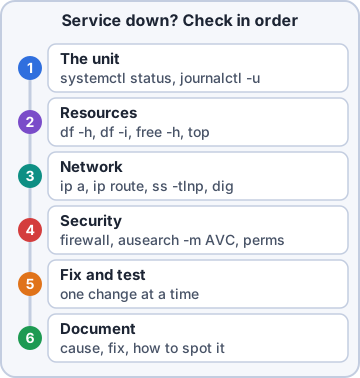
Slow application response and slow response times are what users report. They're symptoms, not causes. Time one request (curl -w '%{time_total}\n' -o /dev/null -s URL) and compare it with the baseline. Then check the four resources in order: CPU (load, us/sy), memory (si/so), disk (wa, await) and network (latency with ping or mtr, throughput with iperf3). Change one thing at a time and measure again.
Exam tip The slow part is often not the server you're looking at: a slow database or DNS lookup makes the web app slow.
Go deeper
More on the objectives in this chapter, in the same exam-ready detail.
Objective 4.5 · Best practices: avoid copy/paste without review/quality assurance
Don't paste AI or internet code blindly
Review before running
Scripts and commands from AI assistants or websites can be wrong, outdated for your distribution, or dangerous (rm -rf on a wrong variable, curl | bash from an unknown site, chmod 777).
- Read every line and understand what it does
- Test in a lab or VM first, with a backup
- Check flags against man pages and your distro's docs
- Run linters (shellcheck for bash) and peer review through version control
- Never paste secrets into a public AI tool
Objective 4.5 · Best practices: verify output
Verify what AI tools give you
Trust but verify
AI output can sound confident and still be wrong (made-up options, wrong file paths, old syntax). Verify against authoritative sources (man pages, vendor docs), run it with safe options first (--dry-run, -n, echo the commands), and check the result: did the service start, does the config test pass, do the logs show errors?
Objective 4.5 · Prompt engineering
Prompt engineering for admin tasks
Getting better answers
Good prompts give context and constraints:
- State the environment: distribution and version, shell, tools available
- Say exactly what you want and what you don't (no sudo, idempotent, no external downloads)
- Give examples of input and expected output
- Ask for explanations and edge cases, not just code
- Iterate: refine the prompt when the answer misses
- Remove sensitive data (passwords, internal IPs, customer data) before sending
Objective 5.1 · Data acquisition methods: SNMP (traps, management information bases (MIBs))
SNMP: polling, traps and MIBs
How SNMP works
SNMP (Simple Network Management Protocol) lets a monitoring system read values from devices and servers.
- Polling (GET): the manager asks agents for values on UDP 161
- Traps: the agent sends an alert on its own to the manager on UDP 162 (e.g. link down)
- MIB (Management Information Base): the dictionary describing what can be read; each value has an OID
- Versions: v1/v2c use plain-text community strings; SNMPv3 adds authentication and encryption: use it
- On Linux: net-snmp (snmpd agent; snmpwalk, snmpget tools)
Objective 5.1 · Data acquisition methods: agent/agentless
Agent vs agentless monitoring
Two approaches
Agent-based monitoring installs software on each server (for example Zabbix agent, Prometheus node_exporter, Datadog agent) that collects detailed metrics and logs and pushes or exposes them. Agentless monitoring collects remotely with standard protocols (SNMP, SSH, WMI, ICMP ping, HTTP checks) with nothing to install.
Exam tip Deep metrics and logs: agent. Network gear or systems you can't install software on: agentless.
Objective 5.1 · Configurations: thresholds, alerts, events, notifications, logging
Monitoring: thresholds and alerts
Turning data into action
Monitoring turns raw numbers into action in steps:
- Threshold: the value that matters (CPU > 90% for 5 minutes, disk > 85%)
- Event: something happened (threshold crossed, service down, trap received)
- Alert: an event judged important enough to act on, with a severity
- Notification: how people are told (email, SMS, chat, paging)
- Logging: keep the history for trends and investigations
Good practice
Alert on symptoms users feel, avoid noisy alerts (alert fatigue), use warning and critical levels, and require a condition to persist for a while so brief spikes don't page anyone.
Objective 5.5 · Common symptoms: high load average
High load average
Reading load
uptime shows 1-, 5- and 15-minute load averages: the number of processes running or waiting (including D-state processes waiting on disk). Compare to the number of CPU cores (nproc): load 8 on 8 cores is busy but OK; 30 is overloaded.
- CPU-bound: high %us/%sy in top; find the process
- I/O-bound: high %wa (iowait) in top, processes in D state; check iostat -x
- Memory pressure causing swapping: free -h, vmstat 1 (si/so columns)
Objective 5.5 · Common symptoms: high context switching
High context switching
What it means
A context switch is the CPU stopping one task to run another. Very high rates waste CPU time on switching instead of work. See it in vmstat 1 (cs column), pidstat -w (per process) or sar -w. Causes: too many threads or processes for the cores, lock contention, very chatty interrupts. Fixes: fewer worker threads, tune the application, spread interrupts, add CPUs.
Objective 5.5 · Common symptoms: high failed log-in attempts
Many failed logins
Likely a brute-force attack
Look in /var/log/secure or /var/log/auth.log, or journalctl -u sshd; lastb lists failed logins; faillock --user alice shows lockouts.
- Block offenders automatically: fail2ban
- Disable password authentication for SSH; use keys
- Restrict SSH with AllowUsers/AllowGroups and the firewall (source IPs, VPN)
- Lock accounts after failures with pam_faillock
Objective 5.5 · Common symptoms: high disk latency
High disk latency
Measuring and fixing
Slow reads/writes show as high await and %util in iostat -x 1, high iowait in top, and processes in D state. iotop shows which processes do the I/O.
- Failing disk: check smartctl and dmesg
- Too much I/O for the disk: move to SSD, add RAID 10, spread load, schedule backups off-hours
- Filesystem nearly full or heavily fragmented
- Choose a suitable I/O scheduler (none/mq-deadline for SSDs)
- Benchmark with fio to compare with expected performance
Objective 5.5 · Common symptoms: slow remote storage response
Slow network storage (NFS, SMB, iSCSI)
Where the delay is
Find which part of the path is slow:
- Network: latency and packet loss (ping, mtr), MTU problems, a congested link
- Server side: the NFS/SMB server's own disk or CPU load
- Client: nfsstat, mountstats, retransmissions; mount options such as rsize/wsize, hard/soft, NFS version (v4.1/4.2 preferred)
- DNS or authentication delays on SMB (Kerberos)
- Processes stuck in D state on an NFS path: the server stopped responding
Practice questions
Answer in your head, then open the answer. Ranger's Terminal has 514 questions like these for Linux+, with mock exams.
Question 1Dev asked an AI assistant to write an Ansible playbook that hardens SSH. It looks plausible. What should he do BEFORE using it in production?
- Ask the same AI whether the playbook is correct and trust that answer
- Review it, test it in a lab and check it against the docs
- Paste it into the repo unchanged so the history shows the AI version
- Run it on production right away, since AI output is tested
Show the answer
Answer: B. Review it, test it in a lab and check it against the docs
Treat AI output like code from an unknown contributor: review it, verify facts against official docs, test it (for example ansible-playbook --check in a lab) and only then merge it.
Question 2Maya wants AI help debugging a failing app. The log she would paste contains customer emails and an API key. What is the BEST practice?
- Paste it as-is into any public chatbot to get the best answer
- Mask the sensitive data and use only a policy-approved AI tool
- Encode the log in Base64 before pasting it
- Paste it, then delete the chat afterwards
Show the answer
Answer: B. Mask the sensitive data and use only a policy-approved AI tool
Data governance means not exposing secrets or personal data to AI services that are not approved. Redact first, rotate any key that was exposed, and follow the company's AI policy.
Question 3Kibble & Co. wants engineers to use AI on internal source code but must not send that code outside the company network. Which option fits?
- A free public chatbot with chat history turned on
- Any public chatbot, as long as the code is pasted in parts
- A locally hosted model running on company hardware
- A browser extension that sends the page to a public LLM
Show the answer
Answer: C. A locally hosted model running on company hardware
Local (self-hosted) models keep prompts and data on infrastructure the company controls. Private enterprise services with contracts against training on customer data are the other common option.
Question 4Which task is a reasonable use of an AI assistant for a Linux administrator, provided the result is reviewed?
- Drafting a regex that matches failed SSH login lines
- Approving production changes without human review
- Storing the team's passwords inside the AI chat
- Deciding alone to grant root access to a new contractor
Show the answer
Answer: A. Drafting a regex that matches failed SSH login lines
Generating code, regular expressions, IaC templates and documentation are common AI use cases. Decisions about access, approvals and secrets stay with people and the proper tools.
Question 5Priya asks an AI assistant: 'Write a script.' The result is useless. Which revised prompt is MOST likely to produce something she can use?
- Write a script in every programming language you know
- Write a better script, please, and make it much better this time
- Write the best and most powerful Linux script ever written
- Bash for Ubuntu 24.04: list users with UID >= 1000, add comments
Show the answer
Answer: D. Bash for Ubuntu 24.04: list users with UID >= 1000, add comments
Good prompt engineering states the task, context (OS, versions), constraints, desired format and examples. Clear, specific prompts give results that are easier to check.
CompTIA, A+, Network+, Security+ and Linux+ are trademarks of CompTIA, Inc. Ranger Gamez is not affiliated with or endorsed by CompTIA. The practice questions are written to the published exam objectives; they are not real exam questions.