 RANGER
 CompTIA Linux+ (XK0-006) · chapter 8 of 14
Month 4: Containers and code-built servers
In this chapter Objectives 2.6, 4.1
- Runtimes, images and layers
- Running containers, volumes and networks
- Orchestration: Compose, Swarm, Kubernetes
- Infrastructure as code
- CI/CD: from commit to production
- Container runtimes
- Pulling container images
- Building an image
- Pruning images
- Container volumes
- Container networking
- Privileged vs unprivileged containers
- Unattended installs: Kickstart and cloud-init
- Docker Swarm
- Docker/Podman Compose
- Practice questions
- Chapter recap
Objective 2.6
Runtimes, images and layers
Containers share the kernel
A container is a group of host processes isolated with kernel namespaces (own view of PIDs, network, mounts, users) and limited with cgroups (CPU, memory). No guest kernel boots, so containers start in a second and use little memory. The flip side: they need a compatible kernel, and a kernel bug affects every container on the host.
Exam tip VM = own kernel, strong isolation. Container = shared kernel, light and fast.
The runtime stack
runC is the low-level OCI runtime: it actually creates the namespaces and cgroups and starts the process (crun is a faster alternative). containerd is a daemon that manages images and container lifecycles and calls runc; Kubernetes and Docker both use it. Docker adds the dockerd daemon and the docker CLI on top. Podman is daemonless: each container is a child of your command (or of systemd), it runs rootless by default and accepts Docker's command syntax.
Exam tip Podman has no central daemon running as root. That's its big security selling point.
Images, tags and layers
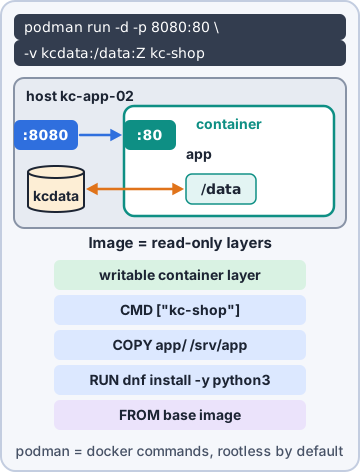
An image is a read-only template. Each Dockerfile instruction adds a layer; layers are cached and shared between images, so a second image built on the same base downloads almost nothing. A tag names a version: shop-api:1.4. latest is just a default tag name, not a promise of newest. Running a container adds a thin writable layer on top, stacked with an overlay filesystem.
podman pull docker.io/library/nginx:1.27
podman images
podman tag shop-api:1.4 shop-api:stable
podman image prune   # remove dangling
Exam tip Pin real tags (nginx:1.27) in production. latest can change under you.
Building with a Dockerfile
FROM picks the base image. RUN and COPY add layers. USER switches to a non-root user for everything after it. ENTRYPOINT fixes the program that always runs. CMD gives default arguments (or a default command), which podman run ... args replaces.
FROM registry.kibbleco.example/ubi9:9.4
RUN dnf -y install python3 && dnf clean all
COPY app/ /opt/api/
USER 1001
ENTRYPOINT ["python3", "/opt/api/main.py"]
CMD ["--port", "8080"]
Exam tip Build: podman build -t shop-api:1.4 . (the dot is the build context).
Check yourself 1The Dockerfile ends with ENTRYPOINT ["python3", "main.py"] and CMD ["--port", "8080"]. Dev runs podman run shop-api:1.4 --port 9000. What runs?
- python3 main.py --port 8080
- --port 9000, with no program
- python3 main.py --port 8080 --port 9000
- python3 main.py --port 9000
Show the answer
Answer: D. python3 main.py --port 9000
ENTRYPOINT is fixed; CMD supplies default arguments. Extra run arguments replace CMD and are passed to the ENTRYPOINT.
Objective 2.6
Running containers, volumes and networks
Container operations
The everyday verbs, the same in podman and docker:
podman run -d --name api -p 8080:80 \
  -e DB_HOST=db01 -v apidata:/data \
  shop-api:1.4
podman ps -a            # list
podman logs -f api      # read logs
podman exec -it api sh  # shell inside
podman inspect api      # JSON details
podman stop api; podman start api
podman rm api           # delete
podman container prune  # all stopped
Exam tip -e sets environment variables, the usual way to pass settings into a container.
Volumes and bind mounts
Container layers vanish with the container, so data goes in volumes. A named volume (podman volume create apidata) is managed by the engine; a bind mount (-v /srv/api:/data) maps a host directory. podman volume prune removes unused volumes. On SELinux hosts a bind mount needs a label: :z (shared by several containers) or :Z (private to this one), or you get Permission denied.
podman run -v /srv/api:/data:Z ...
Exam tip Permission denied on a bind mount on RHEL, while the Unix permissions look fine? Think SELinux, add :Z.
Container networks
Publish a port with -p host:container: -p 8080:80 means clients connect to the host's 8080 and land on the container's 80. podman network create shopnet makes a network; network prune removes unused ones.
- bridge: the default; a private network behind the host, reached through -p
- host: shares the host's network stack: no isolation, no -p needed
- none: no network at all
- macvlan: the container gets its own MAC address on the physical LAN; ipvlan gets its own IP but shares the parent's MAC
- overlay: one network spanning several hosts (Swarm, Kubernetes)
Privileged vs unprivileged
--privileged hands a container nearly all of the host's capabilities and devices: root inside becomes very close to root on the host. Avoid it. Rootless containers run as an ordinary user; user namespaces map root inside the container to an unprivileged UID outside. Add USER in the Dockerfile so even the process inside isn't root.
Sam: If a container escape happens, rootless means the attacker lands as a nobody.
Exam tip "Just add --privileged" is never the fix for a permission problem. Find the real cause.
Check yourself 2A container was started with -p 8443:443. From a laptop, which URL reaches the app?
- https://db01:443
- https://db01:8443
- https://db01:8443:443
- https://172.17.0.2:443
Show the answer
Answer: B. https://db01:8443
-p host:container. The host publishes 8443 and forwards it to 443 inside the container.
Objective 4.1
Orchestration: Compose, Swarm, Kubernetes
Compose
A compose file (compose.yaml) lists services, their images, ports, volumes and environment in one place. docker compose up -d (or podman compose / podman-compose) starts the whole set, down stops and removes it, logs shows output from all of them. Good for one host.
services:
  api:
    image: shop-api:1.4
    ports: ["8080:80"]
    environment:
      DB_HOST: db01
  cache:
    image: redis:7
Docker Swarm
Swarm joins Docker hosts into a cluster. Nodes are managers (keep the desired state) or workers. A service says what to run and how many copies; each copy is a task placed on some node. Networks of type overlay connect tasks across nodes. docker service scale api=5 changes the count, and Swarm replaces tasks that die.
Exam tip Swarm: service = what you want; task = one running container of it.
Kubernetes objects
Kubernetes is the big orchestrator. The objects to know:
- Pod: the smallest unit; one or more containers sharing an IP and volumes
- Deployment: keeps N identical pods running and rolls out new versions gradually
- Service: a stable name and IP that load-balances to matching pods
- ConfigMap: plain configuration; Secret: sensitive values (only base64-encoded by default, so restrict access)
- Volumes: storage mounted into pods; variables: environment values set in the pod spec, often from ConfigMaps and Secrets
Exam tip Pods come and go with new IPs. A Service gives clients something stable to talk to.
Check yourself 3The API's database password must reach its pods without being baked into the image. Which Kubernetes object fits best?
- A Secret, mounted as a variable or file
- A ConfigMap, because it holds pod settings
- A Service, because it connects pods to the DB
- A Deployment, by adding the password to its name
Show the answer
Answer: A. A Secret, mounted as a variable or file
Secrets hold sensitive values and can be mounted as files or environment variables. Protect them with RBAC and encryption at rest, since base64 isn't encryption.
Objective 4.1
Infrastructure as code
Ansible
Ansible is agentless: it connects over SSH and runs Python modules on the targets. The inventory lists hosts and groups. A playbook (YAML) holds plays and tasks, and each task calls a module (dnf, apt, copy, service, user). Facts are details Ansible gathers first (ansible_distribution, memory). Collections bundle modules and roles. An ad hoc command runs one module without a playbook: ansible web -m ping.
- hosts: web
  become: true
  tasks:
    - name: chrony installed
      ansible.builtin.package:
        name: chrony
        state: present
Exam tip Modules are idempotent: run the playbook twice and the second run changes nothing.
Puppet
Puppet usually runs an agent on each node that pulls its catalog from a Puppet server every 30 minutes and fixes drift. Agents and server trust each other through certificates that the server signs. Code is organized in classes inside modules; facts (from Facter) describe each node. It can also run without the server (puppet apply, or Bolt).
Exam tip Ansible pushes over SSH, no agent. Puppet's agent pulls on a schedule.
OpenTofu
OpenTofu (the open-source fork of Terraform) builds infrastructure through APIs: VMs, networks, DNS records, cloud services. A provider is a plugin for one platform; a resource is one thing to create; the state file records what exists so the next run knows what to change. tofu plan previews; tofu apply makes it so.
resource "libvirt_domain" "web03" {
  name   = "web03"
  memory = 4096
  vcpu   = 2
}
Exam tip Protect and share the state file (remote, locked). Losing it means OpenTofu forgets what it built.
Unattended installs
Kickstart is the RHEL-family answer file: a ks.cfg with disk layout, packages and post-install scripts, often served over PXE so a new server installs itself. cloud-init configures cloud and VM images on first boot from user-data: users, SSH keys, packages, files, commands.
#cloud-config
users:
  - name: sam
    ssh_authorized_keys:
      - ssh-ed25519 AAAA...
packages: [chrony]
runcmd:
  - systemctl enable --now chronyd
Exam tip Kickstart = installer answers (RHEL). cloud-init = first-boot setup of an existing image.
Objective 4.1
CI/CD: from commit to production
Pipelines and version control
CI/CD (continuous integration, continuous delivery/deployment) runs every change through an automated pipeline: build, test, scan, then deploy. It starts with version control: playbooks, Dockerfiles, Kubernetes files and OpenTofu code all live in Git, so every change is reviewed, logged and reversible.
commit -> build -> test -> scan
       -> stage -> production
Shift left, GitOps, DevSecOps
Shift-left testing moves tests earlier: lint, unit tests and security checks run on every commit, when fixes are cheap. GitOps makes Git the single source of truth: an agent compares the running system with the repo and syncs it, so you change production by merging a pull request. DevSecOps builds security into each stage: dependency and image scanning, secret detection, signed artifacts.
Priya: If security only looks at the end, we find problems when they're most expensive.
Sam: Shift left. Find it on Tuesday, not on launch day.
Exam tip GitOps: don't hand-edit production. Change the repo; the system follows.
Go deeper
More on the objectives in this chapter, in the same exam-ready detail.
Objective 2.6 · Runtimes: runC, Podman, containerd, Docker
Container runtimes
Who does what
Several layers work together to run a container:
- runC (and crun): the low-level OCI runtime that actually creates the container using kernel namespaces and cgroups
- containerd: a daemon that manages images and containers and calls runC; used by Docker and Kubernetes
- Docker: the popular toolset; a daemon (dockerd) runs as root by default
- Podman: Docker-compatible commands (alias docker=podman works), daemonless and rootless by default; standard on RHEL
Objective 2.6 · Image operations: pulling images
Pulling container images
Pull
podman pull docker.io/library/nginx:1.27 (or docker pull). Images are named registry/namespace/name:tag; without a tag you get latest, which can change under you, so pin tags in production. podman images lists local images; registries searched by short names are set in /etc/containers/registries.conf.
Exam tip Use a digest (name@sha256:...) when you need exactly the same image every time.
Objective 2.6 · Image operations: build an image
Building an image
A Dockerfile/Containerfile
A build file lists the steps to create the image:
- FROM base image
- RUN commands at build time (each creates a layer)
- COPY files in
- USER run as a non-root user
- ENTRYPOINT the fixed program; CMD default arguments (overridable)
- EXPOSE, ENV, WORKDIR
Build and tag
podman build -t myapp:1.0 . builds from the Containerfile/Dockerfile in the current directory. podman tag myapp:1.0 registry.example.com/myapp:1.0 then podman push.
Objective 2.6 · Image operations: pruning
Pruning images
Cleaning up
Old images fill disks. podman image prune (or docker) removes dangling images (untagged layers); image prune -a removes all images not used by a container. podman system prune also removes stopped containers, unused networks and build cache. podman system df shows what uses space.
Exam tip /var/lib/docker or /var/lib/containers is full: prune.
Objective 2.6 · Volume operations: create volume, mapping volume, pruning, SELinux context, overlay
Container volumes
Keeping data outside the container
A container's filesystem disappears with it. Persistent data goes in a volume or a bind mount.
- podman volume create dbdata, then -v dbdata:/var/lib/mysql
- Bind mount a host directory: -v /srv/web:/usr/share/nginx/html
- volume ls, volume inspect, volume prune (removes unused volumes, careful)
- On SELinux systems add :Z (private) or :z (shared) so the content gets the container label: -v /srv/web:/data:Z
- overlay (overlayfs) is the layered storage driver images and containers use; :O mounts a directory as a throwaway overlay
Permission denied on a bind mount
If the container can't read a mounted directory on RHEL, it's usually SELinux: add :Z or relabel the directory.
Objective 2.6 · Container networks: create network, port mapping, pruning
Container networking
Commands
Connecting containers to each other and to the outside:
- -p 8080:80 maps host port 8080 to container port 80
- podman network create appnet, then --network appnet so containers reach each other by name
- network ls, inspect, prune
Network types
bridge (default: private network with NAT), host (share the host's network, no isolation, no port mapping needed), none (no networking), macvlan/ipvlan (container gets its own address on the physical LAN), overlay (spans several hosts, Docker Swarm).
Exam tip Container works but can't be reached from outside: missing -p mapping or the host firewall.
Objective 2.6 · Privileged vs. unprivileged
Privileged vs unprivileged containers
The difference
A privileged container (--privileged) gets nearly all of the host's capabilities and devices: root in it is close to root on the host. Unprivileged/rootless containers run as a normal user, map container root to an unprivileged host UID (user namespaces), and drop capabilities.
Exam tip Default to rootless and unprivileged; add only the specific capability needed (--cap-add) instead of --privileged.
Objective 4.1 · Unattended deployment: Kickstart, Cloud-init
Unattended installs: Kickstart and cloud-init
Kickstart
Kickstart automates installing RHEL-family systems: a ks.cfg file answers every installer question (language, partitions, packages in %packages, users, and %post scripts). Point the installer to it with inst.ks=http://server/ks.cfg (often over PXE). After any manual install, /root/anaconda-ks.cfg is a ready-made example. (Debian/Ubuntu equivalents: preseed and autoinstall.)
cloud-init
cloud-init configures a cloud image at first boot: hostname, users and SSH keys, packages, files and commands, from user-data (a #cloud-config YAML file) supplied by the cloud or hypervisor. Logs: /var/log/cloud-init.log; status: cloud-init status.
Exam tip Installing an OS from scratch on bare metal: Kickstart. Customizing a VM/cloud image as it starts: cloud-init.
Objective 4.1 · Deployment orchestration: Docker Swarm (service, nodes, tasks, networks, scale)
Docker Swarm
The pieces
Docker Swarm turns several Docker hosts into one cluster.
- Nodes: managers (keep cluster state, schedule work) and workers; docker swarm init, then docker swarm join on others
- Service: the desired state, e.g. 3 replicas of nginx (docker service create --replicas 3 -p 80:80 nginx)
- Tasks: the individual containers that make up a service, placed on nodes
- Networks: overlay networks connect containers across hosts
- Scale: docker service scale web=5
Remember
Swarm keeps the desired number of replicas running, rescheduling tasks if a node fails. Use an odd number of managers (3 or 5) to keep quorum.
Objective 4.1 · Deployment orchestration: Docker/Podman Compose (compose file, up/down, logs)
Docker/Podman Compose
One file for a whole app
A compose.yaml (docker-compose.yml) describes several containers that work together: services, images or build paths, ports, volumes, environment variables, networks and dependencies.
- docker compose up -d (or podman-compose / podman compose): create and start everything in the background
- docker compose down: stop and remove the containers and networks (add -v to remove volumes)
- docker compose logs -f web: follow one service's logs
- docker compose ps, restart, pull
Practice questions
Answer in your head, then open the answer. Ranger's Terminal has 514 questions like these for Linux+, with mock exams.
Question 1Priya wants containers on the RHEL servers to run without a root-owned background daemon, using commands compatible with docker. Which tool fits?
- Docker Engine
- containerd
- runC
- Podman
Show the answer
Answer: D. Podman
Podman is daemonless: each container is a child of the podman process (or managed by systemd) and runs rootless by default for normal users. Its CLI mirrors docker's.
Question 2Dev asks what runC does when he runs a container with Docker or Podman. Which answer is correct?
- It is the registry that stores and serves container images
- It is the daemon that manages images, pulls and container lifecycles
- It is the low-level OCI runtime that sets up namespaces and cgroups
- It is the tool that builds images from a Dockerfile
Show the answer
Answer: C. It is the low-level OCI runtime that sets up namespaces and cgroups
Higher-level tools (Docker, containerd, Podman, CRI-O) prepare an OCI bundle and call an OCI runtime such as runC (or crun) to create the container's namespaces, cgroups and process.
Question 3Sam runs podman pull docker.io/library/nginx with no tag. Which image version does he get?
- The image tagged latest
- The oldest image in the repository
- Every tag in the repository
- The image that matches the host's distribution
Show the answer
Answer: A. The image tagged latest
Without a tag, the latest tag is used. latest is just a name and may not be the newest release, so pin a version tag (nginx:1.27) in production.
Question 4Refer to the exhibit. Sam runs podman run kibble/shopctl --version. What does the container execute?
- /usr/bin/shopctl serve --version
- --version, run as its own command
- /bin/sh -c serve --version
- /usr/bin/shopctl --version
Show the answer
Answer: D. /usr/bin/shopctl --version
ENTRYPOINT sets the executable; CMD gives its default arguments. Anything after the image name in podman run replaces CMD, so shopctl gets --version. --entrypoint overrides the entrypoint itself.
Question 5Priya's scan flags that the shop image runs its app as root inside the container. Which Dockerfile instruction should Sam add?
- CMD
- FROM
- USER
- ENTRYPOINT
Show the answer
Answer: C. USER
USER sets the user (name or UID) for later RUN instructions and for the running container. Create the account first, for example with RUN useradd.
CompTIA, A+, Network+, Security+ and Linux+ are trademarks of CompTIA, Inc. Ranger Gamez is not affiliated with or endorsed by CompTIA. The practice questions are written to the published exam objectives; they are not real exam questions.