 RANGER
CompTIA Tech+ (FC0-U71) · chapter 17 of 18
Lock it down
In this chapter Objectives 6.1, 6.3
Objective 6.1
Security goals and privacy
Confidentiality, integrity, availability
Security has three goals, called the CIA triad. Confidentiality: only the right people can see the data, like a pay file for payroll only. Integrity: data stays accurate and isn't changed without permission, like nobody quietly editing the price list. Availability: systems and data are there when people need them, like the web store staying up during the big sale.
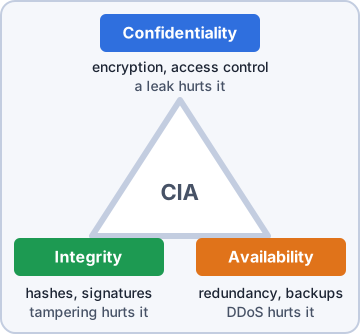
Priya: Every security problem breaks at least one of the three. Name which one, and you're halfway to fixing it.
PII, GDPR and cookie consent
Personally identifiable information (PII) is data that identifies a person: a full name with a home address, a date of birth, an email address or phone number, ID numbers. Laws can require protecting it. The General Data Protection Regulation (GDPR) is a European Union law protecting people's personal data. It reaches companies anywhere that offer goods or services to people in the EU, so a Michigan store shipping to Spain must follow it. Cookie consent banners ask before a site stores non-essential cookies, like tracking cookies.
Where privacy leaks
Privacy slips out through everyday tools:
- Social networking sites: posts are public and hard to take back; check photos for badges, screens and sticky notes
- Email: once sent, a message can be forwarded, printed or saved by anyone who gets it
- File sharing: 'anyone with the link' means anyone, even outside the company
- Instant messaging: chats are stored and can be searched, copied and forwarded
Rosa: I almost posted an anniversary selfie with the alarm code sticky note behind me.
Priya: Almost is my favorite word.
Check yourself 1Someone changed prices in the price list without permission, so a bag of puppy food now rings up at the wrong price. Which part of the CIA triad was broken?
- Confidentiality
- Availability
- Nonrepudiation
- Integrity
Show the answer
Answer: D. Integrity
Integrity means data stays accurate and isn't changed without permission. Unapproved price edits break it, even if nobody outside saw the list.
Objective 6.1
Authentication, authorization and accounting
Authentication
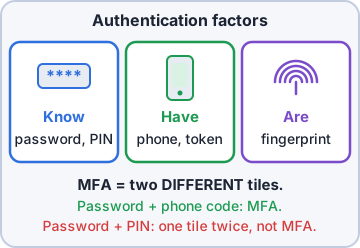
Authentication proves who you are. Single-factor authentication uses one kind of proof, usually a password. Multifactor authentication (MFA) needs two or more different kinds: something you know (password, PIN), something you have (a code on your phone, a security key) and something you are (fingerprint, face). A password plus a PIN is still only one kind. Single sign-on (SSO) lets you sign in once and then open many approved apps without signing in again.
Authorization
Authorization decides what you may do after you sign in. Permissions grant access to files, folders and apps. An administrator account can change the whole system and install software; a standard user account can only do everyday work. The least privilege model gives each person only the access their job needs, so a mistake or a stolen password does less damage.
Sam: Rosa gets a standard account. Once a year she needs a printer driver, and I sign in as admin for that one job.
Rosa: I've been demoted?
Sam: Protected.
Accounting and nonrepudiation
Accounting keeps records of who did what, and when. Examples: logs of sign-ins and file access, location tracking on company devices like delivery tablets, and web browser history on work PCs. Nonrepudiation means a person can't believably deny an action they took, because there's proof tied to them, like a digital signature on an approval.
Exam tip AAA in order: Authentication (who are you?), Authorization (what may you do?), Accounting (what did you do?).
Check yourself 2After Rosa signs in, she can open the inventory app but not the payroll app. Which concept decides that?
- Authentication
- Accounting
- Authorization
- Availability
Show the answer
Answer: C. Authorization
Authorization decides what a signed-in person may access. Rosa proved who she is (authentication); her permissions then allow inventory and block payroll.
Objective 6.3
Password best practices
Length and complexity
Password length matters most: every extra character multiplies the guesses an attacker needs. A long passphrase like 'four dogs nap by the dock door' beats a short, tricky 'K!bb1e#7'. Password complexity rules require a mix of uppercase, lowercase, numbers and symbols. Many workplaces still use them, but current US government (NIST) guidance puts length and blocking common or leaked passwords first.
You: Long and silly beats short and weird?
Priya: Every time.
History, expiration and reuse
Password history remembers your last few passwords so you can't switch back to an old one. Password expiration forces a change after a set time, like 90 days. Many systems use it, though NIST now advises forcing a change only when a password may have leaked. Password reuse across sites is the big danger: when one site is breached, attackers try that same password on your other accounts. Every account gets its own password.
Managers, privacy and resets
A password manager stores a unique, strong password for every account behind one strong master password, plus MFA, and fills them in for you. Password privacy means you never share a password, say it out loud or stick it on the monitor; IT never needs yours. A safe password reset process checks the person's identity with the company's set steps before resetting anything.
Priya: If a caller sounds rushed and wants to skip the identity check, that's exactly when we don't skip it.
Defaults and enabling passwords
New devices often ship with a default username and password, like admin and admin, that anyone can look up online. Change default usernames and passwords before a device goes on the network. And enable passwords: every account and device should require one. An account with no password at all is an open door.
Sam: The new backup box in the warehouse still says admin/admin. Fixing it today.
Priya: Today-today.
Check yourself 3Rosa changes her expired password, then right away changes it back to her old one, and the system allows it. Which setting would stop that?
- Password complexity
- Password expiration
- Password length
- Password history
Show the answer
Answer: D. Password history
Password history remembers recent passwords and blocks them from coming back. Expiration only forces a change on a schedule; it doesn't stop reuse of an old one.
Check yourself 4Rosa uses one strong password for work email, a pet supply shop and her social media. The pet supply shop gets breached. What's the main risk?
- None, because a strong password can't be cracked
- The shop's cookies can now read her work email inbox
- Attackers try that same password on her other accounts
- Her work password will now expire much sooner than before
Show the answer
Answer: C. Attackers try that same password on her other accounts
Reusing a password across sites means one breach unlocks the rest, no matter how strong it is. A password manager makes a unique password for each account easy.
Go deeper
More on the objectives in this chapter, in the same exam-ready detail.
Objective 6.1 · Confidentiality, integrity, and availability; Authentication, authorization, accounting, and nonrepudiation…
Security basics: the CIA triad and AAA
Confidentiality, integrity, availability
Security protects three things, often called the CIA triad:
- Confidentiality: only allowed people can read the data. Only the payroll team reads the pay file.
- Integrity: data stays correct and is changed only by people allowed to change it. An unapproved price change hurts integrity.
- Availability: people can use data and services when they need them. A two-hour web store outage hurts availability.
Authentication: proving who you are
Authentication proves who you are. Single-factor uses one kind of proof, like just a password. Multifactor (MFA) uses two or more different kinds: something you know (password, PIN), something you have (a phone code), or something you are (a fingerprint). A password plus a PIN is still single-factor, because both are things you know. Single sign-on (SSO) lets one sign-in open many apps, like email, the staff portal and tickets, without signing in again.
Authorization: what you may do
Authorization decides what a signed-in user is allowed to do. It happens after authentication. Permissions set it: Rosa may open the inventory app but not payroll. Use a standard user account for daily work and an administrator account only for tasks that need it, like the yearly printer driver. Anything opened in an admin session runs with full control of the PC. The least privilege model gives each person only the access their job needs.
Exam tip A seasonal helper with payroll access? Least privilege says remove it, not add more.
Accounting and nonrepudiation
Accounting tracks what users actually do, so you can look back later:
- Logs: who signed in, from where, and when. A sign-in at 02:47 from abroad, while the user was asleep, points to a stolen password.
- Location tracking: where company devices, like delivery tablets, have been.
- Web browser history: the sites visited on a work PC.
Exam tip Nonrepudiation is proof of who did something, like a digital signature on an order approval, so the person can't later deny it.
Objective 6.1 · Privacy
Privacy, PII and GDPR
Personally identifiable information
Personally identifiable information (PII) is information that can identify a specific person, alone or combined with other details: a full name with a home address, an email address, a date and place of birth, a phone number, a card number. A product price, dock hours or a pallet count describes the business, not a person, so it isn't PII.
Privacy in everyday tools
Once you share something, you lose control of it:
- Social networking sites: anyone can see and save a public post. Check photos for badges, screens and sticky notes first.
- Email: the receiver can forward, save or print it. Typing 'Confidential' in the subject doesn't protect it.
- File sharing: 'Anyone with the link' means anyone it's forwarded to can open it. Share private files with named people.
- Instant messaging: chat history is stored and can be searched, copied and forwarded. Card numbers don't belong there.
Government regulations: GDPR
Laws protect personal data. The best-known is the General Data Protection Regulation (GDPR), a European Union law. It sets rules for how organizations collect and use the personal data of people in the European Union, and it gives people rights, such as seeing or deleting their data. It follows the people, not the company's address: a Michigan web store that ships to customers in Spain must follow GDPR for their data.
Cookie consent
A cookie is a small piece of data a site stores in your browser. Some are needed for the site to work, like keeping you signed in. Others track you for ads. Privacy laws like GDPR led to cookie consent banners: the site must ask your permission before storing cookies it doesn't need to run, and you can accept or reject them.
Exam tip The banner's purpose is your choice about being tracked, not site speed.
Objective 6.3 · Password best practices
Password best practices
Length and complexity
Password length is how many characters a password has, and it adds the most guessing work. Password complexity rules say which kinds of characters to mix: uppercase, lowercase, numbers and symbols. Complexity helps less than it looks, because people use predictable patterns like a capital at the start or 0 for o, and guessing tools try those first. A passphrase of five random words (32 characters) beats K!bb1e#7 (8 characters).
Exam tip Current US government password guidance favors long passwords and passphrases over symbol rules.
History and expiration
Password history remembers your recent passwords so you can't reuse them. Password expiration makes you change a password after a set time, like 90 days. They work together: with history set to 0, a user forced to change can switch right back to the old password. Current guidance says to force a change when a password may have leaked, rather than on a schedule, but many companies still use expiration.
Exam tip Expiration forces the change. History blocks going back.
Reuse and password managers
Password reuse across sites is dangerous: when one site leaks your password, attackers try it on your email, bank and social accounts. A strong password doesn't help once it's known. Adding the site name to one base password (Kibble!2026Shop, Kibble!2026Bank) is still a guessable pattern. A password manager creates and stores a unique, random password for every account behind one protected vault, so you only remember one.
Privacy and the reset process
Password privacy: never share your password, even with a coworker covering for you. Their actions would be logged as yours. IT should give them their own access. A safe password reset process always verifies who's asking, using the company's set method, before changing anything. A stressed caller who wants a new password sent to a personal email is a classic social engineering setup.
Defaults and enabling passwords
Change default usernames and passwords during setup. Factory logins like admin/admin are the same on every unit and easy to find online, whether it's a router, a NAS or a camera. And make sure passwords are enabled at all: a shared PC account with no password lets anyone who sits down use it. Length, history and complexity rules mean nothing if no password is turned on.
Practice questions
Answer in your head, then open the answer. Ranger’s First Byte has 455 questions like these for Tech+, with mock exams.
Question 1Priya says only the payroll team should be able to read the pay file. Which part of the CIA triad is she protecting?
- Integrity
- Confidentiality
- Availability
- Nonrepudiation
Show the answer
Answer: B. Confidentiality
Keeping data readable only by the people allowed to see it is confidentiality. Integrity is the tempting pick, but it is about stopping unwanted changes, not about who can read the file.
Question 2The online kibble store goes down during a big sale, and customers cannot place orders for two hours. Which part of the CIA triad was hurt?
- Availability
- Confidentiality
- Integrity
- Authorization
Show the answer
Answer: A. Availability
Availability means people can reach data and services when they need them, so an outage hurts availability. Integrity is a common wrong guess, but no data was changed; the store just could not be used.
Question 3Someone changed the prices in Kibble & Co.'s price list without permission, so a bag of puppy food now rings up at the wrong price. Which part of the CIA triad was hurt?
- Confidentiality
- Availability
- Accounting
- Integrity
Show the answer
Answer: D. Integrity
Integrity means data stays correct and is changed only by people allowed to change it, so an unapproved price change hurts integrity. Confidentiality is tempting, but nothing secret was exposed; the data was altered.
Question 4Which of these is personally identifiable information (PII)?
- The store's opening hours
- The number of bags on shelf 4
- A customer's full name and home address
- The price of a large bag of puppy food at the store
Show the answer
Answer: C. A customer's full name and home address
PII is information that can identify a specific person, alone or combined with other details, and a full name with a home address does that. A price or a stock count is business data that points to no one.
Question 5After Rosa signs in, the system lets her open the inventory app but blocks her from the payroll app. Which concept decides what she is allowed to open?
- Authentication
- Authorization
- Accounting
- Nonrepudiation
Show the answer
Answer: B. Authorization
Authorization decides what a signed-in user is allowed to do, such as which apps she may open. Authentication is the tempting pick, but it only proves who Rosa is; it happened at sign-in, before the system checked her permissions.
CompTIA, Tech+, A+, Network+, Security+ and Linux+ are trademarks of CompTIA, Inc. Ranger Gamez is not affiliated with or endorsed by CompTIA. The practice questions are written to the published exam objectives; they are not real exam questions.