 RANGER
CompTIA Tech+ (FC0-U71) · chapter 5 of 18
Maya's troubleshooting playbook
In this chapter Objectives 1.4
Objective 1.4
The six steps
A plan for any problem
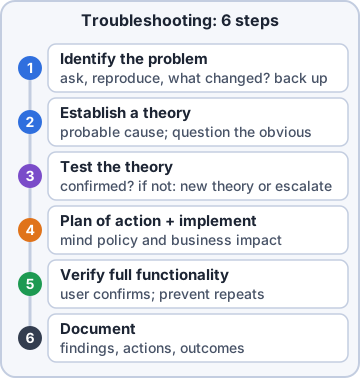
The troubleshooting methodology is a set of steps that works on any problem, from a printer to a server. Follow them in order:
- 1. Identify the problem.
- 2. Establish a theory of probable cause (question the obvious).
- 3. Test the theory to determine the cause.
- 4. Establish a plan of action, then implement the solution.
- 5. Verify full system functionality and, if it makes sense, add preventive measures.
- 6. Document what you found, the lessons learned, what you did and how it turned out.
Maya: It feels slow at first. It's faster than guessing three times.
Step 1: Identify the problem
Start by gathering facts, not fixes. Ask the user what they see and when it started. Ask what changed: a new roll of labels, an update, a moved cable. Try to make the problem happen again yourself. If anything you do might lose data, make sure it's backed up first. Only when you know what's really wrong do you move on.
You: Rosa, what's weird about it?
Rosa: It prints blank labels. It started right after I loaded the new roll.
Exam tip "What changed?" is the most useful question in IT.
Step 2: Establish a theory
A theory is your best guess about the cause. Question the obvious first: is it plugged in, turned on, loaded right? Simple causes are common and quick to check. If the problem is new to you, like an error code nobody has seen, research it in a knowledge base or on the internet, such as the maker's support site.
You: New roll, then blank labels. Theory: the roll is in backward.
Maya: That's a theory. Now prove it.
Step 3: Test the theory
Test your theory to find out whether it's the real cause. Flip the roll and print one test label. If the test confirms it, move on to a plan. If it doesn't, go back and form a new theory, or escalate to someone with more experience. Don't order parts for a cause you haven't proven.
You: flips the roll, prints A real label!
Rosa: Theory confirmed. You're getting good at this.
Exam tip Test failed? New theory (or escalate). Never fix a cause you haven't confirmed.
Check yourself 1A warehouse scanner shows error E-47, which nobody has seen before. You're forming a theory. What should you do?
- Replace the scanner with a new one right away
- Close the ticket
- Write up the lessons learned
- Look up E-47 in the maker's knowledge base
Show the answer
Answer: D. Look up E-47 in the maker's knowledge base
Researching a knowledge base or the internet is part of establishing a theory, and it's the right move for an unfamiliar error.
Check yourself 2You think a scanner won't power on because its battery is dead. You put in a fully charged battery, and it still won't power on. What should you do next?
- Order a box of new batteries
- Mark the problem as fixed
- Form a new theory and test it
- Document the battery as the cause
Show the answer
Answer: C. Form a new theory and test it
The test didn't confirm the theory, so you go back and form a new theory (or escalate). The battery is not the cause.
Objective 1.4
Finish the job
Step 4: Plan, then implement
Now establish a plan of action to fix the problem, then carry it out. A good plan thinks about side effects. Will the fix need a restart? Will people lose time? Does a manager need to approve it? Agree on a time with the user, then implement the solution. If the fix doesn't work, you can roll it back.
You: The update needs a restart. Rosa, can I do it at the 4 p.m. shift change?
Rosa: 4 p.m. is perfect. Thanks for asking!
Step 5: Verify, then prevent
Verify full system functionality: check that the whole job works for the user, not just the part you touched. Have Rosa print a real batch and make sure the labels scan at the dock. Then, if it makes sense, add preventive measures so the problem doesn't come back, like a label on the printer showing which way the roll goes.
Rosa: Twenty labels printed, all scanned. I'm putting your arrow sticker on every printer.
Ranger: sniffs the sticker. Approved.
Exam tip Verify = the user's real work succeeds. Prevent = it won't happen again.
Step 6: Document
Last, document findings, lessons learned, actions and outcomes in the ticket. Write the cause, what you did, and whether it worked. "Fixed" isn't enough. Good notes help the next tech who sees the same problem, and they build up the knowledge base that you'll research in step 2 next time.
You: Ticket notes: roll loaded backward after a change. Flipped it, tested, verified at the dock. Added roll-direction stickers.
Maya: That's a ticket I'd be proud of.
Check yourself 3After a fix, Maya has Rosa print a full batch of shipping labels and checks that they scan at the dock. Which step is this?
- Verify full system functionality
- Test the theory
- Identify the problem
- Document findings, lessons and outcomes
Show the answer
Answer: A. Verify full system functionality
Checking that the user's whole job works after the fix is verifying full system functionality. Testing the theory came earlier, to confirm the cause.
Go deeper
More on the objectives in this chapter, in the same exam-ready detail.
Objective 1.4 · Troubleshooting methodology
Maya's troubleshooting playbook, step by step
Six steps, always in order
CompTIA's troubleshooting methodology is a fixed order of steps. Following it stops you from guessing, wasting money or breaking something else:
- 1. Identify the problem.
- 2. Establish a theory of probable cause (question the obvious).
- 3. Test the theory to determine the cause.
- 4. Establish a plan of action and implement the solution.
- 5. Verify full system functionality and add preventive measures.
- 6. Document findings, actions and outcomes.
Exam tip Questions that ask what to do FIRST or NEXT are really asking which step you are on.
Step 1: identify the problem
Gather facts before you touch anything. Ask the user what they see and what changed before it started. Try to make the problem happen again. When Rosa says the label printer 'acts weird,' you ask what she sees and when it began. Ordering a new print head right away is a fix aimed at a cause nobody has found yet.
Exam tip First move on a new ticket = ask questions. Not replacing parts, not closing the ticket.
Steps 2 and 3: form a theory, then test it
A theory of probable cause is your best guess. Question the obvious first: is it on, plugged in, charged, loaded right? Mr. Barkley's black monitor gets a cable and power check before anyone orders a graphics card. If an error is new to you, like scanner code E-47, research the maker's knowledge base or the internet. Then test the theory: flip the label roll and print one test label. If the test fails (a fresh battery and the scanner still won't start), form a new theory or escalate.
Exam tip A theory isn't the cause until a test proves it.
Step 4: plan the fix, then do it
Once the test proves the cause, plan how to fix it and think about the effects on people. A fix that needs a restart will stop Rosa's team from printing shipping labels, so you agree on a restart time with her, then apply the update. Big changes may also need approval. Restarting in the middle of a shipping rush is the tempting shortcut that causes a second problem.
Exam tip The plan covers the side effects: downtime, who is affected and when.
Steps 5 and 6: verify, prevent, document
Verify full system functionality: check that the whole job works for the user, not just the part you fixed. Rosa prints a full batch, and the labels scan at the dock. Then add preventive measures so it doesn't come back, like a charging dock and a shift-end check for scanners. Last, document the cause, what you did, the outcome and the lesson learned. A ticket that only says 'fixed' is not documented.
Exam tip Verify comes before document, so your notes can say the fix worked.
Practice questions
Answer in your head, then open the answer. Ranger’s First Byte has 455 questions like these for Tech+, with mock exams.
Question 1What is the first step of the troubleshooting methodology?
- Establish a theory of probable cause
- Identify the problem
- Test the theory to determine the cause
- Establish a plan of action and implement the solution
Show the answer
Answer: B. Identify the problem
The methodology starts with identifying the problem: learn what is wrong, ask the user and find out what changed. Jumping to a theory is tempting, but without a clear problem, the theory may chase the wrong thing.
Question 2Which step comes last in the troubleshooting methodology?
- Verify full system functionality
- Test the theory to determine the cause
- Establish a plan of action and implement the solution
- Document findings, lessons learned, actions and outcomes
Show the answer
Answer: D. Document findings, lessons learned, actions and outcomes
Documenting findings, lessons learned, actions and outcomes is the final step. Verifying full system functionality is the close rival, but it comes just before documenting, so the notes can record that the fix worked.
Question 3In the troubleshooting methodology, "question the obvious" is part of which step?
- Establish a theory of probable cause
- Identify the problem
- Verify full system functionality
- Document findings and lessons learned
Show the answer
Answer: A. Establish a theory of probable cause
"Question the obvious" belongs to establishing a theory of probable cause: check simple causes, like power or cables, before complex ones. Identify the problem is the close rival, but that step gathers facts; questioning the obvious is about guessing the cause.
Question 4During which troubleshooting step would you search a knowledge base or the internet, if needed?
- Document findings and lessons learned
- Verify full system functionality
- Establish a theory of probable cause
- Test the theory to determine the cause
Show the answer
Answer: C. Establish a theory of probable cause
Researching a knowledge base or the internet is listed under establishing a theory of probable cause. Documenting is the tempting pick because notes often go into a knowledge base, but that writes to it at the end; research reads from it to find a likely cause.
Question 5Rosa calls: "The label printer is printing blank labels." Maya asks what you will do first. What should you do?
- Replace the printer's print head
- Write up the ticket as solved
- Ask Rosa what she sees and what changed
- Reinstall the printer driver on Rosa's PC
Show the answer
Answer: C. Ask Rosa what she sees and what changed
The first step is to identify the problem, so you ask Rosa about the symptoms and what changed. Replacing the print head is tempting, but it is a fix aimed at a cause no one has found yet.
CompTIA, Tech+, A+, Network+, Security+ and Linux+ are trademarks of CompTIA, Inc. Ranger Gamez is not affiliated with or endorsed by CompTIA. The practice questions are written to the published exam objectives; they are not real exam questions.