 RANGER
CompTIA Tech+ (FC0-U71) · chapter 6 of 18
Getting the warehouse online
In this chapter Objectives 2.7, 2.8
Objective 2.7
Internet service types
Fiber, cable and DSL
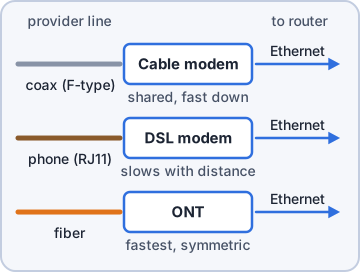
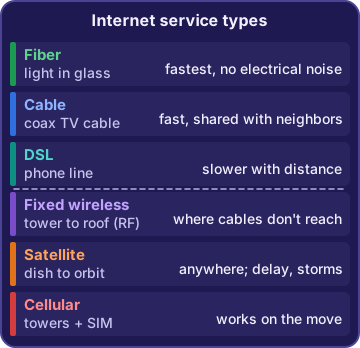
Fiber optic service sends data as pulses of light through thin glass strands. It's the fastest common service, and electrical noise can't disturb it. Cable internet runs over the coaxial cable used for cable TV. It's fast, but it's shared with neighbors, so it can slow down on busy evenings. Digital subscriber line (DSL) uses the copper phone line already in the building. It's slower, and the farther you are from the provider's office, the slower it gets.
Mr. Barkley: Store B is fast every morning and slow every evening.
Dev: Cable. All the neighbors get home and start streaming.
Wireless: RF, satellite and cellular
Wireless service uses radio waves instead of a cable. Fixed wireless sends radio frequency (RF) signals from a provider's tower to an antenna on your building, which helps where cables don't reach. Satellite works almost anywhere with a view of the sky, but the signal travels a long way to space and back, which adds delay, and storms can cut it. Cellular uses a carrier's towers and a SIM card, so it works on the move, and a phone can share it as a hotspot.
Rosa: The delivery vans need internet on their tablets all day.
Dev: Cellular. Wi-Fi stays in the building; the vans don't.
Exam tip Moving vehicle? Cellular. Middle of nowhere? Satellite. Fastest, no electrical noise? Fiber.
Check yourself 1Store A uses DSL. It's far from the phone company's office, and its internet is slow all day, every day. What's the most likely reason?
- DSL gets slower farther from the provider's office
- Neighbors share its cable line
- Storms block its satellite dish
- Its fiber line picks up electrical noise from nearby roads
Show the answer
Answer: A. DSL gets slower farther from the provider's office
DSL speed drops with distance from the provider's central office, which matches slow service all day. Sharing with neighbors is how cable works.
Objective 2.8
Network basics
Packets: data in small pieces
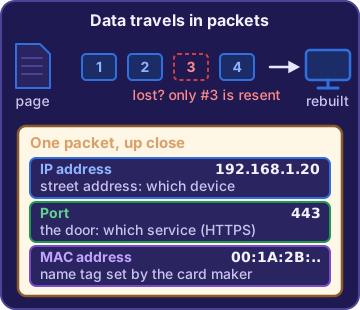
Networks don't send a web page or a file in one big lump. They split it into small packets. Each packet carries the address it's going to and the address it came from. Network devices pass each packet along toward its destination, and the receiving computer puts the pieces back together. If one packet gets lost, only that piece needs to be sent again.
Dev: Like shipping one big order as twenty boxes. Each box has the same address label.
Rosa: And I put them all back together at the dock.
IP addresses, MAC addresses and ports
An IP address identifies a device on a network, like a street address. The network gives it out, and it can change when the device moves to another network. A MAC address (media access control) is a hardware address the maker sets in the network card. It's written in hex and normally stays the same. A port is a number that picks the service on a device, such as 443 for secure websites. The IP finds the building; the port finds the door.
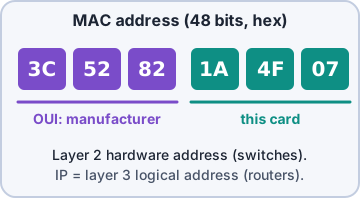
Sam: My laptop got a new IP at the warehouse, but its MAC stayed the same.
Dev: Exactly how it should work.
Exam tip Changes when you move networks? IP. Burned in by the maker? MAC. Picks the service on a device? Port.
Basic network services
Some services you'll use every day:
- Secure web browsing: HTTPS encrypts web traffic with TLS, so passwords are safe on the way. Plain HTTP sends everything readable.
- File transfer: FTP moves files but sends them unencrypted. SFTP moves them over an encrypted connection.
- Email: SMTP sends mail. IMAP and POP3 let an app pick it up; IMAP keeps mail synced on the server.
Theo: The store login uses HTTPS, and I upload product photos with SFTP.
Dev: Good. Never plain HTTP or FTP for anything private.
Check yourself 2Sam plugs his laptop into the HQ network, then into the warehouse network. Which identifier stays the same on both?
- Its IP address
- The port number of every app
- Its MAC address
- The network's name
Show the answer
Answer: C. Its MAC address
A MAC address is set in the network card by its maker, so it stays the same everywhere. The IP address changes because each network hands out its own.
Objective 2.8
Network devices and models
Modem, router and switch
A modem connects to the provider's line, like cable or DSL, and turns its signal into something your network can use. A router connects different networks, such as your office network and the internet, and forwards traffic between them by IP address. A switch connects the wired devices inside one network, like PCs and printers, and sends each piece of data only to the port it's meant for.
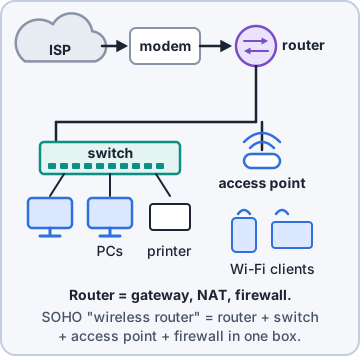
You: Modem talks to the provider, router joins networks, switch connects the desks.
Dev: You'll have my job by Friday.
Access points and firewalls
An access point connects wireless devices, like scanners and laptops, to the wired network. Adding one near the far end of the dock brings Wi-Fi there. A firewall sits between networks and allows or blocks traffic based on rules about addresses, ports and protocols. At home, one small box is often a modem, router, switch, access point and firewall all in one.
Priya: I'm Priya Shah, security. The firewall is my favorite box. It says no for a living.
Ranger: barks at the firewall in solidarity
Client/server and peer-to-peer
In a client/server network, central servers provide services, like files, printing or a website, and the other computers (clients) use them. In a peer-to-peer network, there's no central server. Each computer both shares and uses resources directly with the others. Peer-to-peer is fine for two PCs in a tiny store; client/server scales to a whole company.
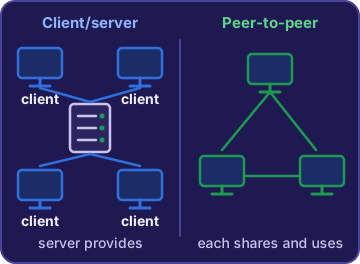
Rosa: The lake store has two PCs sharing a printer. No server.
Dev: Peer-to-peer. Simple, and fine for two.
LAN and WAN
A local area network (LAN) covers a small area, like one office, warehouse or home. A wide area network (WAN) links networks across long distances, like Kibble & Co.'s HQ, warehouse and stores in different towns. The internet is the biggest WAN of all.
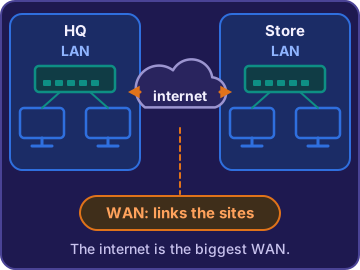
You: So each store has its own LAN, and the WAN ties them together.
Dev: And the internet ties together everyone else's.
Check yourself 3Priya wants a device between the internet and HQ that allows or blocks traffic using rules about addresses and ports. What should Dev install?
- A switch
- A modem
- An access point
- A firewall
Show the answer
Answer: D. A firewall
A firewall allows or blocks traffic between networks according to rules. Switches, modems and access points pass traffic along without judging it.
Go deeper
More on the objectives in this chapter, in the same exam-ready detail.
Objective 2.7 · Fiber optic; Cable; DSL; Wireless
Getting the building online: internet service types
Fiber, cable and DSL
Three wired internet services:
- Fiber optic: data as pulses of light through thin glass strands. The fastest common type, and electrical noise can't disturb it.
- Cable: runs over the coaxial cable used for cable TV. Neighbors share the line, so it can slow down on busy evenings.
- DSL (digital subscriber line): runs over the copper phone line. It gets slower the farther you are from the provider's office.
Exam tip Slow all day, far from the phone company's office = DSL. Slow only in the evening = cable's shared line.
Wireless internet: RF, satellite, cellular
When no line reaches you:
- RF (fixed wireless): radio between a provider's tower and an antenna fixed on your roof, a few miles apart.
- Satellite: a dish talks to a satellite in orbit. It works almost anywhere, but the long trip adds delay (latency), and storms can cut it.
- Cellular: a carrier's towers send data to devices with a SIM card. Works on the move, and a phone can share it as a hotspot.
Exam tip Delivery vans and pop-up stands = cellular. Remote store past the cable lines with a nearby tower = fixed wireless.
The box at the end of the line
Each service ends in a device that turns the provider's signal into one your network can use. A cable line ends at a cable modem, a phone line at a DSL modem, and fiber at an optical terminal. That device then connects to your router. Wi-Fi is not an internet service type. It is a local network that only reaches around the building.
Objective 2.8 · Basics of network communication; Network identifiers; Networking devices; Networking models; LAN; WAN
How a network moves data
Packets and the three identifiers
Networks split data into small packets. Each packet carries the destination's address so it can find its way. Three identifiers matter:
- IP address: a device's address on a network. The network hands it out, so it can change when the device moves. Routers forward packets by IP address.
- MAC address: the hardware address the maker gave the network adapter, written in hex. It stays the same on any network.
- Port: a number that picks which service on the device gets the data, like 443 for secure web traffic.
Five networking devices
Who does what in a small office:
- Modem: connects to the provider's line (cable or DSL) and converts its signal.
- Router: connects different networks, like the LAN and the internet, and directs traffic between them.
- Switch: connects wired devices within one LAN.
- Access point: lets wireless devices join the wired network. Add one to reach the far dock.
- Firewall: allows or blocks traffic using rules about addresses and ports.
Exam tip A home Wi-Fi router often packs the router, switch, access point and firewall into one box.
Client/server vs. peer-to-peer
In a client/server model, central servers provide services like files, printing or a database, and the other computers (clients) use them. In a peer-to-peer model there is no central server: each computer both shares and uses resources. Two PCs at a tiny store sharing files and a printer directly with each other are peer-to-peer.
LAN vs. WAN
A local area network (LAN) covers a small area: one home, office or building, like the HQ office network. A wide area network (WAN) links networks across long distances, like HQ, the warehouse and two stores in different towns joined over provider links. The internet is the biggest WAN of all.
Exam tip One building = LAN. Several distant sites joined together = WAN, not 'a big LAN.'
Reading a network map
Here's a small office from the internet inward. Follow the data down the page:
- Box 1 talks to the provider's line.
- Box 2 joins the LAN to the internet and filters traffic.
- Box 3 has many wired ports for the office PCs.
- Box 4 brings the wireless devices onto the same LAN.
       Internet
          |
     [1 Modem]
          |
  [2 Router + firewall]
          |
     [3 Switch]-------[4 Access point]
      |    |                 ((Wi-Fi))
     PCs  printer      laptops, scanners
Objective 2.8 · Basic network services
Network services: web, file transfer and email
Secure web browsing: HTTPS
Web pages travel using HTTP. Plain HTTP sends pages and form data, including passwords, as readable text, usually on port 80. HTTPS is secure web browsing: the same traffic encrypted with TLS, usually on port 443, so a login page keeps passwords safe on the way to the server. A firewall rule that blocks port 80 stops plain web traffic while port 443 keeps the secure store open.
Exam tip Login page, payment page or any form with personal data: HTTPS.
File transfer: FTP vs. SFTP
FTP (File Transfer Protocol) is an old way to move files between computers, like uploading product photos to the web server. It sends the files and the password in plain text. SFTP moves files over an encrypted SSH connection, so both are protected. When a question says the files must be encrypted on the way, pick SFTP.
Email: sending and receiving
Email moves in two parts. SMTP sends messages from your app to your mail server and between mail servers. To read mail, your email client fetches it with IMAP, which keeps mail on the server so every device stays in sync, or POP3, which usually downloads it to one device. Connections between mail servers can be encrypted with TLS.
Exam tip Sending = SMTP. Reading on several devices = IMAP.
Practice questions
Answer in your head, then open the answer. Ranger’s First Byte has 455 questions like these for Tech+, with mock exams.
Question 1Which internet service sends data as pulses of light through hair-thin glass strands?
- Cable
- Digital subscriber line (DSL)
- Fiber optic
- Satellite
Show the answer
Answer: C. Fiber optic
Fiber optic service turns data into pulses of light sent through thin glass fibers, which gives very high speeds with little signal loss. Cable and DSL send electrical signals over copper wires (coax and phone lines), not light.
Question 2Which internet service runs over the copper telephone line already installed in a building?
- Digital subscriber line (DSL)
- Cable
- Fiber optic
- Cellular
Show the answer
Answer: A. Digital subscriber line (DSL)
Digital subscriber line (DSL) uses the existing copper telephone line, and the phone can still be used at the same time. Cable is the tempting answer because it also reuses existing wiring, but it runs over the coaxial cable used for cable TV, not the phone line.
Question 3Dev is pricing satellite internet for a remote Kibble & Co. store. Which drawback should he warn Maya about?
- It runs over a coaxial line shared with the neighbors
- It slows down the farther the store is from the phone company's office
- It needs a fiber line run all the way to the building
- Signals travel far to space and back, adding delay, and storms can cut service
Show the answer
Answer: D. Signals travel far to space and back, adding delay, and storms can cut service
Satellite signals must travel a long way to an orbiting satellite and back, so there is a noticeable delay (latency), and weather can disrupt the link. Slowing with distance from the phone company's office is a DSL drawback, not a satellite one.
Question 4Kibble & Co.'s delivery drivers need internet on their tablets in the vans, anywhere along their routes. Each tablet has a SIM card from a carrier. Which internet service type is this?
- The warehouse Wi-Fi
- Cellular
- Cable
- Fiber optic
Show the answer
Answer: B. Cellular
Cellular service delivers internet by radio from a carrier's towers to a device with a SIM, so it works while the van moves. The warehouse Wi-Fi is the tempting answer, but Wi-Fi is a local network that only reaches around the building.
Question 5A new Kibble & Co. store sits past the end of the cable and DSL lines. A provider offers service by radio between a small antenna fixed on the store's roof and its tower two miles away. Which service type is this?
- Satellite
- Cable
- Fixed wireless (RF)
- Fiber optic
Show the answer
Answer: C. Fixed wireless (RF)
Fixed wireless sends internet by radio frequency (RF) signals between a provider's tower and an antenna fixed at the customer's building. Satellite is the tempting answer because it also uses a roof dish, but its signal goes to a satellite in orbit, not a nearby tower.
CompTIA, Tech+, A+, Network+, Security+ and Linux+ are trademarks of CompTIA, Inc. Ranger Gamez is not affiliated with or endorsed by CompTIA. The practice questions are written to the published exam objectives; they are not real exam questions.