 RANGER
CompTIA Tech+ (FC0-U71) · chapter 7 of 18
Wi-Fi that reaches the loading dock
In this chapter Objectives 2.9, 6.5
Objective 2.9
Wi-Fi standards and bands
802.11n, ac and ax
Wi-Fi standards are named 802.11 plus letters, and the Wi-Fi Alliance gives them simpler names. 802.11n is Wi-Fi 4. It works on 2.4 GHz and 5 GHz. 802.11ac is Wi-Fi 5, on 5 GHz. 802.11ax is Wi-Fi 6, on 2.4 GHz and 5 GHz. Wi-Fi 6E is 802.11ax extended to the new 6 GHz band. Each newer standard is faster and handles crowds of devices better.
Standard   Name        Bands (GHz)
802.11n    Wi-Fi 4     2.4, 5
802.11ac   Wi-Fi 5     5
802.11ax   Wi-Fi 6     2.4, 5
802.11ax   Wi-Fi 6E    2.4, 5, 6
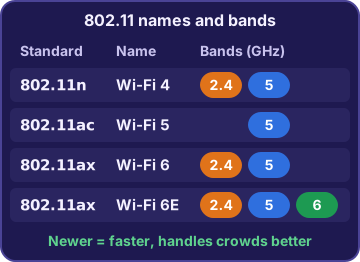
You: So the box that says 802.11ax is Wi-Fi 6.
Dev: Right. Same thing, two names.
Older vs. newer standards
Newer access points still work with older devices. Each device connects using the newest standard that both sides support. So when HQ gets a Wi-Fi 6 router, Rosa's old Wi-Fi 4 scanners still connect, but only at Wi-Fi 4 speeds. A new router can't give an old device features its radio doesn't have, and no software update can add a missing band.
Rosa: New router, same old scanner speed?
Dev: The scanner's radio is the limit. New laptops get the full speed, though.
Speed considerations
The speed printed on the box, like "up to 2400 Mbps", is a best case measured in perfect conditions. Real speed is lower. It drops with distance and walls, with interference, and with the number of devices sharing the access point. It's also capped by the slowest side: an old device gets old-device speeds. So the box number is a ceiling, not a promise.
Exam tip Real Wi-Fi speed is always below the box speed. Distance, walls, interference and crowds all take a bite.
Band options: 2.4, 5 and 6 GHz
2.4 GHz reaches the farthest and gets through walls best, but it's crowded and slower, and microwave ovens interfere with it. 5 GHz is faster and less crowded, with a shorter reach. 6 GHz has the most room and the least interference, but the shortest reach, and only Wi-Fi 6E and newer devices can use it.
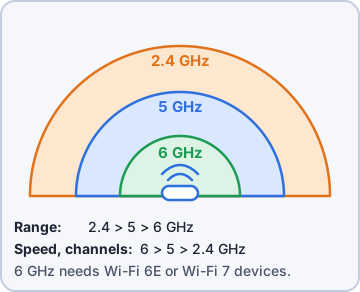
Dev: Lower number, longer reach. Higher number, more speed and less crowding.
Ranger: barks at the microwave, which is now his enemy
Objective 2.9
Interference and attenuation
Why signals get weak
Interference is other radio signals getting in the way: microwave ovens and cordless phones on 2.4 GHz, Bluetooth gadgets, and neighbors' Wi-Fi on the same channels. Attenuation is a signal getting weaker as it travels: with distance, and through walls, concrete, metal shelves and even water, like big bags of wet kibble. Fixes include moving closer, switching bands, or adding an access point where people work.
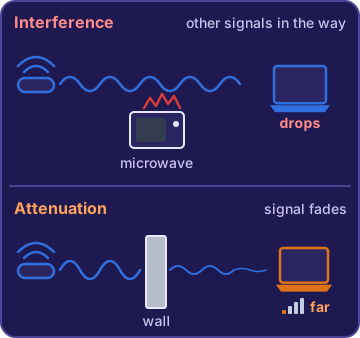
You: The far dock is behind two concrete walls and forty metal shelves.
Dev: That's attenuation. The signal is just worn out by the time it gets there.
Exam tip Drops when the microwave runs? Interference on 2.4 GHz. Weak at the far end behind concrete? Attenuation.
Check yourself 1The break room laptops are on 2.4 GHz, and their Wi-Fi drops every time someone runs the microwave. The router also offers 5 GHz. What's the best fix?
- Turn off the 5 GHz band
- Move the laptops to the 5 GHz band
- Buy a router with a higher box speed
- Change the Wi-Fi name
Show the answer
Answer: B. Move the laptops to the 5 GHz band
Microwave ovens interfere with the 2.4 GHz band, so moving the laptops to 5 GHz avoids the problem.
Check yourself 2The HQ access point offers 2.4, 5 and 6 GHz. Theo's new Wi-Fi 6E laptop connects on 6 GHz, but Maya's Wi-Fi 5 laptop never does. Why?
- Her laptop needs a software update to unlock 6 GHz
- 6 GHz is turned off
- She is too close to the access point
- Only Wi-Fi 6E and newer devices can use 6 GHz
Show the answer
Answer: D. Only Wi-Fi 6E and newer devices can use 6 GHz
The 6 GHz band takes Wi-Fi 6E (or newer) radio hardware. Maya's Wi-Fi 5 laptop doesn't have it, so it stays on 2.4 or 5 GHz.
Objective 6.5
Securing a small wireless network
Change the SSID
The service set identifier (SSID) is the network's name, the one you pick from the Wi-Fi list. A factory SSID often shows the router's brand and model, which tells an attacker which default settings to try. Change it to a plain, unique name that doesn't give away private details like a street address. Hiding the SSID doesn't secure anything: hidden networks are still easy to find with free tools.
Priya: "Kibble-Dock" is fine. "Kibble 14 Harbor Road Back Door" is not.
Rosa: I would never! ...I'm changing my home Wi-Fi name tonight.
Change the default password
Every router has an admin login for its settings page, and the factory password is printed on the sticker and online for that model. Change the default password right away, or anyone who knows the model could change your settings. The admin password and the Wi-Fi passphrase are two different secrets: changing one doesn't change the other.
Priya: After a temp worker leaves, change the Wi-Fi passphrase. If he had the admin login, change that too.
Exam tip Admin password = who can change the router's settings. Wi-Fi passphrase = who can join the network. Change both.
Open vs. encrypted
An open network has no passphrase and no encryption: anyone in range can join, and traffic over the air isn't protected. An encrypted network with a pre-shared key (PSK) uses one passphrase that everyone who joins types in. For visitors, like a delivery driver, set up a separate guest network with its own passphrase, so the staff passphrase stays private.
You: So an open network is like leaving the loading dock door wide open.
Priya: And shouting the inventory across the parking lot.
WPA, WPA2 and WPA3
Wi-Fi Protected Access (WPA) encrypts Wi-Fi traffic. The first WPA, with its old TKIP encryption, is outdated: don't use it. WPA2, with AES encryption, is still acceptable. WPA3 is the newest and strongest. WPA3-Personal still uses a passphrase, but it resists password-guessing attacks better. If one old device only supports WPA2, use WPA2/WPA3 transition mode so it can join while newer devices use WPA3.
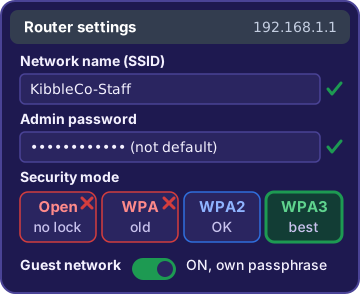
Dev: One old scanner can't do WPA3.
Priya: Transition mode. Everyone stays encrypted, and the old scanner gets a retirement date.
Exam tip Best: WPA3. OK: WPA2. Old device stuck on WPA2? Transition mode, never open or old WPA.
Check yourself 3Every device at the new store supports WPA3. Which security setting should Dev choose for its Wi-Fi?
- WPA with TKIP
- Open, with a hidden SSID
- WPA3-Personal
- WPA2/WPA3 transition mode
Show the answer
Answer: C. WPA3-Personal
When every device supports WPA3, WPA3-Personal gives the strongest protection. Transition mode exists only to let WPA2-only devices join.
Go deeper
More on the objectives in this chapter, in the same exam-ready detail.
Objective 2.9 · 802.11n/ac/ax; Older vs. newer standards; Band options
A small wireless network: standards and bands
802.11n, ac and ax
Wi-Fi standards also have simple generation names:
- 802.11n = Wi-Fi 4 (2.4 and 5 GHz)
- 802.11ac = Wi-Fi 5 (5 GHz)
- 802.11ax = Wi-Fi 6 (2.4 and 5 GHz), and Wi-Fi 6E adds the 6 GHz band
Exam tip Older vs. newer: newer standards are faster and handle many devices better. They still work with older devices, and each device connects using the newest standard it supports, so Wi-Fi 4 scanners on a Wi-Fi 6 router get Wi-Fi 4 speeds.
Speed: the box number is a best case
A router box that says 'up to 2400 Mbps' quotes a lab maximum. Real speed is lower, and that's normal. Distance, walls, interference and the number of devices sharing the network all cut into it. Each device also gets only what its own radio supports.
Exam tip Slower at the far end of the dock doesn't mean the router is broken.
Interference and attenuation
Interference is other signals getting in the way. Microwave ovens, cordless gear and crowded neighbor networks all hit the 2.4 GHz band hardest, so laptops that drop every time the microwave runs should move to 5 GHz. Attenuation is the signal getting weaker with distance and with every wall, especially concrete and metal. The fix for a weak signal far away is often an extra access point near the users.
Picking a band: 2.4, 5 or 6 GHz
Lower frequency reaches farther; higher frequency has more room and speed:
- 2.4 GHz: longest range and best through walls, but slower and crowded.
- 5 GHz: faster and less crowded, smaller area.
- 6 GHz: fastest and cleanest, shortest range, and only for Wi-Fi 6E and newer devices. No software update can add it to an older radio.
Exam tip Far away = 2.4 GHz. Crowded room right next to the access point = 5 or 6 GHz.
Objective 6.5 · Configure security settings for a small wireless network
Locking down the Wi-Fi
Change the SSID and the default password
The service set identifier (SSID) is the network name in the Wi-Fi list. Change the default SSID, because it often reveals the router model. Pick a simple, unique name like Kibble-Dock, not a street address. Next, change the default admin password for the router's settings page. Every unit of a model ships with the same login. The admin password is separate from the Wi-Fi passphrase, so changing one doesn't change the other.
Exam tip Hiding the SSID isn't security. Hidden networks can still be found.
Open vs. pre-shared key
An open network has no passphrase and no encryption. Anyone in range can join, and traffic over the air isn't protected. A pre-shared key network uses one passphrase that everyone gets ahead of time, and the traffic is encrypted. The catch: everyone shares the same secret. A visitor who learns it keeps access until it's changed for everyone, so give visitors a separate guest network with its own passphrase.
WPA, WPA2 and WPA3
Wi-Fi Protected Access comes in three versions:
- WPA: the first version. Outdated and weak today; don't use it.
- WPA2: still acceptable when an older device needs it.
- WPA3: newest and strongest, with better protection against password guessing. WPA3-Personal still uses a passphrase to join.
Exam tip One old scanner supports only WPA2? Use WPA2/WPA3 transition (mixed) mode, not plain WPA. If every device supports WPA3, choose WPA3-Personal.
Router checklist
Dev's audit of a new warehouse router:
- Change the SSID to a simple, unique name.
- Switch security to WPA3 (or WPA2/WPA3 mode).
- Change the admin password.
- Leave broadcast on: hiding it doesn't help.
SSID .............. default model name
Security .......... WPA (old)
Admin password .... factory default
SSID broadcast .... on
Practice questions
Answer in your head, then open the answer. Ranger’s First Byte has 455 questions like these for Tech+, with mock exams.
Question 1The new HQ router box says it supports 802.11ax. Which Wi-Fi generation name matches 802.11ax?
- Wi-Fi 4
- Wi-Fi 5
- Wi-Fi 6
- Wi-Fi 7
Show the answer
Answer: C. Wi-Fi 6
The Wi-Fi Alliance names 802.11ax Wi-Fi 6, 802.11ac Wi-Fi 5 and 802.11n Wi-Fi 4. Wi-Fi 5 is the tempting neighbor, but it is the older 802.11ac standard.
Question 2Which Wi-Fi band generally reaches the farthest and passes through walls the best?
- 5 GHz
- 2.4 GHz
- 6 GHz
- All three reach the same distance
Show the answer
Answer: B. 2.4 GHz
The 2.4 GHz band has the best range and gets through walls better than 5 GHz or 6 GHz. The 5 GHz band is faster and less crowded, but its signal covers a smaller area.
Question 3Which Wi-Fi band can only be used by Wi-Fi 6E and newer devices?
- 6 GHz
- 2.4 GHz
- 5 GHz
- Every band works for every device
Show the answer
Answer: A. 6 GHz
The 6 GHz band was opened to Wi-Fi with Wi-Fi 6E, so only Wi-Fi 6E and newer devices can use it. The 2.4 GHz and 5 GHz bands are used by older devices too.
Question 4The new warehouse router's box says "up to 2400 Mbps." Rosa's laptop at the far end of the dock gets far less than that. What is the most likely reason?
- The router must be faulty
- The box speed is a best-case maximum that distance, walls and other users lower
- The box lists megabytes, so the real speed is eight times higher
- The laptop's Bluetooth is using up the router's speed
Show the answer
Answer: B. The box speed is a best-case maximum that distance, walls and other users lower
The speed on the box is a lab maximum; distance, walls, interference and the number of devices sharing the network all lower real speed. Calling the router faulty is the trap, since slower real-world speed at the far dock is normal.
Question 5The break room laptops are on the 2.4 GHz band, and their Wi-Fi drops every time someone runs the microwave. The router also offers 5 GHz. What should Dev do?
- Connect the laptops to the 5 GHz band
- Place the router right next to the microwave
- Turn off 5 GHz so every device uses 2.4 GHz
- Order a faster internet plan from the provider
Show the answer
Answer: A. Connect the laptops to the 5 GHz band
Microwave ovens give off interference in the 2.4 GHz band, so moving the laptops to 5 GHz avoids it. Turning off 5 GHz is the tempting tidy-up, but it would push every device onto the band the microwave is disturbing.
CompTIA, Tech+, A+, Network+, Security+ and Linux+ are trademarks of CompTIA, Inc. Ranger Gamez is not affiliated with or endorsed by CompTIA. The practice questions are written to the published exam objectives; they are not real exam questions.