 RANGER
CompTIA Tech+ (FC0-U71) · chapter 8 of 18
Servers you can't see
In this chapter Objectives 2.6
Objective 2.6
Virtualization
One computer, many machines
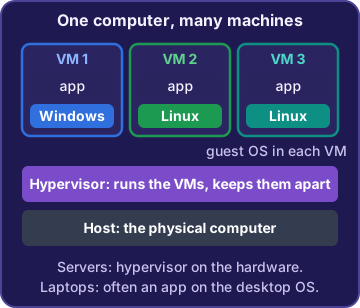
Virtualization lets one physical computer act like several separate computers. Each one is a virtual machine (VM): it has its own operating system, its own apps and its own slice of the real computer's CPU, memory and storage. To the software inside, a VM looks just like a real computer. Sam can run four test servers on one powerful machine instead of buying four.
Mr. Barkley: One power bill instead of four. Go on.
Sam: And if a test server breaks, I delete it and make a new one in minutes.
The hypervisor
The hypervisor is the software that creates and runs virtual machines. It shares the physical computer's hardware among the VMs and keeps them apart, so one VM crashing doesn't take down the others. Some hypervisors run directly on the hardware, which is common for servers. Others run as an app on a normal desktop, which is handy for testing on a laptop.
You: So the hypervisor is like the warehouse manager handing out shelf space.
Rosa: Hey, that's my job!
Host and guest operating systems
The physical computer is the host. An operating system running inside a VM is a guest operating system (OS). Sam can run a Linux guest on his Windows laptop to test the label app, or a Windows guest on a Linux server. Each guest thinks it has a whole computer to itself, while the hypervisor quietly shares the real one.
Sam: My laptop runs Windows. The Linux test box inside it is the guest.
Ranger: a very good guest himself, sits politely
Exam tip Inside the VM = guest OS. The software that runs VMs = hypervisor. The physical machine = host.
Check yourself 1Sam runs a Linux virtual machine on his Windows laptop to test the label app. In this setup, what is Linux?
- The guest operating system
- The hypervisor
- The host computer
- A cloud service model like SaaS
Show the answer
Answer: A. The guest operating system
An operating system running inside a VM is the guest OS. The hypervisor is the software that creates and runs the VM.
Objective 2.6
Cloud concepts
Infrastructure as a Service (IaaS)
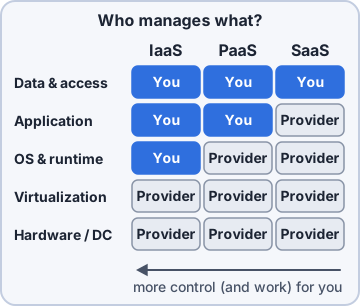
With Infrastructure as a Service (IaaS), a cloud provider rents you the basic building blocks: virtual servers, storage and networks. The provider runs the buildings and hardware. You install and manage the operating system and everything above it. IaaS gives the most control, which helps when an old app needs one exact OS version.
Sam: The old warehouse app only runs on one OS version. IaaS lets me pick it.
Platform as a Service (PaaS)
With Platform as a Service (PaaS), the provider runs the servers, the operating system and the tools, and gives developers a ready-made platform. Developers just upload their code and the provider runs it. Nobody on your team patches an OS. You trade some control for a lot less work.
Theo: That's what the online store needs. I upload code; somebody else patches servers.
Sam: Music to my ears.
Software as a Service (SaaS)
With Software as a Service (SaaS), the provider runs a finished app, usually in a web browser, and handles the servers, the software and the updates. You just sign in and use it, like a web email app or online payroll. SaaS gives the least control and the least work.
Mr. Barkley: Our email in the browser. I've never seen its server.
Sam: Exactly. That's SaaS.
Exam tip Most control: IaaS (you run the OS). Middle: PaaS (you bring code). Least: SaaS (you just use the app).
Objective 2.6
Where systems run
On premises, cloud or hybrid
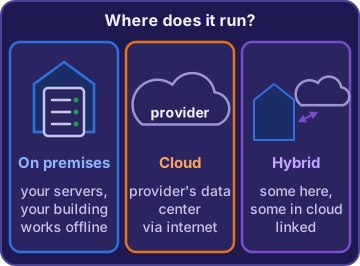
Deployment models describe where systems run. On premises means on your own hardware in your own building. It keeps working on the local network when the internet is down, and the data never leaves. Cloud means at a provider, reached over the internet. Hybrid mixes the two, working together: some systems on premises and some in the cloud.
Mr. Barkley: Payroll stays here where I can see it. The online store goes to the cloud.
Sam: Then Kibble & Co. is hybrid.
Exam tip Deployment model = where it runs. Service model (IaaS, PaaS, SaaS) = how much the provider manages.
Check yourself 2Theo's team wants to upload the online store's code and have a provider run it, without managing any servers or operating systems. Which service model fits?
- Infrastructure as a Service (IaaS)
- Platform as a Service (PaaS)
- Software as a Service (SaaS)
- On premises
Show the answer
Answer: B. Platform as a Service (PaaS)
PaaS gives developers a ready platform for their own code, while the provider manages the servers and the OS. With IaaS, the team would manage the OS.
Go deeper
More on the objectives in this chapter, in the same exam-ready detail.
Objective 2.6 · Virtualization; Cloud concepts; Deployment models
Virtual machines and the cloud
Hypervisors and guest operating systems
Virtualization lets one physical computer run several virtual machines. Each virtual machine acts like a separate computer with its own operating system. The hypervisor is the software that creates and runs the virtual machines and shares the real hardware among them. The OS inside a virtual machine is the guest operating system. Sam can run four test servers as four virtual machines on one powerful server instead of buying four separate computers.
Exam tip Linux running in a virtual machine on Sam's Windows laptop: Linux is the guest OS. The hypervisor is what runs it.
IaaS, PaaS and SaaS
Cloud service models describe what the provider manages for you:
- IaaS (Infrastructure as a Service): rented virtual servers, storage and networks. You install and control the OS. Good when an old app needs one exact OS version.
- PaaS (Platform as a Service): a ready platform. You upload your own code; the provider runs the servers and OS.
- SaaS (Software as a Service): a finished app, like web email. You just sign in and use it.
Exam tip The more 'as a Service' you rent, the less you manage. Your data and accounts are always yours to look after.
On premises, cloud or hybrid
Deployment models describe where systems run:
- On premises: the company's own hardware in its own building. Keeps working on the local network when the internet is down, and the data stays inside.
- Cloud: a provider's data centers, reached over the internet. Easy to grow for holiday traffic.
- Hybrid: some of each, working together, like payroll on HQ servers and the web store in the cloud.
Exam tip Don't mix the lists: IaaS, PaaS and SaaS are service models. On premises, cloud and hybrid are deployment models.
Match the clue to the answer
Cloud questions usually hide one clue:
- 'Just sign in and use it in a browser': SaaS.
- 'Upload our code; don't make us manage servers': PaaS.
- 'We must install and control one exact OS version': IaaS.
- 'Must keep working when the internet is down, data stays in the building': on premises.
- 'Payroll stays at HQ, the store runs in the cloud': hybrid.
- 'Four test servers, one physical box': virtualization with a hypervisor.
Practice questions
Answer in your head, then open the answer. Ranger’s First Byte has 455 questions like these for Tech+, with mock exams.
Question 1Which software creates virtual machines on a physical computer and shares that computer's hardware among them?
- A guest operating system
- A hypervisor
- A virtual machine
- A cloud deployment model
Show the answer
Answer: B. A hypervisor
A hypervisor is the virtualization software that creates and runs virtual machines and controls how they share the physical hardware. A guest operating system is the tempting pick, but it runs inside a VM; it does not create VMs.
Question 2Kibble & Co. uses an email app in a web browser. The provider runs the servers, the software and the updates; staff just sign in and use it. Which cloud service model is this?
- Infrastructure as a Service (IaaS)
- Platform as a Service (PaaS)
- Software as a Service (SaaS)
- Hybrid
Show the answer
Answer: C. Software as a Service (SaaS)
Software as a Service (SaaS) is a finished app the provider runs and the customer just uses, often in a web browser. IaaS is the opposite end: the provider rents raw servers and storage, and the customer manages the operating system and apps.
Question 3Kibble & Co. keeps some systems on servers in its own HQ server room and runs others with a cloud provider, and the two work together. Which deployment model is this?
- On premises
- Cloud
- Software as a Service (SaaS)
- Hybrid
Show the answer
Answer: D. Hybrid
A hybrid deployment mixes on-premises systems with cloud systems that work together. On premises alone would mean everything runs in the company's own building, which leaves out the cloud part.
Question 4Sam runs a Linux virtual machine on his Windows laptop to test the label app. In this setup, what is Linux?
- The guest operating system
- The hypervisor
- The physical host hardware
- A Platform as a Service (PaaS) offering
Show the answer
Answer: A. The guest operating system
An operating system running inside a virtual machine is the guest OS, so Linux is the guest. The hypervisor is the tempting answer, but it is the software that creates and runs the VM, not the OS inside it.
Question 5Theo's team wants to upload the online store's code and have a provider run it on a ready-made platform. They do not want to manage servers or operating systems. Which cloud service model fits?
- Infrastructure as a Service (IaaS)
- Platform as a Service (PaaS)
- Software as a Service (SaaS)
- On premises
Show the answer
Answer: B. Platform as a Service (PaaS)
Platform as a Service (PaaS) gives developers a ready platform to deploy their own code, while the provider manages the servers and operating systems. IaaS is the close rival, but with IaaS the customer manages the operating systems on rented servers.
CompTIA, Tech+, A+, Network+, Security+ and Linux+ are trademarks of CompTIA, Inc. Ranger Gamez is not affiliated with or endorsed by CompTIA. The practice questions are written to the published exam objectives; they are not real exam questions.