 RANGER
 Microsoft 365 Certified: Endpoint Administrator (MD-102) · chapter 10 of 12
Month 4: Patch Tuesday, every Tuesday
In this chapter Objectives 3.2
Objective 3.2
Planning Windows updates and update rings
Plan in rings
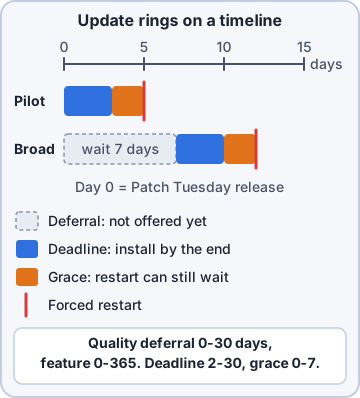
Windows gets quality updates (monthly security and fixes, cumulative) and feature updates (a new Windows version once a year, like 26H2), plus drivers. Plan rings: a small test group (IT), a pilot group (a few staff from each department), then broad. Each ring waits a little longer, so problems show up early on a few devices instead of everywhere.
Ring       Devices   Quality deferral
IT test    8         0 days
Pilot      15        2 days
Broad      70        7 days
Critical   6 (POS)   10 days
Dev: Ring zero is us. If an update bites, it bites IT first.
Update ring settings
An update ring policy (Devices > Windows updates) controls the Windows Update client: quality update deferral (0-30 days), feature update deferral (0-365 days; use 0 when a feature update policy picks the version), feature update uninstall period (2-60 days), active hours, automatic update behavior, and deadlines with a grace period (0-7 days) before a forced restart.
Exam tip Deadline = how long users may postpone installing. Grace period = extra days after the deadline before Windows restarts on its own.
Ring actions: pause, resume, uninstall
From an update ring, Pause stops quality or feature updates for up to 35 days, Resume restarts them, Extend adds another 35 days, and Uninstall removes the latest update of that type from devices in the ring. Pausing is how you stop a bad update spreading.
Exam tip Bad update found in the pilot ring? Pause quality updates on the rings that haven't installed it yet.
Objective 3.2
Feature updates, quality updates, Autopatch and hotpatch
Feature and quality update policies
A feature update policy picks the Windows version a group should run, such as Windows 11, version 26H2, and keeps devices there until you choose a newer one. Rollout options can make it available immediately, on a date or gradually. A quality update policy can expedite a specific security update faster than the ring's deferral, and controls hotpatch.
Exam tip Feature update policies don't apply during Autopilot OOBE; they kick in at the first Windows Update scan after setup.
Windows Autopatch
Windows Autopatch automates update management from Intune for Windows, Microsoft 365 Apps, Microsoft Edge and Teams. Autopatch groups split devices into deployment rings (a test ring, middle rings and a last ring) and create the matching update rings and feature update policies for you. You still pause, resume or roll back from Intune.
Exam tip Don't assign your own update rings to devices Autopatch manages; its policies already cover them.
Hotpatch
Hotpatch installs monthly security updates without a restart. Each quarter starts with a baseline update that needs a restart (January, April, July, October); the other eight months can be hotpatches. Requirements: Windows 11 Enterprise 24H2 or later, an eligible license, virtualization-based security (VBS) running, the latest baseline installed, and management through Intune. Eligible devices get it by default; quality update policies can opt groups out.
Exam tip A hotpatch device that misses the baseline gets the baseline (with restart) and the hotpatch together in a hotpatch month.
Objective 3.2
Apple, Android, Delivery Optimization and monitoring
Apple updates with the settings catalog
For iOS/iPadOS 17+ and macOS 14+, use the settings catalog's Declarative Device Management > Software Update: set a Target OS Version and a Target Date Time by which it installs (plus a details URL). Or Software Update Enforce Latest with Delay in Days and an Install Time. The device runs the whole update itself. The older MDM-based Apple update policies are deprecated.
Exam tip Restrictions like "Defer software updates" only delay what users see. DDM Software Update enforces the install by a deadline.
Android updates and FOTA
For corporate Android Enterprise devices, a device restrictions profile sets system update behavior: automatic, postponed, or a maintenance window, plus freeze periods during busy seasons. For supported brands, firmware over-the-air (FOTA) deployments go further: Samsung Knox E-FOTA and Zebra LifeGuard Over-the-Air let you pick the exact firmware and schedule it (Intune Plan 2).
Exam tip Zebra LifeGuard deployments are fire-and-forget: a device that fails isn't retried later.
Delivery Optimization
A Delivery Optimization profile lets Windows devices share update and app content as peers. Download mode: HTTP only, no peering (0); HTTP blended with peering behind the same NAT (1), devices behind the same public IP share; across a private group (2), devices with the same group ID share across NATs; Internet peering (3); simple download (99). Add bandwidth limits and Microsoft Connected Cache.
Exam tip Branch store, one internet line, many PCs: mode 1 usually does it. Several sites that should share as one group: mode 2 with a group ID.
Monitoring updates
Reports > Windows updates shows feature update, expedited quality update, hotpatch and driver update reports, plus per-ring device status. Many need the Windows diagnostic data tenant connector turned on. Look for devices stuck in Pending restart, errors with a code, and devices that stopped scanning.
Exam tip "Update reports are empty" = check the Windows data connector under Tenant administration before anything else.
Check yourself 1The pilot ring reports that this month's quality update breaks the label printer driver. The broad ring hasn't installed it yet. What should Dev do?
- Expedite the update to the broad ring
- Set the feature update deferral to 365 days
- Pause quality updates on the broad ring
- Delete the broad ring's update ring policy
Show the answer
Answer: C. Pause quality updates on the broad ring
Pausing quality updates (up to 35 days) on rings that haven't installed the update stops it spreading while the issue is fixed.
Check yourself 2Store B has 25 laptops behind one internet connection. Dev wants them to share update downloads with each other. Which Delivery Optimization download mode fits best?
- HTTP only, no peering
- HTTP blended with peering behind the same NAT
- Simple download mode with no peering at all (99)
- Bypass mode
Show the answer
Answer: B. HTTP blended with peering behind the same NAT
Mode 1 lets devices behind the same public IP (NAT) share content, so most of the update comes from neighbors instead of the internet line.
Practice questions
Answer in your head, then open the answer. Ranger's Desktop Duty has 374 questions like these for MD-102, with mock exams.
Question 1In a Kibble update ring for Windows, what is the largest value Dev can enter for Quality update deferral period (days)?
- 365
- 30
- 60
- 35
Show the answer
Answer: B. 30
Update rings allow quality update deferral from 0 to 30 days and feature update deferral from 0 to 365 days. Pauses last 35 days.
Question 2Kibble's accounting PCs should wait as long as possible before receiving a new Windows feature update through their update ring. What is the maximum Feature update deferral period (days)?
- 365
- 180
- 30
- 730
Show the answer
Answer: A. 365
Feature updates can be deferred from 0 to 365 days in an update ring. To hold devices on a specific version indefinitely, use a feature update policy instead.
Question 3Kibble's update ring has a feature update uninstall period of 20 days. On day 25 after rollout began, Dev selects Uninstall. Which devices can roll back?
- No device, because the uninstall must start within 20 days of the release
- Every device, because Uninstall overrides the period
- Only devices that haven't installed the update yet
- Only devices that installed the update within the last 20 days
Show the answer
Answer: D. Only devices that installed the update within the last 20 days
The uninstall period (2-60 days) counts from when each device installed the feature update. Devices past the window have cleaned up the previous version; devices inside it can uninstall if they check in before their window ends.
Question 4Kibble wants Windows 11 laptops to stay on version 25H2 until finance closes its fiscal year in four months, but keep getting monthly security updates. What should Dev use?
- Set the quality update deferral to 30 days
- An expedite policy for the latest security update
- A feature update policy that targets 25H2
- Pause feature updates in the update ring
Show the answer
Answer: C. A feature update policy that targets 25H2
A feature update policy keeps devices on the targeted version until you change or remove it, while quality updates continue. Pausing feature updates in an update ring expires automatically after 35 days.
Question 5Kibble's new Windows 11 feature update policy isn't being offered to devices. Which THREE requirements must the devices meet? (Choose three.)
- Assigned to a user group, not a device group
- Delivery Optimization set to Group mode
- Microsoft Entra joined or hybrid joined
- Microsoft Account Sign-In Assistant service enabled
- Windows Enterprise LTSC edition
- Diagnostic data at Required or higher
Show the answer
Answers: C. Microsoft Entra joined or hybrid joined, D. Microsoft Account Sign-In Assistant service enabled, F. Diagnostic data at Required or higher
Feature, quality and driver update policies are orchestrated by Windows Autopatch and need Intune management, Entra join or hybrid join, Required diagnostic data, the wlidsvc service enabled, and a license with the Autopatch entitlement.
Microsoft, Azure, Intune and Windows are trademarks of the Microsoft group of companies. Ranger Gamez is not affiliated with or endorsed by Microsoft. The practice questions are written to the published exam objectives; they are not real exam questions.