 RANGER
 Apple Device Support · chapter 2 of 12
Week 2: Two accounts, one iPhone
In this chapter Objectives 1.4, 2.1, 2.2
Objective 2.1
Managed Apple Account vs personal Apple Account
Who owns the account
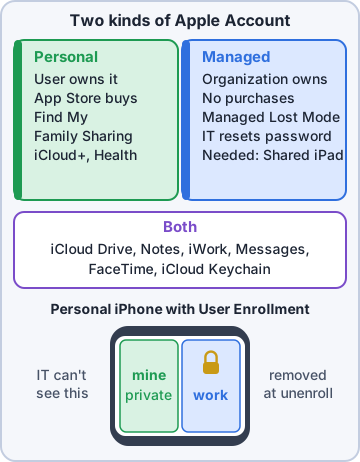
A personal Apple Account belongs to the person: they create it, reset its password at iforgot.apple.com, buy apps with it and use every iCloud service. A Managed Apple Account belongs to the organization. Admins create it in Apple Business (or Apple School Manager), often by federation with an identity provider such as Microsoft Entra ID or Google Workspace, so users sign in with their work credentials.
Dev: So my work account is Kibble's, and my personal one is mine. Got it.
Exam tip Federated Managed Apple Account password? Changed in the company's identity provider, not at iforgot.apple.com.
What a Managed Apple Account can and can't do
It is built for work: iCloud Drive, Notes, Reminders, iWork collaboration, and sign-in for User Enrollment and Shared iPad. The organization chooses which services are on. Some things are never available because the company owns the account.
- No purchases in the App Store or other Apple stores (apps come from the company)
- No Find My, Apple Pay or Family Sharing
- No iCloud Mail or iCloud+ features such as Private Relay and Hide My Email
- No Health data storage
Exam tip Managed accounts don't use Find My. A lost company device is handled by MDM, for example with Managed Lost Mode.
Why companies use them
Work data stays in an account the company controls. When someone leaves, the admin disables the account and the work data goes with it. Nobody needs to know the user's personal Apple Account, and personal purchases never mix with company apps.
Maya: Personal account for your life, managed account for Kibble. Never use one for the other.
Objective 2.2
Both accounts on one device: privacy and security
User Enrollment keeps data apart
On a personal iPhone, iPad or Mac, the user can enroll with account-driven User Enrollment: they sign in with the Managed Apple Account in Settings > General > VPN & Device Management. The device keeps the personal Apple Account as the main one and adds the managed account for work.
Exam tip User Enrollment is for devices the user owns. Company-owned devices use Automated Device Enrollment or Device Enrollment.
A separate, encrypted place for work
Managed apps and their data live in a separate, cryptographically protected volume, tied to the Managed Apple Account. Personal photos, messages, Safari bookmarks and Health data stay in the personal side. The organization can manage its own apps and settings but has no visibility into personal data and can't erase the whole device.
- Work apps can be kept from opening documents in personal apps (managed open-in)
- Unenrolling destroys the keys to the work volume, so work data becomes unreadable
- The personal side is untouched when work data is removed
On company-owned devices
A supervised company iPhone may allow a personal Apple Account too, but the company still decides about things like iCloud Drive, Find My and Activation Lock. The rule of thumb: on a company device, the company decides more; on a personal device, the user does.
Dev: So when I removed management, my photos were safe?
Priya: Yes. Only the work side left the building.
Check yourself 1Dev's personal iPhone is enrolled with account-driven User Enrollment. Which statement is true?
- Kibble's MDM can erase all of Dev's personal photos
- The Managed Apple Account replaces his personal account
- Work app data is kept in a separate encrypted volume
- Kibble's MDM can list every personal app he installed
Show the answer
Answer: C. Work app data is kept in a separate encrypted volume
With User Enrollment, managed apps and data are stored in a separate cryptographically protected volume. The company manages only that side and can't see or erase personal content.
Objective 1.4
Unenrolling a personal device: what breaks and how to fix it
Everything that came from MDM leaves with it
Removing management (or signing out of the Managed Apple Account) removes the enrollment profile and everything it delivered. On a personal device the user is allowed to do this at any time.
- Managed apps and their data (work chat, work mail app data)
- Managed accounts such as the Exchange or work mail account
- Wi-Fi and VPN payloads, including certificates for 802.1X
- Restrictions and settings the company had set
Why resources stop working
Corporate Wi-Fi that uses certificates won't accept a typed password, because the certificate is gone. The work mail and VPN profiles are gone. Many services also check compliance: if the identity provider requires an enrolled device, sign-in is blocked even when the user knows their password.
Exam tip Symptom checklist: no work Wi-Fi, no work mail, work apps missing, sign-in says the device isn't managed or compliant = unenrolled.
The fix: enroll again
Have the user sign in with their Managed Apple Account in Settings > General > VPN & Device Management (Sign In to Work or School Account), or use the enrollment method the company documents. The MDM then sends the Wi-Fi, VPN, mail and apps again. Give it a few minutes, check that the profile and apps appear, then test Wi-Fi and mail.
Exam tip Don't hand out the Wi-Fi password or build a manual VPN to "work around" it. Re-enrollment restores access the supported way.
Check yourself 2After Dev removed management from his personal iPhone, which of these is still on the phone?
- The Kibble Wi-Fi certificate
- The managed work chat app and its data
- The work Exchange mail account
- His personal photos and personal apps
Show the answer
Answer: D. His personal photos and personal apps
Unenrolling removes only what the MDM delivered: managed apps, accounts, payloads and certificates. Personal data is untouched.
Go deeper
More on the objectives in this chapter, in the same exam-ready detail.
Objective 1.4 · Troubleshoot issues with accessing an organization’s resources due to unenrolling a user-owned device from…
Unenrolled a personal device? Here's why work stops
What MDM put on the device
When a user enrolls their own iPhone, iPad or Mac (User Enrollment or profile-based enrollment), the organization's MDM installs a management profile plus things that depend on it: Wi-Fi and VPN settings, certificates, the work email account, managed apps and a separate managed Apple Account volume of work data.
What happens when they unenroll
Removing the management profile (Settings > General > VPN & Device Management, or System Settings > General > Device Management on a Mac) removes everything MDM installed: managed apps and their data, managed accounts, certificates, and Wi-Fi/VPN payloads. Personal data stays.
- Can't join the work Wi-Fi: the Wi-Fi profile and its certificate are gone
- VPN missing: the VPN payload was removed
- Work email, calendar or managed apps gone
- Conditional access in the company's identity system now blocks the device because it no longer reports as managed/compliant
Exam tip User-owned devices can always unenroll; that's by design. Organization-owned devices enrolled through Automated Device Enrollment can be set so the profile can't be removed.
How to fix it
The fix is to re-enroll the device the way the organization requires (for example sign in with the managed Apple Account in Settings for User Enrollment, or download the enrollment profile from the company's portal), wait for the MDM to push profiles and apps back, then reconnect to Wi-Fi/VPN. Data from managed apps that was deleted comes back only if it's stored in the organization's cloud service.
Exam tip First question to ask: 'Did you remove a profile or Device Management recently?'
Practice questions
Answer in your head, then open the answer. Ranger's Device Doctor has 538 questions like these for Apple Device Support, with mock exams.
Question 1Rosa removed the work management profile from her personal iPhone. Now her Kibble & Co. mail account and work apps are gone. How does she get them back?
- Restore the iPhone from last week's iCloud backup
- Reinstall the work apps from the App Store
- Use Sign In to Work or School Account
- Add the work mail account under Settings > Apps > Mail
Show the answer
Answer: C. Use Sign In to Work or School Account
Unenrolling removes the organization's configurations, apps and data. Re-enrolling with the Managed Apple Account (Settings > General > VPN & Device Management) brings back the managed mail, apps and settings.
Question 2After unenrolling a personal iPad, a user can no longer join the company's 802.1X Wi-Fi network, which uses certificates. Other Wi-Fi networks work. What is the most likely cause?
- The iPad's private Wi-Fi address changed
- The Wi-Fi router started blocking the iPad after it was unenrolled
- The iPad needs a reset of all network settings
- The Wi-Fi settings and certificate the MDM installed were removed
Show the answer
Answer: D. The Wi-Fi settings and certificate the MDM installed were removed
When a device is unenrolled, the configurations the MDM service delivered, such as Wi-Fi payloads and certificates, are removed. Re-enrolling restores them.
Question 3A Kibble & Co. employee unenrolled her personal iPhone and wants to copy work files that were inside a managed app. What happened to that managed data?
- It moved into her personal iCloud Drive
- It stays on the iPhone in a hidden folder
- It was removed and its keys destroyed
- It is kept until the next restart
Show the answer
Answer: C. It was removed and its keys destroyed
Unenrolling removes managed apps and their data, and the OS destroys the keys that protected the managed data, so it cannot be read. The work data can return only through the organization's services after re-enrolling.
Question 4Dev unenrolled his personal Mac by mistake. He suggests restoring it from a Time Machine backup made while it was enrolled to get management back. Why will this not work?
- Time Machine cannot back up a managed Mac
- The backup is encrypted with the company's key
- Time Machine restores only user files, not settings
- Restoring from a backup does not restore MDM enrollment
Show the answer
Answer: D. Restoring from a backup does not restore MDM enrollment
Device management enrollment is never restored from a backup; the device has to enroll again with the Managed Apple Account.
Question 5An employee is about to unenroll her personal iPhone and worries about her family photos. What happens to her personal data when the work enrollment is removed?
- Personal photos are erased with the work data
- Personal data is not affected
- Personal data is backed up to the company's iCloud
- Personal photos move to the Managed Apple Account
Show the answer
Answer: B. Personal data is not affected
With User Enrollment, organizational data is kept separate and removed on unenrollment, while personal data stays untouched.
Apple, iPhone, iPad and Mac are trademarks of Apple Inc. Ranger Gamez is not affiliated with or endorsed by Apple. The practice questions are written to the published exam objectives; they are not real exam questions.